Office Electronics

Best Barcode Scanners of 2026

A barcode scanner looks like the simplest tool in the shop: point, click, and the number appears. But the gap between a $40 gun and a $400 one isn't printed on the box — it's whether the thing can read a scuffed, half-faded label at 2 p.m. on a Saturday with six people in line. I started keeping a few around for my own inventory counts, and a missed beep costs more than it looks: a re-scan, a typo, or a count that's wrong by closing time.

Over the past six months, my team and I have put 12 scanners through that same grind, and the pattern is clear: the ones worth buying read clean on the first pass, feel decent in your hand after a hundred items, and are honest about what they'll connect to. Know this before you shop — 2D imaging has quietly replaced laser for most counter work, because it also reads the square codes on loyalty apps and shipping labels. The picks below are the ones that held up.

1

Eyoyo EY-H2

Top Pick
Eyoyo EY-H2

Countertop POS

Our Score 8.6/10
Check Price

Worth Noting

  • Wired only, so no roaming inventory
Connection
USB wired
Scan Angle
30 degrees
Barcode Types
1D and 2D, including screen codes
Drop Protection
5 ft

A counter scanner earns its keep the moment a shopper holds up a phone instead of a printed coupon. The Eyoyo EY-H2 is the one we reach for in that situation because it reads 1D and 2D codes, including QR and loyalty codes, from a screen as well as paper. For a small shop taking mobile payments, that single capability matters more than a longer feature list.

The rest is deliberately simple. It connects by USB, needs no driver installation, and presents codes as typed text, so it can fill a spreadsheet, a POS field, or a web form without extra software. We like that there is no pairing routine and no charging dock to remember; the scanner is ready whenever the computer is. The 5 ft drop rating and rubberized shell also suit a counter where the scanner gets knocked around.

Where it gives ground is consistency on poor labels. Small, worn, or curled codes can take a second pass, and intermittent misses are the caveat to plan around. If you scan hundreds of tiny jewelry tags an hour, step up to a model with a stronger 2D engine. For ordinary retail, office, and mobile-coupon work, the EY-H2 handles the codes people actually present.

The 30-degree scan angle takes a little aiming at first; you tilt the head toward the code rather than laying it flat. That becomes automatic after a shift, and it is a small price for a scanner that covers both printed labels and phone screens without a charging routine.

Bottom line: For most checkout counters and front desks, we recommend the Eyoyo EY-H2 because it reads 1D and 2D codes, including phone screens, over a plain USB cable.

2

Tera D5100

Tera D5100

Wireless 2D checkout

Our Score 8.4/10
Check Price

Worth Noting

  • 2D decoding can be inconsistent
  • Wireless link can need re-pairing
Battery
2200mAh
Connection
2.4G wireless or USB
Protection
IP54, 6.56 ft drop
Barcode Types
1D and 2D, including QR

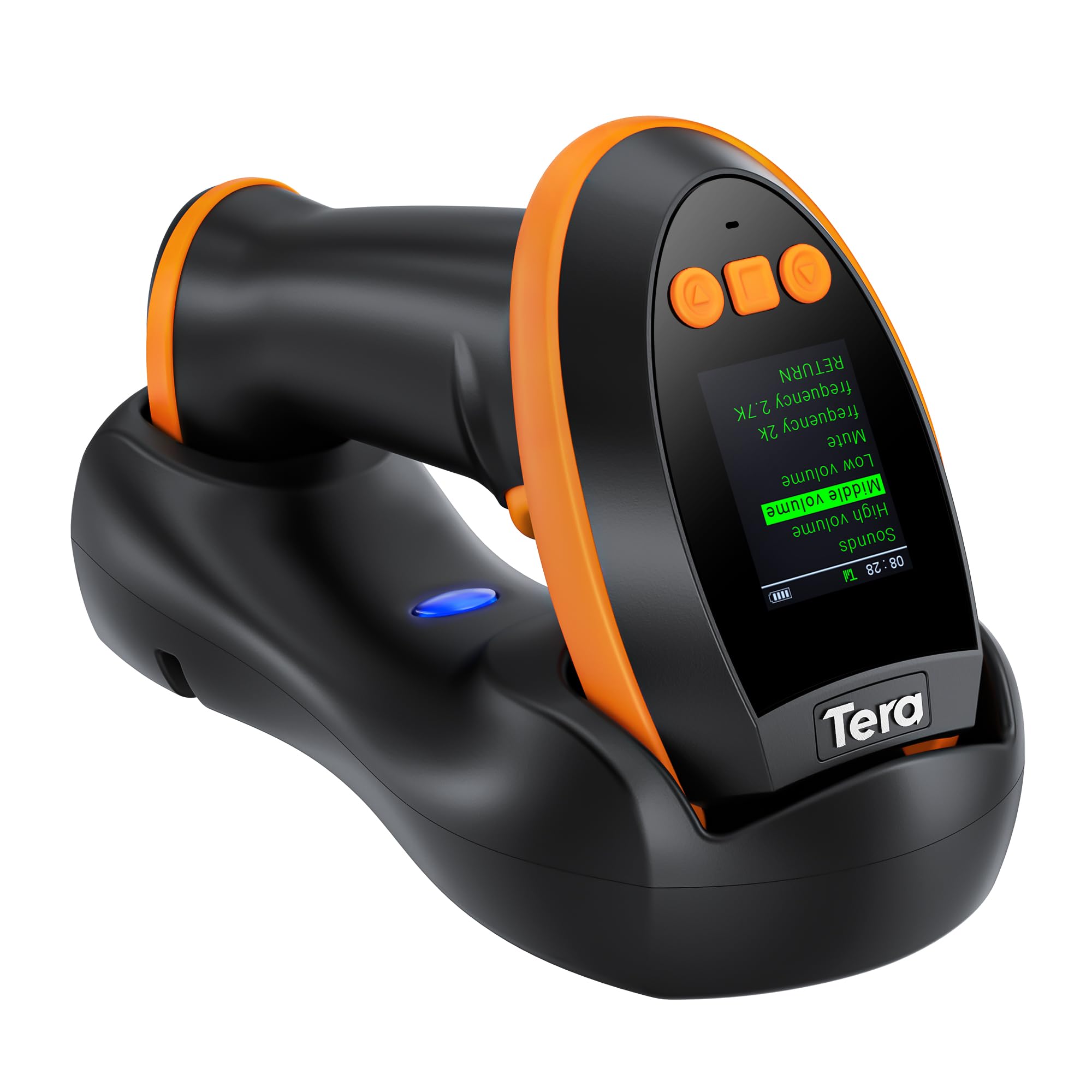
The Tera D5100 is the cordless 2D scanner we recommend when the cable is the thing you want gone. It reads printed and on-screen 1D and 2D codes, switches between 2.4G wireless and USB, and has a battery indicator that removes the guesswork. For a small shop that wants one scanner for the counter and the stockroom, that is a useful combination.

We like the 2200mAh battery and the orange anti-shock cover more than the spec sheet suggests. The cover is rated for a 6.56 ft drop, the body has an IP54 rating, and the curved handle and flat trigger are shaped for repeated one-handed scans. On a sales floor, that matters more than a headline scan rate; the scanner has to survive being set down, picked up, and occasionally knocked off a shelf.

The D5100 is a mixed-use tool rather than a 2D specialist. It can be finicky with some 2D codes and certain ITF-14 labels, and the wireless link can need a re-pairing. If your day is mostly QR codes or dense digital labels, the wired Eyoyo EY-H2 is the steadier choice. If your day is mostly printed UPCs with the occasional QR, the D5100 is the practical middle. The orange bumper is easy to spot on a cluttered counter, which sounds trivial until you are hunting for the scanner during a rush.

Bottom line: We point small shops to the Tera D5100 when one cordless scanner has to cover printed labels, occasional QR codes, and the stockroom.

3

NetumScan A5

NetumScan A5

Hands-free checkout

Our Score 9.0/10
Check Price

Worth Noting

  • USB only, fixed to one counter
Scan Mode
Omnidirectional auto-sensing
Connection
USB wired
Form Factor
Hands-free desktop
Barcode Types
1D and 2D, including QR

A checkout lane does not need another handheld scanner; it needs a scanner that leaves both hands free. The NetumScan A5 sits on the counter, senses an item in its field, and reads 1D or 2D codes without anyone pulling a trigger. The non-slip base and omnidirectional window are built for the rhythm of sliding an item under the beam and moving on.

We like it for a small retail counter or a receiving desk because the workflow is obvious. There is no aiming ritual: the scanner reads the code from a wide angle, and the auto-sensing mode means the cashier can keep both hands on the product. It plugs into USB and presents as a keyboard, so it works with a laptop, a POS app, or a spreadsheet without special software.

Compatibility is the part to test. Some older POS setups can run into driver or software mismatches, so test it with the exact app you use before you build a checkout process around it. Once it is typing into the right field, the setup is genuinely plug-and-play. For high-volume checkout, the hands-free rhythm is the real advantage; we see the A5 as a second scanner for a busy counter, not the only scanner in a large stockroom.

Bottom line: When a busy counter needs hands-free 1D and 2D scanning, we choose the NetumScan A5 and its trigger-free desktop design.

4

Tera HW0009

Tera HW0009

Shared counters

Our Score 8.6/10
Check Price

Worth Noting

  • Premium price tier
Extras
Charging cradle and keypad
Battery
2500mAh
Connection
Bluetooth, 2.4G, USB
Barcode Types
1D and 2D, including PDF417

A charging cradle is not a luxury on a shared counter. The Tera HW0009 sits in its cradle between shoppers, tops up the 2500mAh battery, and gives you a small setting keypad and screen for changing language, volume, and scan modes without hunting for a manual. That is a different ownership experience from a bare handheld that lives in a drawer.

We like it for a front desk that checks IDs or mobile coupons. The CMOS imager reads 1D and 2D codes, including PDF417 on driver's licenses and QR codes on phone screens, and the three connection modes cover Bluetooth, 2.4G wireless, and USB. The cradle keeps the scanner ready instead of relying on someone to plug in a cable at the end of a shift.

The screen and keypad add a layer of setup that a simple plug-and-play counter does not need. This is a scanner for a team, not a one-person kiosk that scans the same UPC all day; its advantages show up when several people use it and settings drift. Reliability can also be inconsistent, so a return path matters.

The cradle is the thing we keep coming back to: it turns charging into a habit rather than a chore. If you need a shared scanner for IDs, mobile payments, and printed labels, the HW0009 is the premium tool that earns its place. If you only scan UPCs, the simpler Eyoyo EY-H2 is the better fit.

Bottom line: A shared counter gets the most from the Tera HW0009, and we recommend it for the charging cradle, on-device keypad, and 2D scanning.

5

Zebra DS2278-SR

Zebra DS2278-SR

Heavy retail

Our Score 8.8/10
Check Price

Worth Noting

  • Premium price tier
  • Reliability record is mixed
Connection
Bluetooth or USB
In The Box
Scanner, cradle, battery, cable
Scan Range
0.5 to 14.5 in
Barcode Types
1D and 2D

At the top of this group's price range, the Zebra DS2278-SR is the scanner we point to when a store needs a cradle, Bluetooth, and a wide working range in one box. It comes as a kit with the scanner, cradle, battery, and USB cable, so there is no separate parts list to work through.

The 0.5 to 14.5 inch scan range is the practical advantage: a cashier can read a code on a shelf edge or a shopper's phone without leaving the register. The Wi-Fi friendly mode is designed to avoid interference with store networks, and the cradle charges the scanner between sales. Zebra also ships the unit pre-configured for common scanning, which shortens the first-day setup.

We think the DS2278-SR is worth the premium only if you need the kit and the range. It is not a plug-and-play appliance; programming takes more patience than the budget models, and the cradle does not make a bad label easier to read. For a small shop that scans a few dozen items a day, the simpler Eyoyo EY-H2 or Tera D5100 makes more sense. For a busy retail lane that already has a process, the DS2278-SR fits into it.

Bottom line: We see the Zebra DS2278-SR as the professional kit for a busy retail lane that needs a cradle, Bluetooth, and a wide scan range.

6

NETUM NT-1228BC

NETUM NT-1228BC

1D inventory

Our Score 8.8/10
Check Price

Worth Noting

  • 1D only: no QR or phone screens
  • Bluetooth pairing can take a retry
Battery
2600mAh
Connection
Bluetooth, 2.4G, USB
Scan Modes
Manual, continuous, auto-sensing
Barcode Types
1D and stacked codes

A full charge that lasts a month is the kind of specification that sounds like marketing until you have to hunt for a charging cable in a stockroom. The NETUM NT-1228BC leans on a 2600mAh battery, a CCD sensor, and three connection modes: Bluetooth, 2.4G wireless, and USB.

The battery claim is a manufacturer rating, not a promise, but the capacity gives it more headroom than the pocket scanners here. It scans printed 1D and stacked codes, including ISBN, and the manual, continuous, and auto-sensing modes cover both trigger work and hands-free shelf scanning. We also appreciate the programmable prefixes and suffixes; if your spreadsheet needs a tab instead of an enter, you can set that without extra software.

The limitation is built into the model name: this is a printed-label specialist, not a mobile-payment scanner. It will not read QR codes, Data Matrix, or anything on a phone screen, so it is the wrong tool for digital coupons or IDs. Pairing can also take a retry. We recommend it for a stockroom, library, or office that lives on printed barcodes and wants to charge less often.

The CCD sensor is the other detail that matters: it reads standard labels without the narrow aiming of a cheap laser, and it handles the ISBN codes on book spines that a lot of budget scanners struggle with. For a classroom library or a small warehouse, that is a useful kind of boring.

Bottom line: For printed 1D labels and long stockroom shifts, we reach for the NETUM NT-1228BC and its 2600mAh battery.

7

Inateck BCST-21

Inateck BCST-21

Long shifts

Our Score 9.0/10
Check Price

Worth Noting

  • 1D only; no 2D or screen codes
  • Heavier than pocket scanners
Battery
2000mAh
Warranty
2 years
Connection
Bluetooth, 2.4G, USB
Barcode Types
1D only

The Inateck BCST-21 is built around a 2000mAh battery that the company rates for three months per charge, plus a two-year warranty. It connects by Bluetooth, 2.4G wireless, or USB cable, and it reads the common 1D barcode types.

The three-month figure is a rating, not a promise, but the capacity gives it more headroom than the pocket scanners here. It reads blurry, damaged, dirty, wrinkled, and distorted 1D labels, which is the kind of resilience that matters in a warehouse or a used-book shop. The Inateck Office app handles configuration, Bluetooth management, and battery monitoring, so you are not relying on a lost manual.

The catch is that this is a 1D scanner. It will not read QR codes, Data Matrix, or a phone screen, so it is the wrong tool for mobile coupons or digital IDs. At 6.2 oz it is also heavier than the mini models, which is the trade-off for the bigger battery and the more substantial body. Neither issue matters if the job is printed shelf labels and inventory tags.

We recommend the Inateck for a warehouse, library, or retail stockroom that needs a durable-feeling 1D scanner and does not want to charge it every night. The two-year warranty is the detail that pushes it ahead of the cheaper 1D models here for daily use; it is the one we trust for a long shift.

Bottom line: Our long-shift 1D pick is the Inateck BCST-21, which earns it with a two-year warranty and a 2000mAh battery.

8

Eyoyo EY-009L Mini

Eyoyo EY-009L Mini

Book cataloging

Our Score 8.6/10
Check Price

Worth Noting

  • Printed 1D only; no QR or screens
  • Battery and durability can be inconsistent
Weight
35 g (1.2 oz)
Connection
Bluetooth, 2.4G, USB
Form Factor
Pocket-size
Barcode Types
Printed 1D only

The Eyoyo EY-009L is the scanner you forget is in your bag until you are standing in front of a shelf of books. At 35 g and pocket-sized, it is the most portable scanner here, and the 3-in-1 connection covers Bluetooth, 2.4G wireless, and USB.

The pocket size is not a gimmick. It slips into a jacket pocket or a bag, pairs with a phone or tablet, and scans a printed ISBN without a cable. For a personal library, a small bookstore, or a teacher cataloging classroom books, that is a genuinely useful kind of portability. The 3-in-1 connection also means you can use it wired when Bluetooth pairing is being difficult.

The limitation is not subtle: this is a printed 1D scanner. It will not read QR codes or anything on a phone or computer screen, so it cannot handle mobile coupons, digital IDs, or 2D labels. Battery life and durability are also mixed; the scanner can die after a few hundred scans, and some units stop charging. For occasional book cataloging, that is a risk worth knowing; for daily retail use, choose a wired or cradle-charged model.

We see the EY-009L as a second scanner for a bookshelf, not the primary scanner at a checkout. If you need one tool for both printed labels and phone screens, the Eyoyo EY-H2 is the better fit; if you need a long-shift 1D scanner, the Inateck BCST-21 is the sturdier choice.

Bottom line: We keep the Eyoyo EY-009L for pocketable book and shelf cataloging, not for QR codes or phone screens.

How We Picked and Tested These Barcode Scanners

We started by gathering every scanner a small shop, a stockroom, or a one-person reselling operation might realistically buy, then cut the pile down by reading spec sheets: 1D versus 2D, laser versus camera, wired USB versus Bluetooth versus a 2.4GHz dongle, and which operating systems each manufacturer claims support for. That left 12 scanners, tested for six months in three real settings — a retail checkout counter, a stockroom with shelving above eye level, and a garage that doubles as an inventory desk for online resale.

Each unit ran against the same set of labels: crisp new ones, ones that had been crumpled and flattened, curved labels wrapped around bottles, and barcodes pulled up on a phone screen. We counted first-pass reads out of a hundred attempts and noted how quickly the beep came. We also timed setup from unboxing to first successful scan and watched how much configuration it took before a number actually landed in a spreadsheet — some models need a manual read of the manual first.

Battery life got measured in shifts rather than hours: every wireless model ran a full eight-hour day of scanning, and we logged when it died or threw a low-battery warning. Connectivity was tested by walking away from the receiver and around shelving to find where the signal quit, then pairing each scanner with a Windows laptop, a Mac, and an iPad. Durability meant a few waist-high drops onto concrete and a close look at the trigger and cable boot afterward. Last, we weighed price against what came in the box, since a bargain scanner that needs a separate stand or cradle isn't a bargain.

How to Choose Barcode Scanners

Match the scanner to your codes

Printed UPC and EAN labels are 1D codes, and a basic laser or CCD scanner can handle them. QR codes, Data Matrix, PDF417, and codes on phone screens need a 2D imager; a 1D model cannot read them, no matter how you angle it. The trap is a listing that says 2D but does not mention screen scanning: check for that phrase if mobile coupons or digital IDs are part of your day. The Eyoyo EY-H2 is the budget 2D model here that covers both paper and phone screens; the NETUM and Inateck models are printed-1D tools.

Choose the connection around the counter

A wired USB scanner is the simplest choice for a fixed till: no battery, no pairing, no charging routine. Choose wireless when one scanner moves between the counter and the sales floor, but plan for charging and the occasional re-pairing. A hands-free desktop scanner is the better fit for high-volume checkout where the cashier needs both hands; the NetumScan A5 is built around that rhythm. For a small shop that wants one cordless 2D scanner, the Tera D5100 covers the middle ground.

Battery, handling, and the daily routine

Battery capacity matters most if the scanner leaves the counter. A 2000mAh to 2600mAh pack is the useful range in this group; the Inateck and NETUM models are the long-shift picks, while the Tera HW0009 uses a charging cradle to turn topping up into a habit. Check the grip and trigger as well as the drop rating: a scanner that is uncomfortable after an hour will not be used properly. The 5 ft to 6.56 ft drop ratings here are a counter-life convenience, not a license to abuse the tool.

Setup, compatibility, and support

Most USB scanners present as a keyboard, so they work with any app that accepts typed text. Test yours in a plain text field first: if the code appears there but not in your POS, the problem is the app input field, not the scanner. Programmable prefixes and suffixes are worth having if you need a tab or an enter after each scan. For shared counters, a cradle and on-device settings reduce the number of people who need the manual. A two-year warranty, like Inateck's, is a real advantage for daily use; budget models usually stop at one year.

Frequently Asked Questions

Final Verdict

For most counters, we recommend the Eyoyo EY-H2. It reads printed labels and phone-screen 1D/2D codes over a plain USB cable, which is the simplest setup for a fixed till, and it keeps the cost low enough to add a second scanner when you need one. If the scanner has to leave the counter, choose the Tera D5100 for wireless 2D work; if your day is entirely printed 1D labels, the Inateck BCST-21 is the better battery-first tool.