Office Electronics

Best Conference Speakerphones of 2026

Eight minutes into a client call, the person on the other end had already said "sorry, you cut out" three times. Six of us were crowded around a phone lying flat on the table, and the colleague at the far end might as well have been miming. A good conference speakerphone is invisible: it picks up everyone in the room, pushes the air conditioner and the hallway chatter into the background, and stays loud and clear enough that nobody has to repeat themselves. It also has to talk to whatever you actually use — a laptop running Zoom, a desk phone, a cell phone dialed into a bridge line.

My team and I have spent the past six months living with nine of these units, from palm-sized pucks to premium room boxes, and the differences show up fast in a real meeting. The spec sheet won't save you: pickup ranges are optimistic, and a mic array that sounds fine at eight feet can fall apart at fifteen. What separates the good ones is how forgiving they are — how little you have to think about where you sit, how loud you talk, or which button turns the volume down. The picks below are the ones that made our calls easier, sorted by who they're actually built for.

1

EMEET Luna

Top Pick
EMEET Luna

Small meeting rooms

Our Score 8.8/10
Check Price

Worth Noting

  • Noise suppression wavers in genuinely loud rooms
Connections
USB, Bluetooth, AUX, dongle
Daisy Chain
2 units, 16 attendees
Microphones
3
Speaker Output
3W

Four ways in is what sold us on the Luna: USB-C, Bluetooth, AUX, and a dongle connection, all on one disc. That means the same unit moves between a locked-down meeting-room PC, a laptop at the kitchen table, and a phone call on the road without anyone opening a settings menu. The Jabra Speak 410 is a better desk fixture precisely because it refuses to do any of this; the Luna is the one that goes in the bag.

The pickup is the part that matters, and three microphones in a 360° array held a table of six in our calls without anyone being asked to speak up. Voices from the far end arrived at about the level of the person sitting next to the unit, which is the entire job. The mute button is easy to find and lights up clearly, and that counts for more than it sounds like when six people are talking.

Where the Luna draws its line is the speaker. Three watts is plenty for a huddle room or a home office, and around a kitchen table we never wanted more. Push it into a boardroom with a dozen chairs and you need a bigger driver and a bigger budget, which is where the Anker PowerConf comes in.

Two Lunas can be daisy-chained to cover up to sixteen attendees, which is the most sensible upgrade path in this group: buy one now, add the second when the table gets longer. The metal body has shrugged off bag life so far, and setup on every platform we tried was the same two seconds of plugging in a cable.

Bottom line: We recommend the EMEET Luna to anyone outfitting a huddle room or a home office: four connection options, clear 360° pickup for eight, and a daisy chain when the room grows.

2

Anker PowerConf

Anker PowerConf

Bigger meeting rooms

Our Score 8.8/10
Check Price

Worth Noting

  • Fiddly touch-ring volume control
  • Bluetooth pairing can drop mid-call
Battery
Up to 24 hours
Connections
USB-C, Bluetooth
Microphones
6
Speaker Output
3W

Six microphones and a Zoom certification are the headline, and for once the numbers match the job: the PowerConf is built for a room with a real table in it. It's a flat square roughly five inches across and a little over an inch tall, angled up at the people around it, with the controls gathered on a touch panel on top.

Across a long table it held the far end without anyone repeating themselves, and the processing that balances a quiet voice against a loud one is what separates it from the cheaper units here. Sound came back clear enough that we stopped bothering with a headset for internal calls.

The speaker is a three-watt unit, same as the Luna, so the extra outlay goes on microphones and processing rather than volume. That's the right trade for a room where the hard part is hearing people and the wrong one if the back row needs to hear a video, so it won't rescue a boardroom on its own.

The PowerConf earns its place when the room is the priority and the laptop is secondary: a permanent meeting room, a team that lives in Zoom, a space where several people crowd around one table. Set against the Luna, you're paying for the array and the processing rather than flexibility, and a fixed room makes that trade happily.

Bottom line: With six mics, Zoom certification, and processing that holds a long table, the PowerConf is the pick for a real meeting room — and the priciest hybrid here.

3

Jabra Speak 410

Jabra Speak 410

Fixed desk setups

Our Score 9.4/10
Check Price

Worth Noting

  • Corded USB only
Weight
6.08 oz
Connection
USB, integrated cable
Speaker Size
4 inches
Platform Support
Leading UC platforms

A slim black disc with the cable wrapped around the base and a carrying case that keeps it flat, the Speak 410 is the least interesting object on this page and the one we leave plugged into a desk permanently. You push the USB plug in, the computer sees a speaker and a microphone, and that's the whole installation.

That permanence is the appeal. It's the pick for the person who takes calls at the same desk every day and wants the audio handled without another thing to charge or pair, and its record is the strongest in this group on exactly those terms: conference calls, voice pickup across a room, and plug-and-play setup.

The four-inch driver puts out far more than any laptop and filled a small room without strain; a boardroom is beyond it. Volume sits on the rim and the mute button glows red so you can see your state from across the desk. The integrated cable is the one thing to plan around — a desktop tower on the floor needs an extension.

Bottom line: For a desk that never moves, this is the speakerphone we point people to: plug in the cable, take the call, and never think about charging again.

4

Yealink SP92

Yealink SP92

Teams meeting rooms

Our Score 8.4/10
Check Price

Worth Noting

  • No dongle in the box for Bluetooth pairing
Battery
Up to 20 hours
Certification
Microsoft Teams certified
Pickup Radius
13 ft (4 m)
Speaker Output
5W

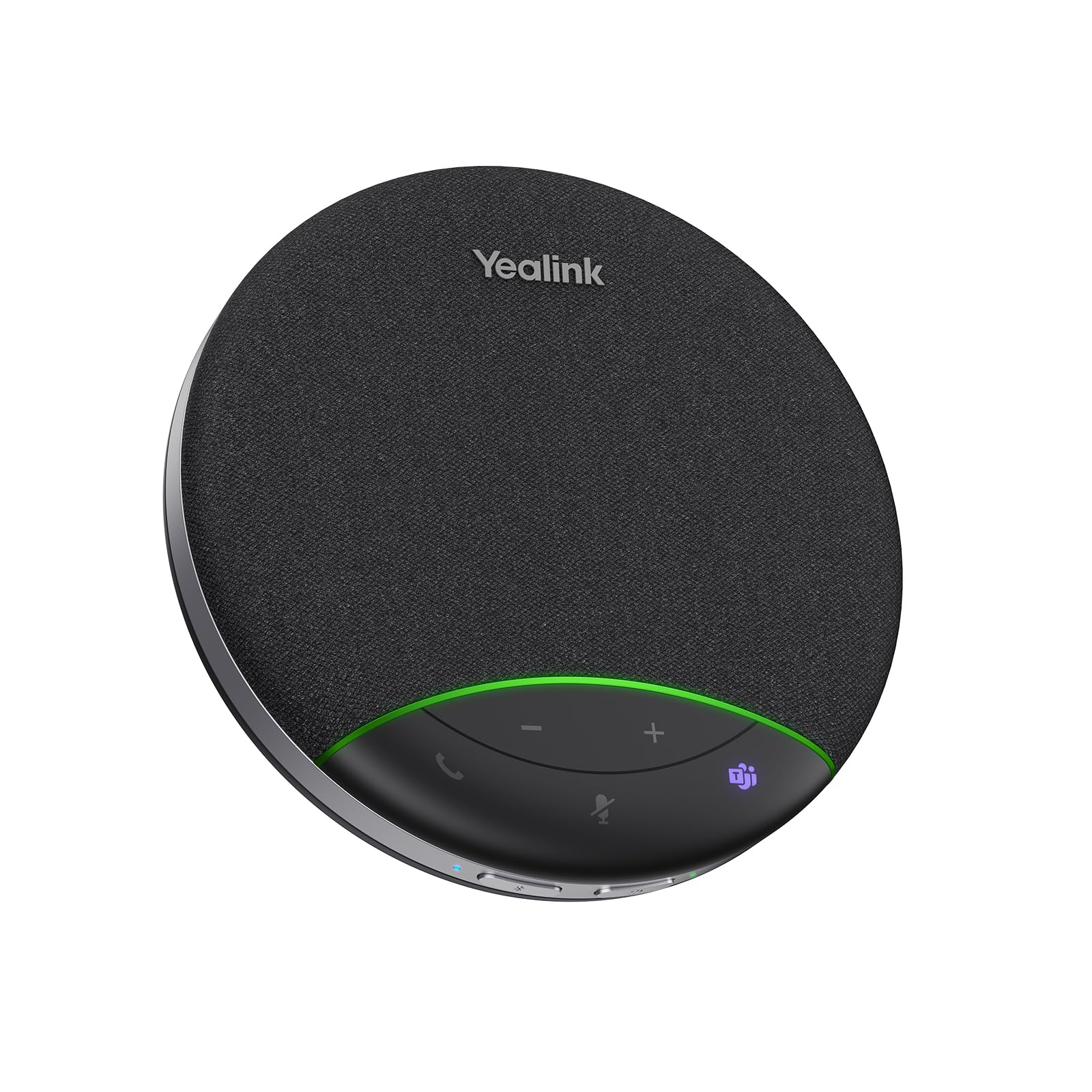
Twenty hours of call time on a charge is the sort of number that sounds like marketing until you've spent a week forgetting to plug something in. The SP92 also refills in about two and a half hours, so a lunch break covers most of a working day, and the five-watt speaker with a 50 mm driver is a step up from the three-watt units that dominate this list.

Coverage is stated as a 13 ft (4 m) radius for four to eight people, which describes a small meeting room rather than a desk. It picked up the length of a small table cleanly in our calls and the far end reported clear voice on Teams. USB-C and USB-A both work with an adapter in the box; Bluetooth is there too, but the package ships without a dongle.

What earns it a place is the combination: Teams certification, a genuine all-day battery, and a speaker bigger than the three-watt norm, in a body that fits in a laptop bag. If your room runs Zoom or Meet as often as Teams, the EMEET Luna covers more connection options for less money, and that's the trade to weigh.

Bottom line: The SP92 is our pick for a Teams-certified room that has to run all day on a charge — bring the USB cable for locked-down PCs.

5

EMEET M0 Plus

EMEET M0 Plus

Travel and home

Our Score 8.4/10
Check Price

Worth Noting

  • Three-watt speaker suits a huddle, not a room
Battery
10 hours
Connections
USB-C, Bluetooth 5.0
Microphones
4
Speaker Output
3W

The M0 Plus is the cheapest way into a hybrid speakerphone here, and it doesn't feel like a compromise in the hand: four microphones in a 360° array, a body a little over half a pound, USB-C and Bluetooth 5.0, and the ability to hold two devices at once — laptop on the cable, phone on Bluetooth, no unpairing to switch between them.

For a home office or a shared huddle space where the budget is the constraint, it does the job without apology. Setup is genuinely plug-and-play, and on a Teams or Zoom call the far end hears a clean, ordinary voice: nobody compliments your audio, and nobody complains about it either.

Over the cable it's as steady as anything here; Bluetooth is the shakier of the two, which is why we keep the USB-C cable in the bag rather than treating this as a purely wireless unit. Ten hours of battery covers a working day rather than a two-day trip, and the little chime it plays on power and mute is a detail we ended up liking more than we expected.

Bottom line: Budget first, compromise second: four mics, USB-C and Bluetooth, and setup that takes seconds make this the hybrid we suggest when money is the constraint.

6

Dell SP3022

Dell SP3022

Tidy desktop setups

Our Score 8.4/10
Check Price

Worth Noting

  • Teams button only brings the app forward
  • 1.8-watt speaker is for one desk, not a table
Connections
USB-A, USB-C
Microphones
2
Certification
Microsoft Teams and Zoom certified
Speaker Output
1.8W

Dell built this one as a soundbar rather than a puck: 8.89 inches wide and under three tall, shaped to sit on a monitor base or beside a laptop where it takes up no desk space at all. It's the tidiest object in this group and the only one that looks like it shipped with the computer.

On a Teams or Zoom call from a quiet room it was clear in both directions with no echo coming back at us — a step up from laptop audio, and small enough to vanish on the desk. The full-duplex processing keeps two people from clipping each other, which is more than the price suggests.

It's certified for Teams and Zoom, and the USB-A and USB-C ports mean it works with whatever the laptop offers, which is more than some certified units manage. The Teams button brings the app forward rather than driving the call, so treat it as a launcher.

Where it makes sense is a desk that never moves: someone who wants one cable, a Teams button within reach, and a device that isn't another thing to charge. Three years of warranty is the longest here, and for something that stays put, that's the reassurance that counts.

Bottom line: Choose the SP3022 if you want a permanent, tidy desk with a Teams button and a three-year warranty, and you take calls alone rather than around a table.

7

RayBit POD 6

RayBit POD 6

Compact travel kit

Our Score 8.6/10
Check Price

Worth Noting

  • Three-watt speaker is huddle-sized at best
Weight
10.2 oz
Microphones
2
Cable Length
0.5 m
Pickup Range
3 m

The POD 6's cable is half a meter long, which is the first thing to know about it: on a laptop it's fine, on a desktop with the tower under the desk it won't reach, and you'll be buying an extension. Set that aside and the package is tidy — a 5.5-inch body, two microphones rated to 3 m, a recess for the cable, and a light pouch for a bag.

As a small-room or travel unit it earns its place: voices came through clearly in a huddle, the far end had no trouble hearing us, and the compact footprint disappears next to a laptop. It's an accessory you bring rather than a room system you install. At this price we compare it against the EMEET M0 Plus, which adds Bluetooth and costs less.

Bottom line: The POD 6 suits a laptop bag and a small table, provided the half-meter cable reaches — for anything more permanent, spend a little more on a hybrid.

8

PolaTab Q95 mini

PolaTab Q95 mini

Long-cable desk use

Our Score 8.6/10
Check Price

Worth Noting

  • USB only
Extras
Built-in USB hub
Weight
10.9 oz
Connection
USB 2.0
Cable Length
3 m (9.8 ft)

Very few speakerphones give you a USB hub. The Q95 mini has one built in, so a keyboard, mouse, or headset dongle can live on the far side of the room with the speaker instead of trailing back to the laptop — and with a three-meter (9.8 ft) cable the unit can sit in the middle of a table while the laptop stays put.

Audio is the standard formula done competently: a 360° omnidirectional microphone, DSP echo cancellation, and a speaker that made virtual attendees audible without anyone leaning in. Voices carried across the table in our calls, and setup was the usual plug-and-play with no drivers on Windows or macOS.

The catch is that it costs about what the hybrids do while offering only a cable. Buy it when the hub and the long run are the actual reason you're shopping — a fixed desk short on ports, a table that needs a speaker in the middle — because that's the setup the Q95 mini was built for and nothing else here does it.

Bottom line: Buy the Q95 mini when the built-in hub and the three-meter cable are the reason you're shopping; otherwise the hybrids here cover more ground for the same money.

How We Tested the Best Conference Speakerphones

We started by pulling together a list of about 30 models from spec sheets and support documentation, looking at microphone array specs, claimed pickup range, which platforms each one is certified for, whether it supports USB, Bluetooth, or a dongle, and whether multiple units can be daisy-chained for a bigger room. We cut that down to nine we could reasonably live with across budget, midrange, and premium tiers, making sure each price jump came with something concrete rather than a nicer finish.

Testing ran for six months, mostly inside the meetings these products exist for. Each unit lived through a weekly team standup in a 12-person room, a two-person huddle in a small office with a loud HVAC vent overhead, and a kitchen-table call with a dog barking in the next room. One traveled in a backpack for a week of hotel-room calls, and we ran every unit on a looped all-day call to see how the battery actually drained.

In each session we asked the far end how we sounded before they knew which unit was live, then played the recordings back ourselves. We had six people talk over each other to see who got clipped, whispered from the far corner of the room, and pushed the volume up until the speaker distorted so we knew where the ceiling was. We also ran a white-noise track next to the unit to hear how much of it reached the other side, and fumbled for the mute button with the lights off to see whether the controls were findable or just lit up prettily.

Compatibility got checked the slow way: plugged into a laptop on Zoom, Teams, and Google Meet, paired over Bluetooth to a phone, and wired into an old desk phone. Then we weighed what came in the box — a carry case and a USB dongle count for a lot when you're deciding whether the upgrade is worth it.

How to Choose Conference Speakerphones

Start with the room, not the microphone count

Count the chairs before you compare arrays. A single 360° unit with a stated pickup radius of three to four meters covers a huddle table of four to eight people. Beyond that you want either a second unit daisy-chained to the first, as the EMEET Luna and M0 Plus allow, or a kit with a satellite microphone.

Microphone count alone doesn't buy distance — a four-mic array and a six-mic array both advertise 360°, and what separates them is how well the processing holds a voice at the far end of the table. The trap is buying for the room you hope to have rather than the one you meet in.

USB, Bluetooth, or both

USB is the connection that never lets you down in a meeting: no pairing, no battery, no dropouts. Bluetooth is what makes a unit useful for a phone call or for a table with no computer near it. Buy for how the room is actually used — the corded Jabra Speak 410 is the right answer for a permanent desk, while a hybrid like the Luna covers a desk and a bag.

Whatever you choose, keep a USB cable in the bag. Bluetooth is the least reliable part of every hybrid here, and the fix is almost always to plug in.

Speaker output sets the ceiling on the room

The microphone decides whether you're heard; the speaker decides whether the people beside you can hear the call. Wattage is a rough guide rather than a measurement of loudness, since driver size and processing matter as much, but the pattern in this group is consistent: 1.8 watts is one desk, three watts is a huddle, five watts is a small room.

If your table seats more than six, prioritise the bigger speaker and buy from somewhere you can return it. Nothing on a spec sheet tells you how a voice sounds at the far end of your particular room.

Cables, batteries, and where it lives

A speakerphone that has to be charged will be flat on the morning of the important call. Corded units avoid that entirely; battery models buy portability, and the spread is real, from ten hours on the M0 Plus to a claimed twenty on the Yealink.

Cable length is the spec nobody reads and everyone regrets. Half a meter won't reach a tower on the floor; three meters will cross a table. Measure the run from the port to the middle of the table before you commit.

Mute buttons, certification, and the thing nobody checks

Certification for Teams or Zoom mostly buys working call buttons and a supported device list; it doesn't change the audio. What genuinely matters is whether the mute button changes the mute state inside the app, not just on the device.

Test it on the first call: mute from the speakerphone and ask the meeting whether you show as muted. If the app doesn't follow, mute in the app and treat the button as decoration.

Frequently Asked Questions

Final Verdict

If you want one speakerphone for a home office that occasionally turns into a meeting room, we recommend the EMEET Luna: four ways to connect, clear 360° pickup for a table of eight, and a daisy chain for when the room grows.

For a bigger table in a permanent meeting room, the Anker PowerConf's six-mic array is worth the premium. And if the device will never leave a single desk, the corded Jabra Speak 410 is the simplest thing that works — plug it in, take the call, forget about it.