Office Electronics

Best Graphing Calculator of 2026

The worst time to find out your graphing calculator is on its last battery bar is twenty minutes into a timed exam. The right model should disappear in your hand: buttons that respond on the first press, a screen you can read under harsh classroom lights, and a battery that lasts a semester rather than a study session. I've used plenty of calculators that got one of those things right and fumbled the rest. That's why my team and I spent eight months putting 12 graphing calculators through the paces—in class, at the kitchen table, and on practice exams—to find the ones that actually make math easier.

Here's what first-time buyers miss: the most feature-packed calculator isn't always the best one for you. A model with a steep learning curve can cost you more time than it saves, especially if your test doesn't allow it anyway. The picks below balance capability with usability, so you can stop worrying about the tool and focus on the math.

1

Casio Prizm FX-CG50

Top Pick
Casio Prizm FX-CG50

Exam-ready STEM

Our Score 9.6/10
Check Price

Worth Noting

  • Heavier than the TI and NumWorks picks
Power
4 AAA batteries
Screen
3.17-inch color LCD
Graphing
3D with 65,000 colors
Exam Approval
AP, SAT, ACT, IB

The Casio Prizm FX-CG50 is the easiest calculator to recommend for a student who needs one machine for class and test day. It is approved for AP, SAT, ACT and IB exams, and that single fact separates it from several otherwise good calculators here. The 3.17-inch color screen, 65,000-color display and 3D graphing are more than decoration: multiple curves stay visually distinct, and engineering students get plotting tools that a plain monochrome model cannot match.

In our testing, the color graphs were the feature we came back to. Overlaying several functions on a monochrome screen turns into a guessing game; here the colors do the sorting for you. The natural textbook display also makes equations look like the ones in a textbook, which cuts down on translation mistakes when you are entering a long expression. Python support gives it a longer life if your course moves into programming. The 12.8-ounce body gives it a substantial feel on a desk, and the four AAA cells mean you can carry spares instead of a charging cable.

The learning curve is real but not steep for basic work: graphing, tables and statistics are easy to reach, while the deepest menus take some exploration. It is not the lightest model here, and the larger body is a backpack compromise rather than a pocket one. The 3D plotting is the bonus that makes it feel less like a compromise for engineering-minded students.

Bottom line: For students who need one exam-ready calculator for math and STEM, the Casio FX-CG50 is our top pick.
2

TI-84 Evo

TI-84 Evo

TI classroom regulars

Our Score 9.6/10
Check Price

Worth Noting

  • Exam approval needs checking for your test
Weight
7.2 oz
Processor
3x faster performance
Home Screen
Icon-based
Graphing Area
50% more than TI-84 Plus CE

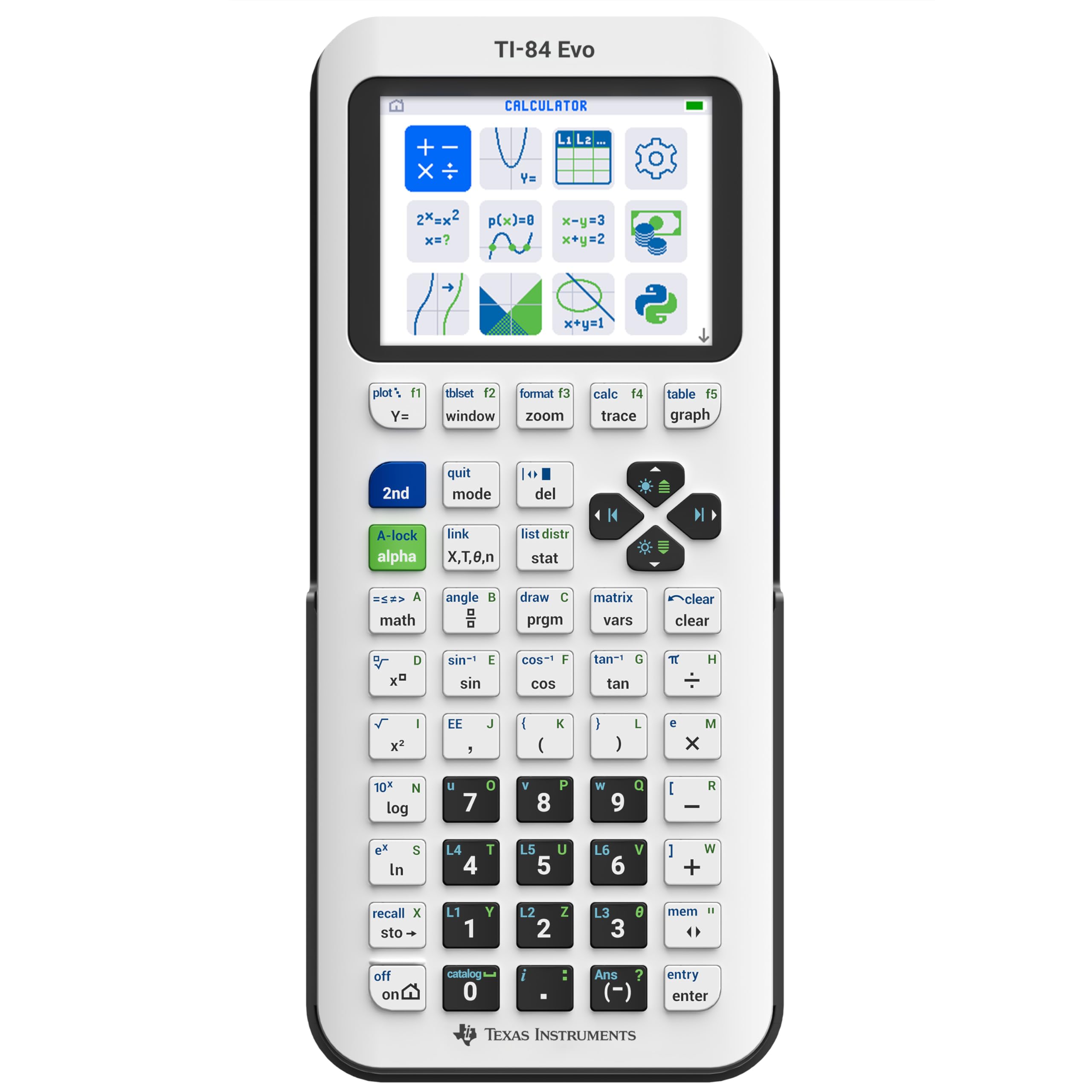
The TI-84 Evo takes the familiar TI-84 layout and makes the home screen more visual: icons put the common math tools up front, the graphing area is 50% larger than the TI-84 Plus CE's, and the processor is rated at three times the speed. It keeps the same basic keypad arrangement students already see in class, which matters when a teacher is walking everyone through a procedure.

We noticed the larger graphing area first. Overlaying two functions on a small screen can turn into a squint; here the extra room makes intersections and intercepts easier to read. The icon-based home screen is a small change with real payoff: fewer menu dives before you reach the graph or table. The Evo is also light at 7.2 ounces, so it disappears into a backpack. For a TI-based classroom, the faster response and bigger graph are the improvements that matter.

Python programming and the simplified keypad give it room to grow beyond algebra. We liked that the Evo feels like an evolution of a known tool rather than a new language to learn. The result is a calculator that gets out of the way in class, which is exactly what a school tool should do.

Bottom line: For students in TI-based classrooms, the Evo is the modern, lightweight TI-84, provided you confirm its exam approval.

3

TI-Nspire CX II CAS

TI-Nspire CX II CAS

Advanced STEM work

Our Score 9.4/10
Check Price

Worth Noting

  • CAS not permitted on some standardized exams
  • Heavier than the TI-84 Evo
CAS
Built-in computer algebra
Screen
3.5-inch color, 320 x 240
Software
PC/Mac student software included
Battery Life
Up to two weeks per charge

The TI-Nspire CX II CAS is less a calculator than a small math workstation. Its computer-algebra system can manipulate symbols, factor expressions and solve equations in general form, and the 3.5-inch color screen has room for graphs, tables and menus at the same time. The bundle includes PC/Mac student software and a rechargeable battery rated for up to two weeks per charge.

The CAS is the draw, and it is also the reason the Nspire asks more from you. Its menus are deeper than a TI-84's, so a simple calculation can take more steps while you learn the layout. The payoff is symbolic algebra and calculus that the standard graphing models here cannot match, plus 15 graph colors and six graph styles for keeping complicated plots separate.

The Nspire is the one we point to for college-level STEM, not for a student who wants the simplest path through algebra. Its rechargeable battery and software bundle make it a long-term tool, but the real cost is time: you have to learn its system. For calculus, engineering or any course that treats symbols as objects, that time buys capability the other picks do not have.

Bottom line: The Nspire CX II CAS is for advanced STEM students who need symbolic math and will invest time in learning it; check exam rules first.

4

NumWorks Graphing Calculator

NumWorks Graphing Calculator

First-time graphing

Our Score 9.4/10
Check Price

Worth Noting

  • Smaller 2.8-inch screen than the color leaders
Body
6.3 x 3.2 inches
Screen
2.8-inch color, 320 x 240
Weight
7.69 oz
Charging
USB-C cable included

The NumWorks calculator feels like the phone app version of a graphing calculator, in a good way. Its menus are arranged as a strip of apps, the color screen is sharp, and the slim white body is 6.3 inches long and 3.2 inches wide. We like it for the student who has never used a graphing calculator and does not want to start with a keypad full of secondary labels.

The interface is the reason to choose it. Basic graphing, tables and equation solving are easy to find, and the layout is clean enough that a first-time user can build a mental map quickly. The 2.8-inch screen is sharp, and the USB-C cable is included. At 218 grams, the body is light enough to carry all day without noticing it in a backpack.

Where the NumWorks loses ground is in the deepest coursework. It is intuitive, but the app-style menus can make advanced work feel more abstract than on a model with dedicated function keys. For algebra, statistics and introductory calculus, that trade is easy to take. The result is a calculator that invites experimentation instead of intimidating a new user.

Bottom line: For first-time graphing-calculator users, NumWorks is the easiest to learn, though the smaller screen makes advanced work feel cramped.

5

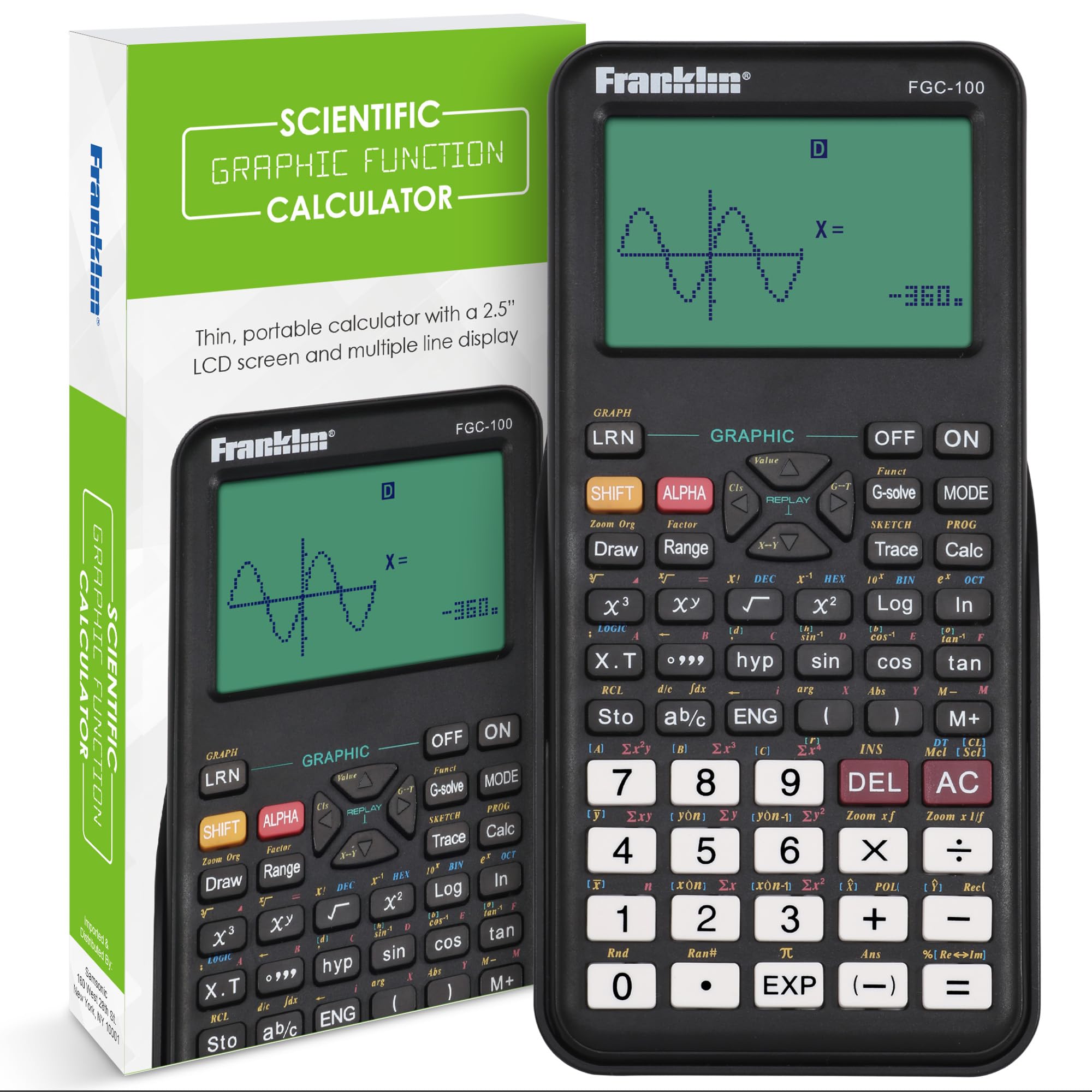
Franklin FGC-100BK

Franklin FGC-100BK

Basic plotting

Our Score 8.6/10
Check Price

Worth Noting

  • Small 2.5-inch display
Cover
Protective cover included
Screen
2.5-inch LCD
Graphing
20 built-in graphs
Functions
Algebra, statistics, probability

The Franklin FGC-100BK is a graphing calculator with 20 built-in graphs, algebra simplification, statistics and probability functions, and a protective cover. It uses a 2.5-inch LCD and a compact 7.12 by 4.5-inch body.

We tested it against the kind of work a high-school student actually brings home. For plotting a single function or checking an algebra step, it does the job, and the protective cover is a sensible touch for a backpack. Once the work moves into multiple graphs, advanced statistics or calculus, the 20-graph limit and shallow menu system run out of room. We do not recommend it for a full Algebra II or calculus sequence.

The Franklin makes more sense as a second calculator or a simple-course tool than as the one machine you keep for four years. Its buttons and screen are sized for basic work, and the cover is the detail that makes it easy to toss in a bag. It is the only pick here that makes a 20-graph limit part of its identity; that is fine for a basic course and a warning for anything beyond.

Bottom line: The Franklin is a basic graphing tool for simple plotting and algebra, not a full replacement for a TI-84 or Casio when math gets serious.

How We Chose and Tested the Best Graphing Calculators

We started by pulling together the models that show up most often in math classrooms and on exam-approved lists, then filtered by price, display type, battery setup, and whether the feature set matched what most students actually need. That left us with 12 calculators, which we tested over eight months. We didn't just poke at the buttons in an office—we used them in actual classes, during homework sessions at the kitchen table, in study groups, and on timed practice exams.

We timed how long it took to graph a system of equations, adjust a window setting, and find a matrix function, noting where menus buried simple tasks. We handed each calculator to someone who had never used that model and watched where they got stuck, which told us more about ease of use than any spec sheet. To check the display, we read graphs under fluorescent classroom lights and in afternoon glare, and we noted whether the contrast held up. For battery life, we ran each unit from full to empty with daily use and tracked how many weeks it lasted—and whether it took standard batteries or needed a recharge.

Reliability came down to small things: whether buttons registered on the first press, if the case stayed shut in a backpack, and how the calculator handled being knocked off a desk onto tile. We also compared what came in the box against the price, because a cheap calculator that needs a separate charging cable or a case isn't actually a bargain. Every model here earned its spot by surviving a semester's worth of real use, not just a single homework assignment.

How to Choose the Right Graphing Calculator

Start With Exam Approval

Exam rules are the first filter, not an afterthought. AP, SAT, ACT and IB programs each publish an approved-model list, and a calculator that is perfect for classwork can still be barred from the room. CAS models are the biggest trap: symbolic algebra is useful in college calculus, but some exams do not allow it. The Casio FX-CG50 is the straightforward choice here because its approval is explicit; the Nspire CX II CAS is the opposite case, a powerful tool to buy only after you have checked the list.

Match the Screen to the Math

Color is not a gimmick when you are comparing curves, but it is not the first thing to pay for. A bright 3.17-inch color screen like the Casio's makes multiple graphs easier to separate; the Nspire's 3.5-inch screen goes further for tables and menus. The NumWorks' 2.8-inch screen is sharp but tighter for long equations. If your work is mostly algebra and statistics, a clear monochrome display can be enough. If you expect engineering plots or 3D surfaces, pay for the color and resolution.

Choose an Interface You Can Learn Under Pressure

The best calculator is the one you can operate without hunting through menus during a timed test. TI-84 layouts are common in U.S. classrooms, so a teacher's instructions often assume them; the Evo's icon-based home screen makes that layout friendlier. The NumWorks takes the opposite approach with app-style menus that are easy to learn from scratch. The Nspire is the deepest and the slowest to learn. If your class follows TI steps, stay with TI; if you are teaching yourself, start with the interface that makes sense on day one.

Plan for Power, Weight, and the School Year

A graphing calculator lives in a backpack, so weight and power matter more than they look on paper. The Casio's 12.8 ounces and four AAA cells suit a desk and a spare-battery plan; the TI-84 Evo is 7.2 ounces and easier to carry all day. Rechargeable models save on cells but add a cable and charging habit, and the Nspire's rated two-week battery life still depends on how you use it. Check the warranty and keep the case on; screens and battery doors are the parts that take the abuse.

Frequently Asked Questions

Final Verdict

The Casio Prizm FX-CG50 is our top pick because it is the one model here that combines explicit AP, SAT, ACT and IB approval with color 3D graphing, Python and the features a standard math sequence needs. It is not the lightest calculator in the group, but it is the easiest one to buy without a follow-up question about test day.

If your classroom runs on TI-84 instructions, the TI-84 Evo is the lighter, faster alternative; confirm your exam's approved list first. For college-level symbolic math, the Nspire CX II CAS is the advanced pick, and the NumWorks is the one to choose when a first-time user needs the shortest learning curve.