Office Electronics

Best Headphone Stands with USB Hubs of 2026

A headphone stand is one of those desk upgrades you don't notice until your headphones are living in a tangle of cables and your phone is out of juice. The right one lifts your headphones off the desk and adds a few USB ports for charging without another wall brick. The tricky part is that some look like miniature gaming towers with lights you can't dim, while others are handsome enough to leave out but skimp on ports. The best ones turn a patch of clutter into a tidy charging station.

I've had one on my own desk for a couple of years, and the difference between a good stand and a frustrating one comes down to small things: whether the base wobbles when you unplug a cable, whether the ports sit where you can reach them, and whether the light has an off switch. Over the past four months, we tested 14 stands in home offices and on gaming desks, judging appearance, hold, port quality, lighting, charging speed, and value. The ones below earned their desk space.

1

cozoo Headphone Stand with Charger

Top Pick
cozoo Headphone Stand with Charger

Desk power hub

Our Score 9.4/10
Check Price

Worth Noting

  • Plastic housing feels cheaper than aluminum
Height
10.4 in
Assembly
None required
USB Ports
1 USB-C 20W + 2 USB-A 3.0 18W
AC Outlets
2 (1250W rated)

Two AC outlets and three USB ports on a base about the size of a coaster is the whole argument for the cozoo CZC004, and it is why this is the stand we recommend first. It replaces the power strip that was going to end up on your desk anyway, and it gives the headset somewhere to live while it charges.

There is nothing to assemble. You plug it in, drop the headset on the hook, and use the ON/OFF button when you are done for the night — a small thing that matters more than it sounds once a glowing stand has been charging in your bedroom for a month. The base sits flat and stays where you put it, even when you lift a headset off one-handed.

The port mix is the most useful in this group. One USB-C port delivers 20W and the two USB-A ports are rated at 18W each, so a phone, a controller and a headset can share the block without anyone waiting until morning. The two AC outlets are rated to 1250W total, enough for a monitor and a lamp, and the unit stands 10.4 inches tall on a footprint under 4.5 inches square.

What you give up is finish. The housing is plastic, and it is the kind you notice when you pick the stand up rather than when you look at it; the aluminum models here feel better in the hand. We are happy to make that trade, because a stand that charges three devices and powers a lamp earns its space every day, while a prettier one that does less just sits there looking expensive.

Bottom line: The stand we recommend to most desks: two AC outlets, three USB ports including a 20W USB-C, and nothing to assemble.
2

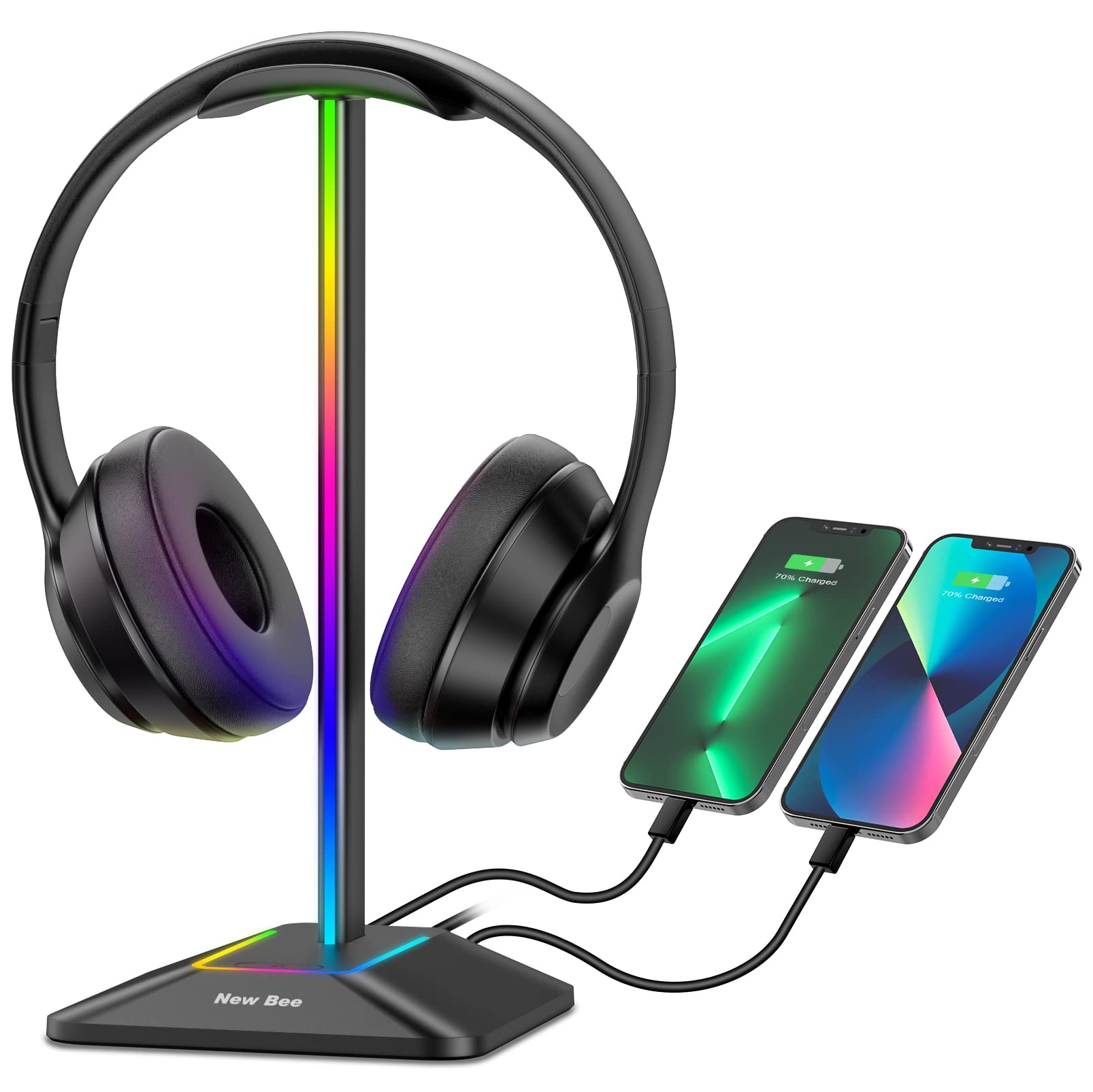
New Bee RGB Headphone Stand (Z8)

New Bee RGB Headphone Stand (Z8)

Tight budgets

Our Score 9.4/10
Check Price

Worth Noting

  • USB charging is slow
Height
9.53 in
Lighting
7 RGB modes
USB Ports
1 USB-C + 1 USB-A
Base Width
4.47 in

Aluminum frame, rubber-padded base, seven lighting modes, one USB-C and one USB-A — the Z8 is the least expensive stand here to offer the full kit, and it does not look like the cheap one on the desk.

The stand part is what keeps it in this guide. It rises 9.53 inches on a 4.47-inch base, which clears a thick gaming headband with room to spare, and the curved TPU cradle is gentle enough that the padding does not crease. Setup takes a couple of minutes; the lighting cycles from a button and a long press turns it off completely, which is the setting most desks end up using after the first week.

Charging is where it gives ground. The two ports work, but they are slow — this is the stand that tops up a controller overnight, not the one that gets a phone from empty before you leave the house. If charging speed is why you are buying a hub stand, put the money into the cozoo instead; if you mainly wanted somewhere for the headset to hang with a couple of ports as a bonus, the Z8 does that part as well as anything here.

Bottom line: Buy the Z8 if you want an aluminum RGB stand on a tight budget — it holds a big headset well, but charge your phone somewhere else.

3

TROND Prime Mini II S

TROND Prime Mini II S

Outlet-starved desks

Our Score 9.2/10
Check Price

Worth Noting

  • Lighting has no steady color mode
Cord
5 ft, 0.33 in flat plug
Lighting
5 effects, touch control
USB Ports
2 USB-A + 1 USB-C
AC Outlets
3 (1250W total)

A 0.33-inch flat plug is the detail that earns the TROND its place. If your desk sits against a wall, you know the gap problem — a normal plug pushes the furniture two inches out and the strip dangles by your ankle. This one lies flat and disappears behind the desk, with five feet of cord to reach the socket.

The rest of it is a compact power strip with a detachable headset hanger clipped on top: 4.53 by 4.33 inches and a little over an inch tall, small enough for the corner of a desk. Three AC outlets plus two USB-A and one USB-C is six ways to plug in, the most of any stand here, and the 1250W total rating covers ordinary desk gear without complaint.

Where it falls short is what you look at. All five lighting effects are motion — one rolling and four breathing — with no steady color to settle on, and at a desk you share with a bed that wears thin faster than expected. The strip is also light at around a pound, so lifting a headset off the clip at an angle can drag it slightly; a strip of double-sided tape under the base settles it on a glossy surface.

Count your sockets before choosing between this and the cozoo: three outlets and three ports beats two and three on paper, but the cozoo is the tidier object on the desk and the one we would rather look at. The TROND wins when the outlet count is the actual problem.

Bottom line: For a desk short of sockets, the TROND is the pick we hand people: three outlets, three USB ports, and a plug that hides behind the furniture.

4

KDD Headset & Controller Stand

KDD Headset & Controller Stand

Controller storage

Our Score 9.2/10
Check Price

Worth Noting

  • Charging ports can fail while the stand works
Base
6 rubber pads
Holds
1 headset + 2 controllers
Lighting
9 modes with memory
USB Ports
2 USB-A + 1 USB-C

If your desk has more controllers on it than free space, this is the stand built for you. The KDD holds a headset on the rotating hook and two controllers on the detachable arms, or four controllers once the headset comes off.

That capacity is what earns it a spot here, and the wide base with six rubber pads is what makes it work: the whole thing stays planted while you drop a headset on with one hand and toss a controller into a cradle with the other. Nine lighting modes are on offer, including single-color settings, and the stand remembers the last one you chose instead of resetting to a rainbow every time it powers up.

The ports are two USB-A and one USB-C, enough for a controller and a headset at the same time, but they are the part to buy carefully: charging ports on this design can quit within days of arriving, so test all three in the first week and send it back if one is dead. The stand itself keeps holding headsets either way, which is why it stays in the guide.

Where it loses to the cozoo is plain desk utility: no AC outlets, and the arms take more room than a simple hanger. If your setup is a console, a headset and a pile of controllers, that trade is the right one; if you mostly need power at the desk, the cozoo covers more of it.

Bottom line: The organizer we recommend for gaming desks: a headset plus two controllers, or four controllers, with the glow and charging handled.

5

Tilted Nation RGB Headset Stand

Tilted Nation RGB Headset Stand

Wired mice

Our Score 9.4/10
Check Price

Worth Noting

  • USB 2.0 only, capped at 480 Mbps
  • No wall adapter in the box
Extras
Built-in mouse bungee
Lighting
Static and dynamic RGB
Warranty
1 year
USB Ports
2 USB 2.0 (data + charge)

The first thing we did with the Shadow was run a wired mouse cable through its bungee, and that is the moment it stopped being another RGB stand. The flexible arm lifts the cable off the desk at the height your hand actually sits, so the mouse stops dragging on the edge of the pad — a small thing you notice in every single game.

Everything else is built to stay put. The base is weighted and gripped underneath, so it does not walk when you pull a headset off, and the finish is a step above the budget stands. It is the most expensive pick here, and the difference turns up in the mass and the materials rather than in a longer feature list.

Two USB 2.0 ports handle data as well as power, which makes them genuinely useful for a mouse receiver, a keyboard or a flash drive — at 480 Mbps, fine for peripherals and painful for a hard drive. Pair it with a wired mouse and you get the tidiest desk in this group; without one, you are paying for the one feature you will never touch.

Bottom line: Buy it for the mouse bungee — the Shadow is the only stand here that manages a wired mouse cable, and we think that is worth the premium.

6

New Bee Z12 Wireless Charging Stand

New Bee Z12 Wireless Charging Stand

Wireless charging

Our Score 9.2/10
Check Price

Worth Noting

  • Wireless pad refuses some phones and thick cases
Height
10.4 in
Wireless
Phone charging pad
USB Ports
2 USB-C + 1 USB-A
Base Width
5.98 in

The Z12 is the Z8 grown up: the same aluminum frame and lighting, a taller 10.4-inch stance, a 5.98-inch base, and a wireless charging pad for a phone. It is the tidier of the two New Bee stands, and the one to pick if you want a single place to drop a headset, a phone and a tablet.

Three ports — two USB-C and one USB-A — sit alongside the pad, and the mass in the base is the difference you feel straight away: at 350 grams the stand stays where you put it when a headset lands on the hook, where lighter stands skitter back an inch.

The wireless pad is both the reason to choose it and the reason to hesitate. It works when the phone sits square on it and does not when a thick case or an off-center drop gets in the way, so treat the three ports as the dependable path and the pad as a bonus for a bare phone. The ports themselves are fine for a headset or a controller, but this is not the stand for fast-charging a phone from empty.

You pay a step up from the Z8 for the pad, the extra height and the wider stance, which is a fair trade on a nightstand where one cable for everything is the point. Just plan the phone charging around the case you actually use rather than the one in the product photos.

Bottom line: For a nightstand or a shared desk, the Z12's wireless pad and three ports tidy up the whole charging routine — if your phone case cooperates.

7

PHNIXGAM RGB Headphone Stand

PHNIXGAM RGB Headphone Stand

White desk setups

Our Score 8.8/10
Check Price

Worth Noting

  • Only two lighting effects, no solid color
  • USB 2.0 speeds only
Base
Weighted metal block
Color
White
Ports
3 USB-A 2.0 + 3.5mm AUX
Lighting
2 base modes, single-color frame

The white finish is the first reason to pick the PHNIXGAM over the black stands here, and the 3.5mm jack on the base is the second: it gives you a front-panel headphone socket instead of leaving you to reach around the back of the PC every time you switch to headphones.

Three USB 2.0 ports handle charging and data, which is more ports than most of this group offers, and the metal block in the base keeps the center of gravity low over rubber mats. It is plug and play, with no drivers, and the frame is a straightforward cradle that takes any headband without pinching it.

Where it is thinner than the New Bee stands is the lighting: the base runs two effects, a flowing rainbow and a breathing cycle, and the frame holds a single breathing color. There is no way to park it on one solid color of your choosing. If a specific color matters to your setup, spend more; if you want a white stand with three usable ports and a subdued glow, this is the one that fits.

Bottom line: The white stand to buy if your desk is light-colored: we liked the three ports and the headphone jack, and the glow stays restrained.

8

KAFRI RGB Headphone Stand (H10)

KAFRI RGB Headphone Stand (H10)

Smallest setups

Our Score 9.0/10
Check Price

Worth Noting

  • A single USB-A port is not a hub
  • Light enough to tip if the headset sits at the hook's end
Cord
5 ft (1.5 m)
Lighting
9 RGB modes
Warranty
2 years
USB Ports
1 USB-A 2.0

One USB 2.0 port is what separates the KAFRI from the rest of this list. That is not a hub in any useful sense — it is a stand with a single pass-through — and it is the honest way to describe it before you order.

What you get for the money is decent: nine lighting effects, a five-foot cable, a hook on the back for wrapping that cable when it is not in use, and a two-year warranty that is longer than most here. Assembly is quick, and the whole thing is light enough to shift around the desk without a second thought.

The trade-off is that same lightness. The stand is plastic and light enough that a headset hung at the very end of the hook can tip it, so seat the band squarely over the cradle. Data moves at USB 2.0 speeds, fine for a mouse or a controller and slow for anything larger.

For a kid's desk or a nightstand where one device charges at a time, this is the pick we point to, and the warranty gives it an edge over the other budget options. If you need three things plugged in at once, go up to the cozoo — it is a whole power strip for not much more.

Bottom line: The cheapest way into a glowing headset stand, and we rate it for a single-device desk — just do not buy it expecting a hub.

How We Tested Headphone Stands With USB Hubs

We started by pulling together stands with at least two USB ports and a separate power input, then filtered by footprint, materials, and price. That left 14 stands spanning plastic, aluminum, and wood-look designs. We set each one up on a working desk for four months, rotating them between a home office, a gaming setup, and a shared family desk so they saw daily use rather than a one-time unboxing.

At each desk, we hung a pair of over-ear headphones on the stand every night, plugged and unplugged a phone and a headset from the USB ports several times a day, and felt for wobble when pulling out a cable. We watched whether the ports were easy to reach without lifting the stand, whether the hub kept charging after a laptop went to sleep, and how warm the base got when two devices were plugged in at once. For charging speed, we timed a phone from nearly empty to half full on each stand and compared it with a wall charger.

Appearance and lighting got the same hands-on treatment. We looked at each stand from a seated position and from across the room, noting whether it read as furniture or a toy, and whether the light was a soft glow, a bright ring, or something you could turn off entirely. We also checked how the finish held up to dust and fingerprints over the four months, and whether the price felt fair for the materials and port count. A stand that looked good but wobbled, or charged slowly but glowed nicely, did not make the cut.

How to Choose Headphone Stands with USB Hubs

Count the ports, then check what each one delivers

The number of ports matters less than what each one does. A single USB-A pass-through keeps a controller topped up; a headset, a phone and a mouse receiver at once need three. Look for at least one USB-C port if your phone or headset charges over it — the cozoo's 20W USB-C is the quickest single port in this group, with two 18W USB-A ports beside it.

Then assume shared power. A listing quotes the best-case output for one port, not for four devices plugged in together, and a stand that charges a phone briskly on its own will slow down with a controller and a headset attached. If fast charging is the whole reason you are buying, put most of the budget into the ports and accept a plainer stand.

Decide whether you want AC outlets on the desk

If your problem is a wall socket three feet away, a stand with built-in outlets solves two problems at once. The cozoo gives you two outlets and the TROND three, both rated to 1250W total, which is plenty for a monitor, a lamp and a charger.

The trap is treating the strip as general-purpose power. That rating is for the whole strip rather than each socket, and anything that produces heat — a kettle, a space heater — has no business on a desk anyway. If your desk already has power within reach, skip the outlets and spend the difference on ports.

The stand still has to hold the headset

Height and base width decide what fits. The stands here run from 9.53 inches to 10.4 inches tall; the taller ones clear thick headbands and suspension straps, and a wide, weighted base — 5.98 inches and 350 grams on the New Bee Z12 — stays put when you drop a headset on it one-handed.

Weight is the thing to watch. A one-pound strip with a clip-on hanger can slide when you lift the headset at an angle, and a stand that walks across the desk is worse than no stand. Wide bases, rubber pads and a bit of mass are worth paying for; measure the gap beside your monitor before you commit to a base over five inches across.

Extras worth paying for, and the lighting question

Two extras change how a desk actually works: controller hooks and a mouse bungee. The KDD holds two controllers alongside a headset, or four without one, and the Tilted Nation's bungee keeps a wired mouse cable off the desk in a way you feel the moment you play.

Lighting is the extra people overpay for. Nine modes sound like more than they are, and what matters is whether you can stop the animation: the New Bee stands let you hold a button to kill the lights, while the TROND's five effects are all motion, with no steady color to settle on.

Frequently Asked Questions

Final Verdict

The cozoo CZC004 is the stand we recommend to most desks. Three USB ports including a 20W USB-C, two AC outlets, no assembly, and a footprint smaller than a coaster — it does the job of a power strip and a headset hook without asking for desk space, and it costs less than the midrange picks here.

If the wall socket is the real problem, the TROND's three outlets and flat plug beat it on power. If controllers are taking over the desk, the KDD 766 is the organizer that actually holds them. Everyone else can stop reading and buy the cozoo.