Office Electronics

Best Monitor Light Bars of 2026

There's a particular eye strain that shows up around 10 p.m., when the rest of the house is dark and your desk lamp throws a bright pool of light across the keyboard — and a reflection of itself in the middle of your screen. A monitor light bar sits above the display and throws light down onto the desk instead of out into the room, so the glare comes off the glass and the keys stay readable. I switched to one for late writing sessions, and the headache that used to arrive around hour three stopped showing up.

These bars aren't interchangeable, though. My team and I spent six months with 12 of them, from slim plastic clip-ons to heavier aluminum models with a dial on top, and what separated them was how evenly the light landed across the desk, whether the warm setting actually got warm, and whether the clamp still held after a week of being nudged. A bar that lights the middle of the keyboard and leaves the corners dark is worse than no bar at all. The ones below are the ones we kept reaching for.

1

Quntis ScreenLinear Pro

Top Pick
Quntis ScreenLinear Pro

Everyday desk work

Our Score 9.2/10
Check Price

Worth Noting

  • No remote; all control is on the bar
Power
5W USB
Dimming
Stepless with auto-dimming
Bar Length
15.7 in
Color Rendering
Ra98

The moment that sold us on this bar is a small one: the room gets darker and the bar does the adjusting. Rather than holding whatever level you last set, its ambient sensor reads the room and pulls the desk back toward the same working brightness, so the light you tuned at four in the afternoon still works at nine at night.

That automation is why it is our default for an ordinary desk. Against the rest of this group it has the highest stated color rendering at Ra98, 78 LEDs behind an asymmetric lens that tips light onto the desk rather than the panel, and stepless color temperature from warm to cool. We found the beam stayed where it was aimed, with no bright band across a glossy screen, and the touch strip along the top answers a tap without making you look.

The mount is the part we mind. It hangs on a counterweight over the top edge of the panel, and on a thin bezel or a curved screen it can be nudged out of square when you reach behind the monitor for a cable. On a flat panel it survived ordinary typing without moving. If your screen curves, skip it: Quntis's own curved bar is built for that shape, and BenQ's clamp grips instead of hanging.

What keeps it in front is how little it asks. No remote to lose, no second lamp to switch on, one USB cable to route behind the panel. For a desk that has to be usable at any hour, that is most of the job done.

Bottom line: For most desks this is the bar to buy: it holds the desk at a steady brightness on its own and renders color better than anything else here, all for midrange money.

2

BenQ ScreenBar Halo 2

BenQ ScreenBar Halo 2

All-day desks

Our Score 9.4/10
Check Price

Worth Noting

  • Dial needs its own spot on the desk
  • Front and back lights adjust on separate controls
Control
Wireless dial
Bar Length
19.7 in
Color Temperature
2700K-6500K
Monitor Thickness
0.17-2.36 in

The ScreenBar Halo 2 is the most expensive bar in this group, and the premium has not gone into more light. It has gone into the controller, a wireless dial with a small display that shows the exact brightness and color temperature you are setting, and into the ambient backlight that washes the wall behind the monitor.

That backlight is the part we ended up valuing most. Lighting the wall behind a screen lowers the contrast between a bright display and a dark room, which is the reason a bar helps at night at all; the front light then handles the desk at an 18-degree anti-glare angle. Both are adjustable from 2700K to 6500K on separate controls, and the motion sensor turns the bar on as you sit down and off as you leave. It sounds like a gimmick until you stop touching a switch.

We think it is the best-built bar here, and the one that fits the widest range of monitors: 0.17 to 2.36 inches of panel thickness and curved screens between 1000R and 1800R. Whether that is worth the premium over our top pick is the honest question, because the light on your keyboard will not look dramatically different. The extra buys control, fit and finish, which is a defensible place to spend if you sit at the same desk eight hours a day.

Bottom line: Buy it if your desk is where you spend the day and you want the best controller, backlight and mount in this group, with fit for almost any panel.

3

Quntis ScreenLinear Curved RGB

Quntis ScreenLinear Curved RGB

Curved ultrawide monitors

Our Score 9.4/10
Check Price

Worth Noting

  • Heaviest bar here at 1.22 kg
  • Costs more than the standard flat bars here
Bar Extension
Up to 26 in
Light Sources
Dual foldable bars
Color Temperature
3000K to 6500K
Monitor Curvature
800R-3000R

Put a 15.7-inch light bar on a 34-inch curved monitor and the ends of the screen sit in shadow while the middle blazes. This bar answers that directly: its two halves extend to 26 inches in total and fold on pivots so they follow the curve instead of bridging it.

The extra width is the reason it earns a place. A bar this long reaches the far ends of a wide desk rather than pooling in the middle, and the pivoting halves sit against the curve. Quntis rates it for screens of 34 inches and up with 800R to 3000R curvature, which covers the curved monitors most people are actually buying.

The front light runs stepless from 3000K to 6500K with four preset brightness levels on top, and the auto-dimming sensor does the evening adjustment for you. Control is a wireless puck that also handles the RGB backlight, color washing down the wall behind the screen while the desk stays neutral. It is more fun than we expected, and it saves buying a separate LED strip if you want a gaming setup to look like one.

The body is aluminum and finished like the rest of Quntis's range. On a 27-inch flat screen, though, this is more bar than you need.

Bottom line: The pick for a 34-inch or larger curved monitor: it extends to 26 inches and folds to match the screen, with RGB backlight for the evenings.

4

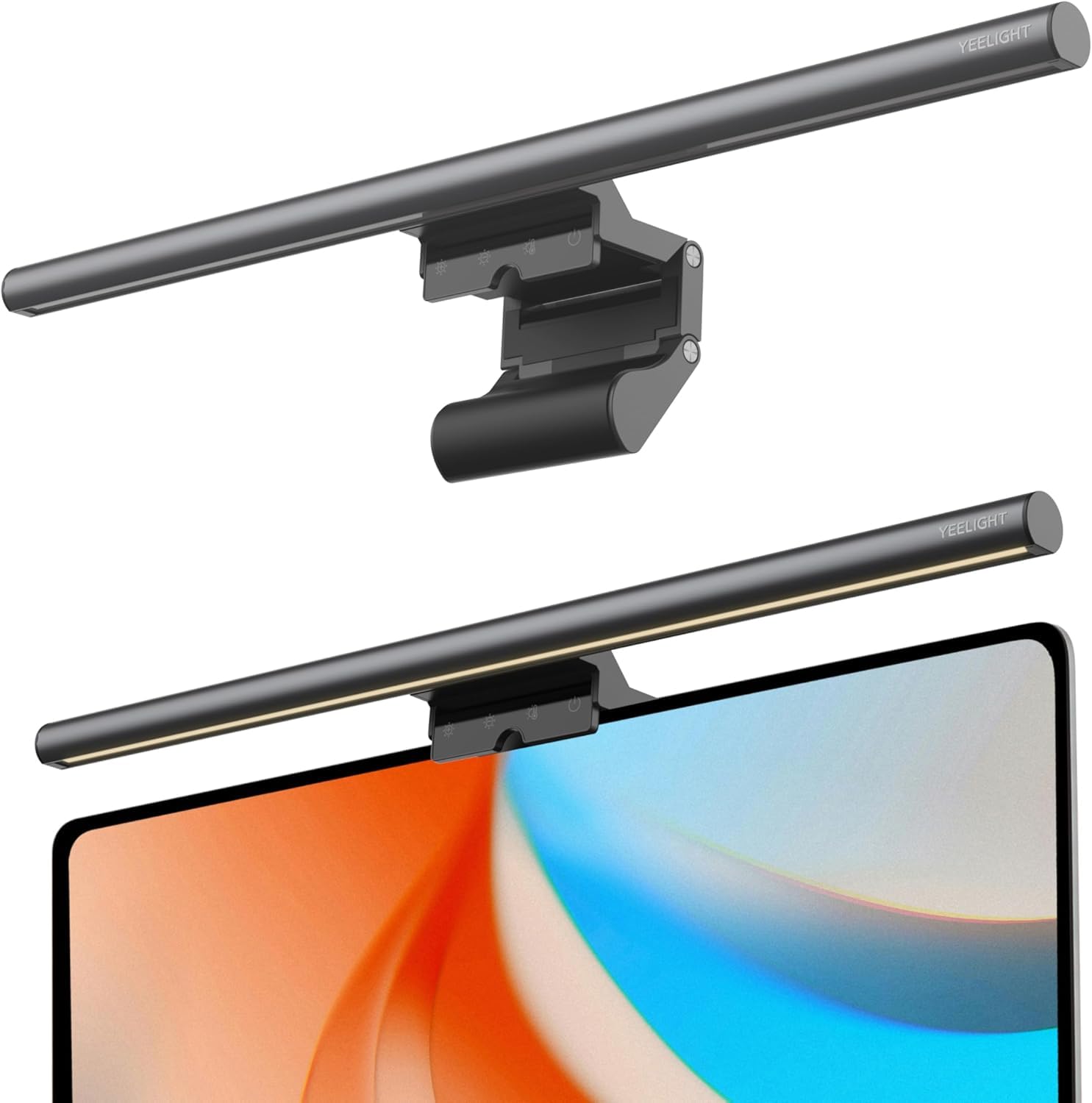
Yeelight Monitor Light Bar

Yeelight Monitor Light Bar

Smaller desks

Our Score 9.0/10
Check Price

Worth Noting

  • Ships without a USB power adapter
Body
Full metal
Dimming
Stepless
Light Output
250 lm
Color Rendering
Ra95

The body is the first surprise. Most bars near the bottom of the range are plastic shells with a metallic finish; this one is aluminum, and you can feel the difference in the hand before it goes anywhere near the monitor.

What it delivers is 250 lumens through an Ra95 lens with stepless dimming on both brightness and color temperature, a continuous roll rather than the three or four steps the cheapest bars give you. The beam is tidy: it lands in front of the screen and stays off the panel, and the raised center section leaves room for a webcam, which is the detail that decides it for anyone on video calls all day.

Where it gives ground to the top pick is automation. There is no ambient sensor, so you set the level yourself, and no remote, so you set it at the bar where the touch button sits. On a desk where the light stays put all day that costs you almost nothing; if you chase the light as the room changes, the manual routine will wear thin by the second week.

Bottom line: The best-looking bar per dollar here: aluminum, Ra95 light and stepless dimming, as long as you don't need a remote or a sensor.

5

Colorpanda Monitor Light Bar

Colorpanda Monitor Light Bar

Second desks

Our Score 9.0/10
Check Price

Worth Noting

  • Some units flicker or quit after a few weeks
Body
Aluminum
Bar Length
16.14 in
Brightness Levels
3
Color Temperatures
2700-4000-6500K

Three brightness levels, not a slider, is the first thing you notice on the Colorpanda, and for most evenings the middle one is exactly right, so the missing in-between settings matter less than the spec list makes them sound.

Everything else is more considered than the money suggests. The body is aluminum, the touch buttons along the top respond cleanly, and it remembers where you left it when you switch it back on. Three color temperatures, warm, neutral and cool, cover reading, working and late-night screen time, and the asymmetric lens keeps the beam off the panel. At 16.14 inches it spans a 27-inch monitor comfortably.

What it does not have is a sensor or a remote, and the mount is the simple counterweight kind that rests on the top edge rather than gripping it. On a flat monitor that holds fine; on a thin bezel it slides if you knock it. Treat it as a good second-desk bar, or a first one where the monitor is ordinary and the budget is not.

Bottom line: A well-finished budget bar for a second desk, with an aluminum body, touch controls and a memory function at the bottom of the price range.

6

Samphon SC04 Monitor Light Bar

Samphon SC04 Monitor Light Bar

Keyboard lighting

Our Score 8.4/10
Check Price

Worth Noting

  • Plastic body with a clip that holds by weight
  • No USB power adapter in the box
Dimming
Stepless
Bar Length
15.75 in
Central Brightness
900 lux
Color Temperatures
3000K-6500K

If the job is simply to make a keyboard readable at eleven at night without switching on the room light, this bar does it for less than anything else here. On the evenings we used it as the only light in the room, the top setting was more than enough.

The specification is generous for that role: 900 lux at the center over a claimed 35-by-25-inch spread, three color temperatures between 3000K and 6500K, and stepless dimming rather than steps. There is no touch strip. A mechanical button on the right end clicks through the modes, and we preferred that, because you can find it without looking.

Where it sits against the rest of the group is simple: it gives you the light and skips the polish. That is the right trade for a monitor nobody touches, a spare room, a workshop bench, a first setup in a rented flat, and the wrong one if the bar is going to be the piece of hardware you look at all day.

Bottom line: The cheapest competent bar here: bright, stepless, with three color temperatures, and all the refinement the price allows.

How We Tested the Best Monitor Light Bars

We started with a list of about 40 bars from brands we'd heard of and a few we hadn't, then cut anything that couldn't span a 24- to 27-inch monitor, anything that only ran off a wall outlet, and anything priced like a desk lamp without the features to match. That left 12, which we bought at retail and lived with for six months on real desks — a home office with a 27-inch display, a shared office desk with a 24-inch, and a kitchen counter that doubles as a standing desk.

Light quality got measured, not guessed at. We held a light meter at keyboard level and again at screen center, noting whether brightness fell off at the edges or stayed flat across the desk. In a dark room we turned each bar down to its lowest setting to see whether it was genuinely dim enough for 11 p.m. work, and ran the color temperature end to end to check that the warm end looked like lamplight rather than a warning light. Then we watched for the thing no spec sheet mentions — whether any of that light landed on the screen itself and put a haze over dark scenes in a video.

Mounting is where most of them lost points. We clamped each bar on and off a dozen times, checked whether the pad scuffed the bezel, and gave the bar a deliberate knock every few days to see if it drifted or sagged under its own weight over a month. We ran them off monitor USB ports, a powered hub, and a wall adapter to catch flicker or dimming when the screen changed brightness, and wiped the housings weekly to see how the finish held up and how conspicuous each one looked on a bare desk. Value came last: a bar at twice the price had to be visibly better built and more even, and several weren't.

How to Choose Monitor Light Bars

Glare control comes before brightness

Every bar here claims an asymmetric lens, and that claim is worth checking rather than trusting. The good ones angle the beam so light lands on the desk in front of the keyboard and stops at the screen; the poor ones spill a bright band across the top of the panel, which is exactly the glare you bought the bar to escape. Once it is mounted, sit at your normal height, open a dark page full screen, and look for a smear across the top third of the display. If you see one, the angle is wrong or the optics are.

A bar you can rotate on its mount gives you a second chance to fix that. A fixed one does not.

Fit the bar to the monitor, not the desk

Bar length should roughly match what you are lighting. A 15.7-inch bar is right for a 24- to 27-inch flat panel; on a 34-inch curved ultrawide the outer thirds fall into shadow unless you move up to something like the 26-inch span of Quntis's curved model. Then check the mount: panel thickness, whether the back of the monitor is flat or bulged, and whether the screen curves. Weighted clamps with an adjustable jaw grip; counterweight clips hang, and hanging mounts shift when knocked.

Measure the thickness at the top edge before ordering, not in the middle — that is where the clamp actually sits.

Dimming: steps, sliders and sensors

Lux and lumen figures are quoted at the brightest point, usually the center of the bar, so they say little about the ends of a wide desk. A long bar with a modest figure can light more of your workspace than a short one with a big number. Stepless dimming matters more at night, when the level you want tends to sit between two fixed steps. An ambient sensor changes daily life with a bar more than any of it: it holds the desk steady as the room darkens, which is why our top pick earns its place on automation rather than raw output.

Color temperature and color rendering

Warm light around 3000K is easier late at night; cool light near 6500K suits detailed work in the morning. A bar that sweeps between them covers both, and most of these do. Color rendering is the figure worth paying for if you edit photos or check design work: Ra95 and above keeps colors close to how they look in daylight, and the Ra98 of our top pick is the highest stated in this group. For typing and reading, anything above Ra90 is fine.

Controls and cable routing

Touch strip, puck remote or dial is mostly preference, with one practical rule: the more often you change the level, the more a control you can reach without stretching over the screen is worth. BenQ's dial and the wireless pucks on the Quntis models sit under your hand, while a touch bar on top of the monitor means reaching past the screen every time. Check the connector as well — an L-shaped USB-C plug on a bar that sits low behind the panel avoids a cable bend that pushes the bar off square.

Frequently Asked Questions

Final Verdict

Buy the Quntis ScreenLinear Pro if you want one bar that handles a normal flat monitor without being asked. It holds the desk at a steady brightness on its own, renders color better than anything else in this group, and asks for nothing but a USB port.

Spend on the BenQ ScreenBar Halo 2 only if the dial, the backlight and the wider monitor fit are things you will use every day — the light itself is not the upgrade. And if your screen curves, skip both: Quntis's 26-inch curved bar is the one that actually fits that shape.