PC Components & Storage

Best CPU Coolers of 2026

A CPU cooler is the one part of a build you never think about until it makes itself known: the fan that climbs to a whine the second a game loads, the frame rate that sags twenty minutes into a render, the case that quietly turns your desk into a space heater. Swapping in a proper tower air cooler or a sealed liquid loop is usually the cheapest upgrade in the whole machine, and the one that finally lets the rest of your parts behave.

The trap is assuming bigger is better. A 360mm radiator can crowd out your graphics card, a tall heatsink can foul your RAM, and a cooler rated for 250 watts does nothing for you if the side panel won't close over it. We've installed 14 coolers over the past eight months, in builds ranging from a cramped mini-ITX box to a full-tower workstation, and every pick below earned its place by fitting first and cooling second.

1

Thermalright Peerless Assassin 120 SE

Top Pick
Thermalright Peerless Assassin 120 SE

Most builds

Our Score 9.4/10
Check Price

Worth Noting

  • 155 mm tall, so case clearance comes first
  • Thin printed instructions
Fans
2 × 120 mm PWM
Height
155 mm
Heat Pipes
6 × 6 mm
Noise Rating
25.6 dB

Six heat pipes, two 120 mm fans, a 265 W rating and a 155 mm dual tower: the Peerless Assassin 120 SE casts the same shadow as the expensive air coolers here. What separates it is how little it asks you to give up to get there.

It's the cooler we point most people to, because it buys margin. There's enough headroom for an eight-core chip running flat out, so the fans spend most of their life at low speed and only ramp when something heavy actually happens. The pair tops out at 1550 rpm with a 25.6 dB rating; during a long all-core run we could hear them, but the noise is a smooth rush rather than a whine. Nothing else here combines that much cooling capacity with that low a price.

In the hand it's a serious lump of aluminum — 907 g of fin stack — and the two fans clip on with wire brackets, which we came to appreciate any time a screwdriver was needed near the socket. Lift a fan off, reach the mounting screws, clip it back. The box includes thermal paste and a fan splitter, so a two-fan cooler doesn't eat two motherboard headers. The printed instructions are the weak point; on a first build, watch a video for your socket before you start.

Check two things before ordering. At 155 mm tall and 135 mm wide it's a full-size tower, so confirm your case lists that much CPU cooler clearance rather than assuming it. And on a board where the memory slots sit tight to the socket, the front fan is the part that gets in the way — the clips let you nudge it up a little, which is usually enough.

Bottom line: We recommend it to almost anyone building a PC: it's the best cooling-per-dollar here, with headroom that keeps a mainstream build quiet.
2

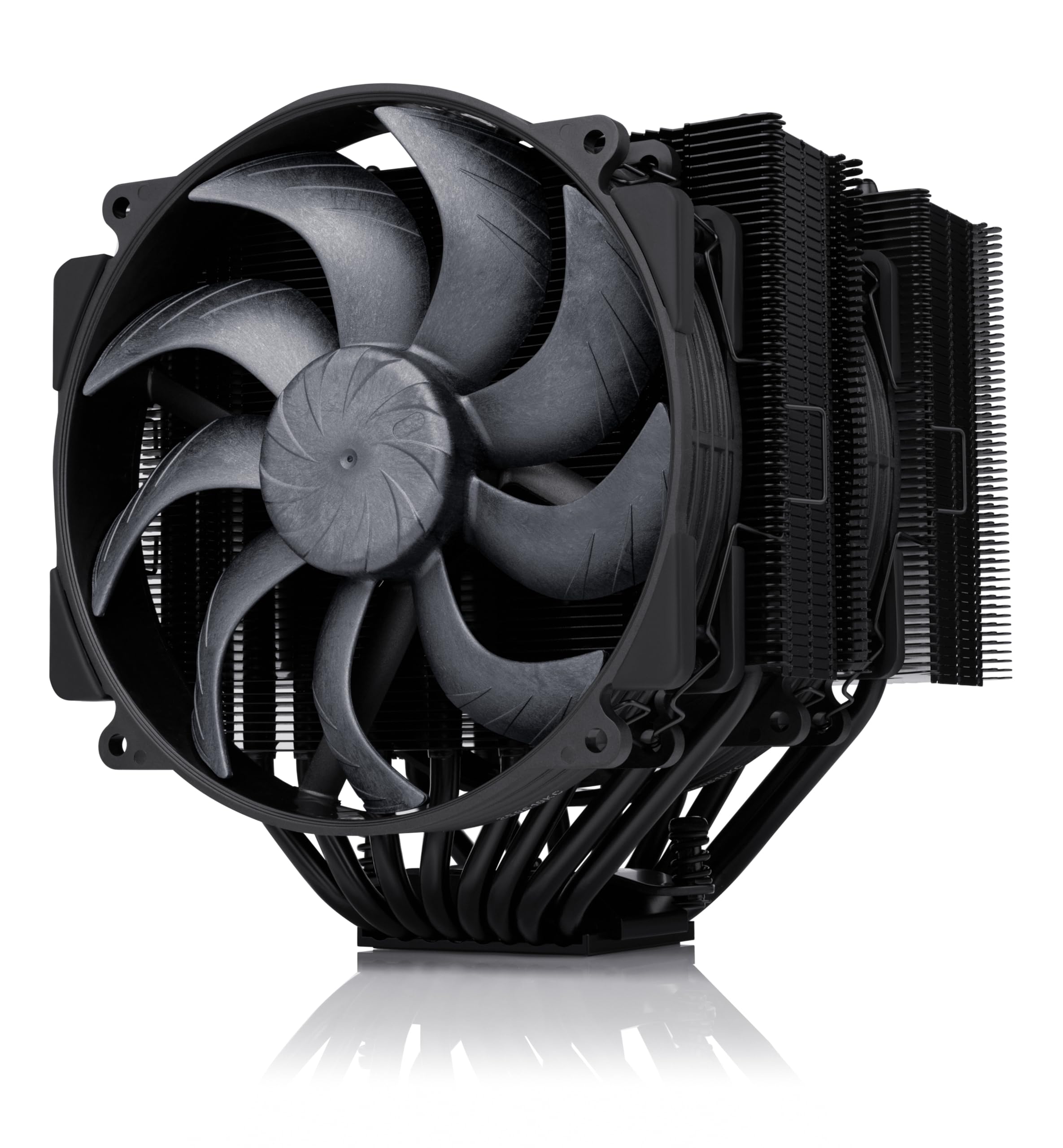
Noctua NH-D15 G2 chromax.black

Noctua NH-D15 G2 chromax.black

Quiet premium builds

Our Score 9.2/10
Check Price

Worth Noting

  • 168 mm tall and 1.81 kg
  • Memory clearance drops to 32 mm with both fans
Fans
2 × 140 mm
Height
168 mm
Warranty
6 years
Heat Pipes
8

Everything about the NH-D15 G2 is expensive except the noise. This is the second generation of the cooler that became the benchmark for big air, now with eight heat pipes, roughly a fifth more fin surface and a pair of 140 mm NF-A14x25r G2 fans — the same formula taken further, in an all-black finish.

The money goes into parts you notice at install time. The SecuFirm2+ bracket uses Torx screws and comes with its own screwdriver, the fans have a speed offset for acoustic tuning plus low-noise adaptors, and there's a tube of NT-H2 paste in the box. The offset fin stack clears the top PCIe x16 slot on most current boards, a detail you only appreciate when a graphics card backplate is pressed against your cooler.

For a hot CPU in a big case with a budget that stretches, this is the air cooler we reach for. It's the quietest of the big towers here at 24.8 dB and 1500 rpm, and it holds a high-core-count chip without the fans becoming the loudest thing in the room. The bracket and accessory kit are the best in this group; the cooler feels engineered rather than assembled.

The catch is physical. It stands 168 mm tall and weighs 1.81 kg, and memory clearance depends on how many fans you fit: 59 mm with one, 32 mm with both. Most low-profile kits are fine either way, and tall RGB heat spreaders are the case where you leave the front fan off or move it. Six years of warranty on a cooler with no pump to fail is the rest of the argument — the money went into bearings, blades and a bracket you fit once.

Bottom line: This is the air cooler we choose when silence matters more than price, and it earns the money with its fans, bracket and six-year warranty.

3

be quiet! Pure Rock Pro 3

be quiet! Pure Rock Pro 3

Tall memory

Our Score 9.4/10
Check Price

Worth Noting

  • Highest published noise rating of the air coolers here
  • Mounting kit replaces your board's fan mounts
Fans
2 × 120 mm PWM
Height
155 mm
Rated TDP
250 W
Heat Pipes
6

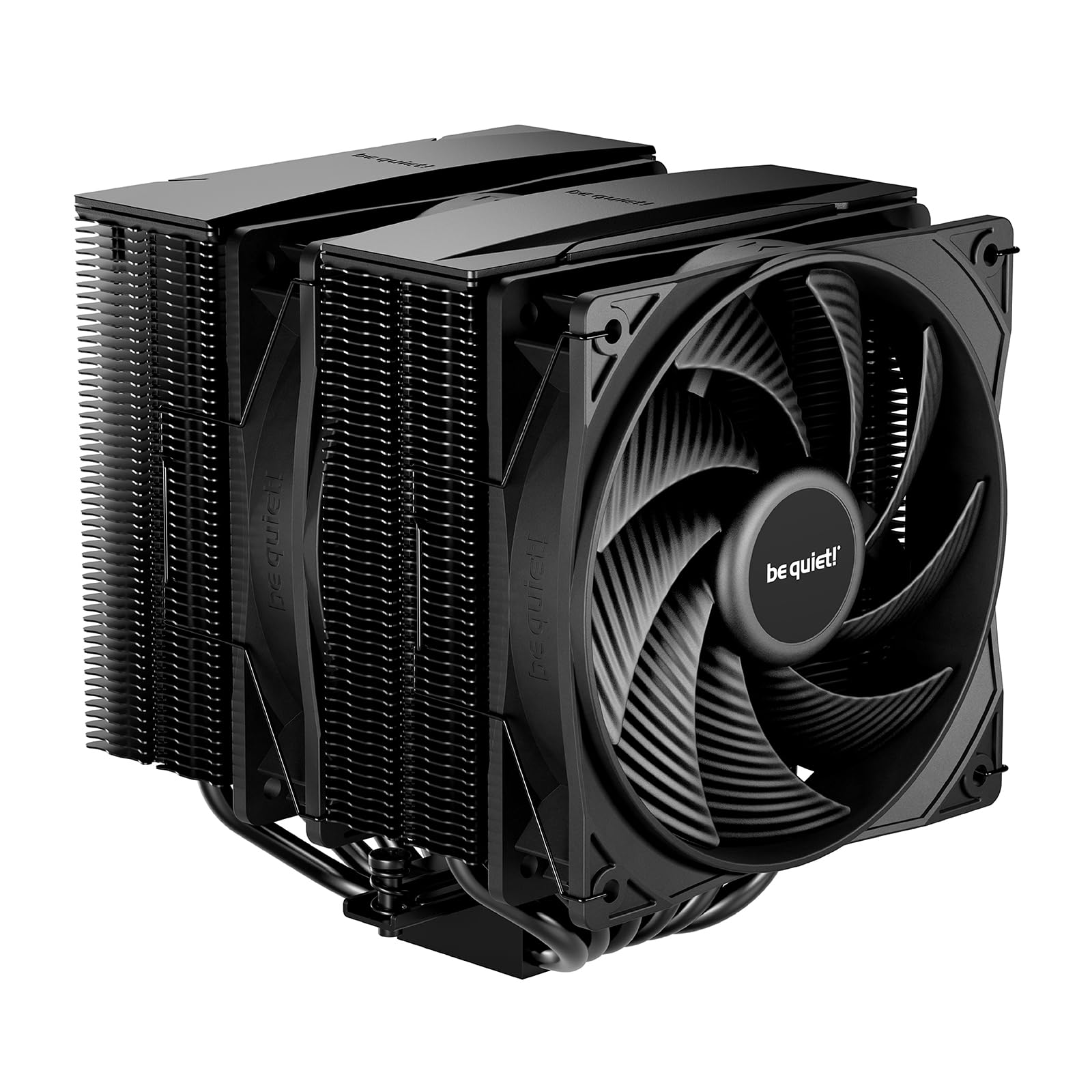
The clever bit on the Pure Rock Pro 3 is a double tower that doesn't sit square over the memory. The towers are offset, the front fan rides on a rail you can raise, and the result is a 250 W air cooler that leaves room for tall memory and the voltage-converter heatsinks around the socket. For a build where the RAM is the showpiece, that's the layout we appreciate most in this group.

Six nickel-plated heat pipes and two 120 mm Pure Wings 3 fans do the cooling, and the 250 W rating is the number to hold against your CPU — comfortable on a 170 W-class chip, working hard on the very biggest consumer parts. In normal use it's a quiet cooler. The published 34.8 dB figure is measured at the top of a 2000 rpm range you'll rarely reach, and what it does emit under load is a low rush rather than motor noise.

Fitting it takes more steps than the Thermalright towers, because the mounting kit replaces the board's own fan mounts, and 1.4 kg of metal wants supporting while you tighten. The kit is self-explanatory and the paste is in the box. At 155 mm tall it sits in the same clearance bracket as the Peerless Assassin, so a mid-tower is fine and a slim case is not.

Bottom line: Our pick for a quiet mid-range build with tall memory: the offset towers do a job no other air cooler here manages as neatly.

4

ARCTIC Liquid Freezer III Pro 360

ARCTIC Liquid Freezer III Pro 360

Hot CPUs

Our Score 8.6/10
Check Price

Worth Noting

  • Bracket is fiddly to seat evenly
  • Needs a 360 mm radiator position
Fans
3 × 120 mm
Radiator
360 mm
Warranty
6 years
Max Fan Speed
3000 rpm

The bracket is where the Liquid Freezer III Pro 360 asks for patience. The cold plate is deliberately offset toward the CPU hotspot, so the block only sits right when the frame is seated evenly, and getting there takes more care than any of the air coolers here need. What softens it is what ARCTIC includes: a contact frame for LGA1851 and LGA1700 that most brands sell separately, and hardware for AM4, AM5 and the current Intel sockets in one box.

For the hottest CPUs in this roundup, this is the cooler to build around. Three 120 mm P12 PRO fans on a 360 mm radiator give it more heat capacity than any air cooler here — the fans reach 3000 rpm and shift 77 CFM — and the pump housing carries a small PWM fan that blows across the voltage converters around the socket. There's a tidy part too: the radiator fan leads are woven into the hose sleeving, so one cable reaches the motherboard instead of four.

Noise is where it gives ground. At low and mid speeds it's unremarkable in the good way; at the top of that range it's loud enough that you'll want a custom fan curve rather than the default. Watch for a fan that develops a squeal early on — that's a warranty conversation, and ARCTIC gives you six years to have it.

Space is the other half of the decision. A 360 mm radiator needs a 360 mm position, top or front, and about 2 kg of hardware hanging off the case. If your case only offers a 240 mm mount, this cooler is not an option regardless of how well it cools.

Bottom line: We point liquid-curious builders with hot CPUs here: the cooling is the strongest in this roundup, as long as you take the bracket slowly.

5

Thermalright Assassin X120 R SE

Thermalright Assassin X120 R SE

Small cases

Our Score 9.4/10
Check Price

Worth Noting

  • Four heat pipes limit it to mid-range CPUs
Width
71 mm
Height
148 mm
Fan Speed
1550 rpm
Heat Pipes
4 × 6 mm

Seventy-one millimeters is the measurement that decides this one. The Assassin X120 R SE is a single 120 mm tower just 71 mm wide, narrower than anything else in this roundup by a wide margin, and that's the whole reason to buy it: it drops into small cases and onto boards where a dual tower would foul the memory or the first expansion slot. It's also the cheapest cooler here, and it doesn't feel like a corner-cutting one.

Four heat pipes set the ceiling. On a 65 W part or a mid-range six-core it runs cool and stays quiet, and the 1550 rpm fan is inaudible at idle; push a long all-core load at it and you'll hear it working, but never harshly. On a 200 W-class chip it becomes the limiting component in the build, and that isn't the job it's for.

Installation on AM5 and LGA 1700 is the usual backplate-and-standoff routine and went on in one pass. Two practical notes: the fan unclips, which is how you reach the memory slots underneath it — plan your RAM before the cooler goes on, not after — and the finished aluminum cover means the tower looks intentional through a side panel rather than raw. At 148 mm tall it clears more cases than the big towers, though it still deserves a check against your case spec.

Bottom line: Buy this if your case is cramped and your CPU is modest — we think it's the best small-case value here.

6

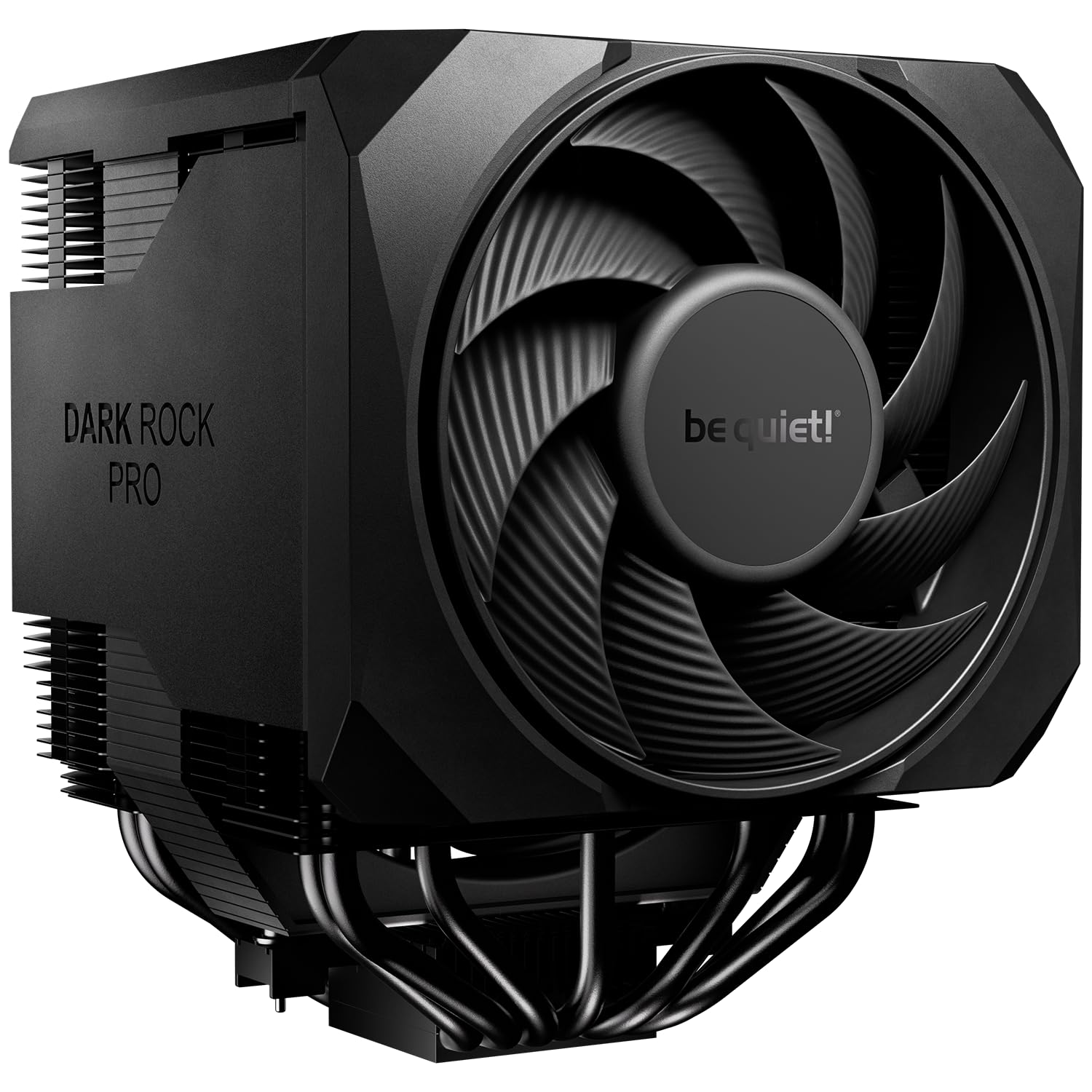
be quiet! Dark Rock Pro 6

be quiet! Dark Rock Pro 6

Silence-first builds

Our Score 9.0/10
Check Price

Worth Noting

  • Fan stop depends on a curve below 40% PWM
Fans
135 mm + 120 mm
Rated TDP
300 W
Heat Pipes
7
Noise Rating
32.4 dB

A switch on the cooler itself decides how the Dark Rock Pro 6 behaves. In active mode you get the full 2000 rpm and maximum cooling; in semi-passive mode the fans stop completely below 40% PWM and the tower runs silent until load picks up. It's the only cooler here that lets you choose between those two personalities without opening software.

Underneath the switch sits a serious air cooler: seven heat pipes, a 300 W rating, and a 135 mm Silent Wings fan paired with a 120 mm one, both on fluid-dynamic bearings and six-pole motors. The front fan runs on a rail so you can raise it for memory clearance, the mounting bridge comes pre-installed, and the grease is in the box. At 1.34 kg it's built like something that expects to stay put.

For a silence-first build — a big case, a big CPU, and no interest in hearing the machine from the next room — this is the air cooler we rate highest. The 300 W rating puts it at the top of the air group here, and the fan-stop mode gets closer to a passive system at idle than anything else on this page. The bracket is good, though the Noctua's is better, and the Pure Rock Pro 3 does most of this job for less.

One thing to know going in: the fan stop only happens if your fan curve actually drops below 40% PWM at idle. A board that runs the header flat out will keep the fans turning and the switch will look broken. And the point of this cooler is silence rather than the last degree — if you're chasing peak numbers, a 360 mm radiator is the better spend.

Bottom line: For a silence-first build with the budget for it, we rate the mode switch and fan-stop idle behaviour above anything else in the air group.

How We Chose and Tested These CPU Coolers

We started by pulling together roughly 60 coolers sold in the U.S., then cut that list down by socket support, published heatsink height and radiator clearance, and price band, so every survivor had a realistic shot at fitting a normal build. From that pool we bought 14 and ran them for eight months — long enough for dust to build on the fins and for the mounting hardware to prove whether it would survive being taken off and put back on.

Installation was the first filter. I mounted each cooler solo on both an Intel and an AMD board, timed the job, and counted how many times I had to pull a fan off to reach a screw or hold a backplate in place with one finger. Then each one moved into a real case: I measured heatsink height against the side panel, radiator thickness against the graphics card, and fan shrouds against tall RAM, because a cooler that doesn't clear your parts is a cooler you end up returning.

For cooling, we logged peak core temperatures across a 30-minute gaming session, a long video export, and an hour of idle, then weighed each result against the noise it made — a decibel meter at desk height, plus my own ears late at night when the room is quiet. Value came down to what the extra money actually bought in degrees and decibels, not what the box promised. And yes, we looked at them: each one sat behind a tempered glass panel with the lights on, to see whether the cables hid and the lighting software behaved.

How to Choose CPU Coolers

Match the cooler to your CPU, not to a build tier

A 65 W Ryzen 5 and a 250 W Core i9 don't need the same hardware. Cooler ratings — 250 W, 265 W, 300 W — are the quickest way to compare across brands, and the useful rule is margin: pick one rated comfortably above your processor's maximum package power so the fans can stay slow. Everything here will cool a mid-range chip without drama; the split happens at the top, where the air towers run out of capacity and a 360 mm radiator takes over. Look up your CPU's power limit before you shop, not after.

Clearance beats specifications

Three measurements decide whether a cooler fits: height to your case's side panel, room over the memory slots, and, for liquid, a radiator position. The air coolers here run 148 mm to 168 mm tall, so check your case's listed CPU cooler clearance against that range. Don't trust the word compact — it describes how the cooler is built, not whether it will clear your panel. If your case doesn't publish a figure, measure from the top of the installed CPU to the side panel with a tape and leave a few millimeters spare.

Air or liquid, decided by the case

Air is the simpler purchase: no pump, no coolant, and the only wear item is a fan you can swap in five minutes. Liquid earns its place when the case is small but has a 240 mm or 360 mm radiator mount, or when the CPU is a 250 W part that stays hot for hours — a 360 radiator simply has more capacity than a tower. The trade is a pump that can fail and a mounting job with more parts in it. If neither of those conditions describes your build, buy the tower.

What a noise rating actually tells you

Every figure on a box is measured at full speed, so a 25 dB cooler and a 35 dB cooler can sound identical at idle and completely different under load. What matters at home is the fan's minimum speed, its diameter, and the curve your motherboard applies. Bigger, slower fans are easier to live with than small fast ones, and a 3000 rpm ceiling on an AIO is headroom, not a cruising speed. Set a custom curve so the fans stay low until the CPU is genuinely working.

Budget for the install, not just the cooler

Mounting is where builds go sideways: backplates that want the board out of the case, standoffs that cross-thread, and on liquid coolers a pump block that has to sit flat before you tighten anything. Check the socket list covers your board's revision — AM5 and LGA 1851 appear across these picks, but older brackets aren't always in the box. Dry-fit the bracket, tighten in a cross pattern, and apply paste once, on the final seating.

Frequently Asked Questions

Final Verdict

The Thermalright Peerless Assassin 120 SE is the cooler we recommend to most people. It has more cooling headroom than a mainstream build will use, it stays quiet while delivering it, and it leaves money for the parts that actually change how a PC feels.

Two situations point elsewhere. If you want the quietest big-air cooler with the best bracket in the group, the Noctua NH-D15 G2 is worth the step up. And if your CPU is a 250 W part that runs hot for hours, the ARCTIC Liquid Freezer III Pro 360 has capacity the air towers here can't match — just take the bracket slowly.