Gaming

Best Gaming Routers of 2026

The worst lag spike I've ever had didn't come from a crowded lobby — it came from my own living room, mid-match, the second someone upstairs started a download. A gaming router doesn't magically lower your ping; what it actually does is decide whose traffic goes first, hold the connection steady when the whole house is online, and push a usable signal into the room where your console or PC actually sits. That's a narrower promise than the box makes, and it's the one worth shopping for.

The spec sheet won't tell you much on its own — those enormous combined speed figures are every band added together, and no single device you own will ever see that number. Over eight months my team ran 11 gaming routers through the same house, the same games, and the same congested evenings, and the gaps came down to setup, real throughput, and whether the signal survived two rooms and a floor away. The picks below are the ones that held up.

1

GL.iNet Flint 2

Top Pick
GL.iNet Flint 2

All-round gaming

Our Score 9.0/10
Check Price

Worth Noting

  • No 6 GHz band or Wi-Fi 7 radios
  • Two-year warranty, the shortest in this set
Firmware
OpenWrt, pre-installed
Rated Speed
6000 Mbps
Wi-Fi Standard
Wi-Fi 6 (802.11ax), dual-band
Multi-gig Ports
2 x 2.5G, 4 x 1G

Six fold-down antennas, a matte slab, and no light show: the Flint 2 looks more like a small office appliance than something sold for gaming. Inside it is an 8-stream Wi-Fi 6 router rated at 6 Gbps, with two 2.5-gigabit ports, four gigabit ports, 1 GB of RAM and OpenWrt already installed. At under two pounds it sits on a shelf or behind a monitor without asking for space.

OpenWrt is why this is our top pick. It gives you real traffic shaping, the queue management that keeps your ping steady when someone else starts a download, rather than a gaming toggle you have to take on faith. Put the two 2.5G ports to work, one for the PC and one for a console or a switch, and this is the most useful router here for the money. AdGuard Home support is built in too, blocking ad traffic at the DNS level without a second box on the shelf.

The trade-off is radios. This is dual-band Wi-Fi 6, so there is no 6 GHz channel for a Wi-Fi 7 laptop or phone to use, and the 6 Gbps rating is both bands added together rather than something one device will see. If your gaming hardware is Wi-Fi 6 or older, you give up nothing. VPN users get up to 900 Mbps over WireGuard and 880 Mbps over OpenVPN, fast enough that the tunnel stops being the bottleneck. Update the firmware before you judge the range: the setup notes tell you to, and it is not optional housekeeping.

Stability is the one thing we cannot call settled. Dropouts mid-match are the failure to watch for with any router in this group, and the sensible move here is a week of ordinary evenings while the return window is open. The warranty runs two years, one less than the ASUS picks carry, which is worth weighing if you keep a router for five.

Bottom line: Our pick for most gaming desks: two 2.5G ports and OpenWrt traffic shaping give you the control that keeps latency steady, at midrange money.
2

ASUS ROG Strix GS-BE12000

ASUS ROG Strix GS-BE12000

Wi-Fi 7 wired desks

Our Score 8.2/10
Check Price

Worth Noting

  • 2.4 GHz connections can lag or drop
  • 6 GHz range fades quickly with distance
Coverage
Up to 3,000 sq ft
Rated Speed
12,000 Mbps
Wired Ports
1 x 2.5G WAN, 7 x 2.5G LAN
Wi-Fi Standard
Wi-Fi 7 (802.11be), tri-band

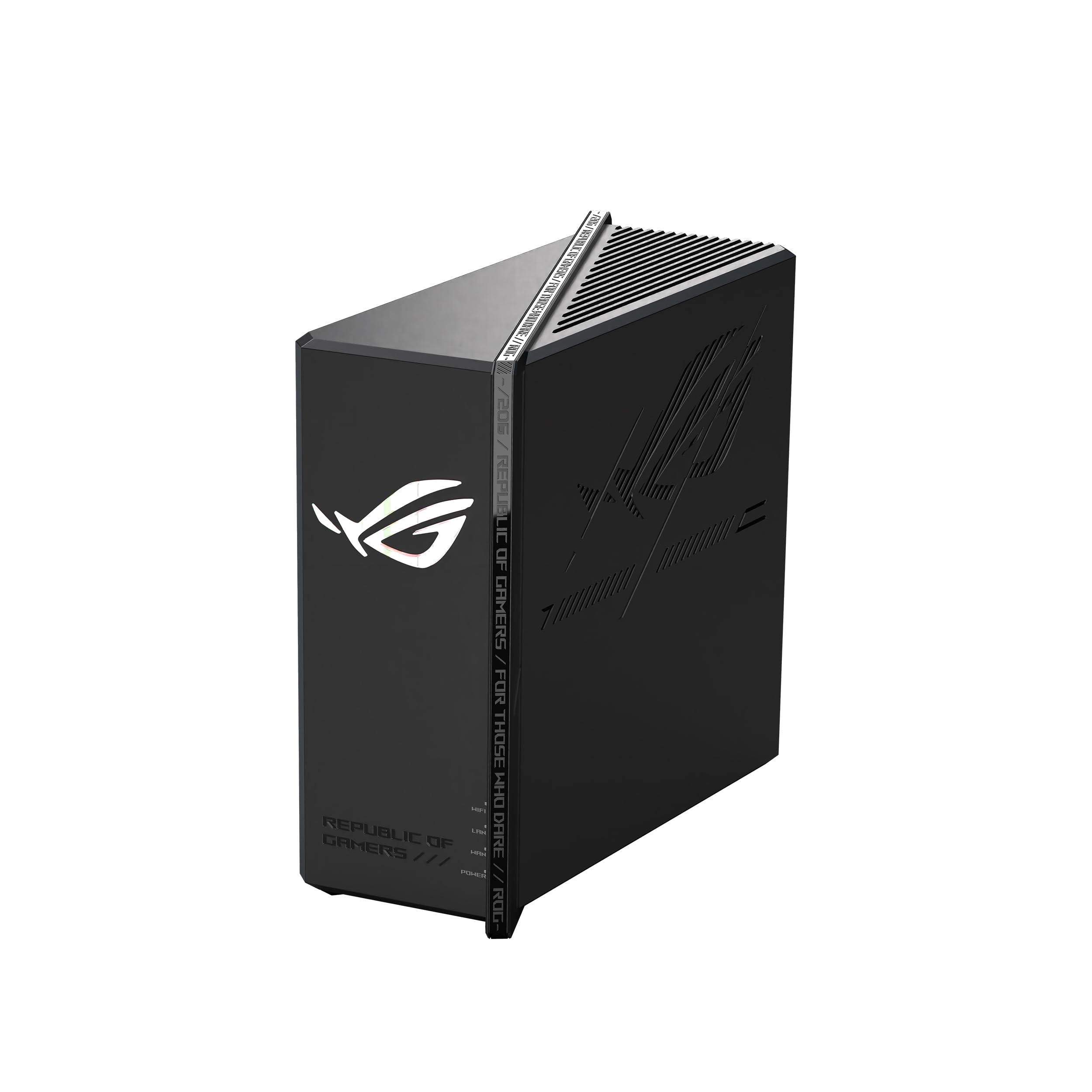
Eight 2.5-gigabit ports is the number that matters on the GS-BE12000: one WAN and seven LAN, adding up to 20 Gbps of wired capacity. For a desk with a gaming PC, a console, a NAS and a spare cable for a laptop, that is a router you never have to put a switch behind. The port cluster is the part we care about most, because a cable is still the cheapest latency upgrade in the building.

The wireless side is tri-band Wi-Fi 7 rated at 12 Gbps, with 320 MHz channels in the 6 GHz band, MLO, 4K-QAM, eight internal antennas, a 2 GHz quad-core processor and 2 GB of RAM. It is a two-pound, nine-inch square with no external antennas, so it tucks onto a shelf rather than announcing itself. Setup is the catch: the phone app is the way in and you need a data connection to download it, so install it before you unplug the old router.

This is the pick if you want Wi-Fi 7 now. The 6 GHz band is a genuine upgrade for a headset, a handheld or a laptop in the same room, and the port cluster is the best here short of the flagship. What keeps it off the top spot for us is the 2.4 GHz band, where connections can lag or drop, and Wi-Fi 7 throughput that fades with distance faster than 5 GHz does. Put the things that matter on 5 GHz or a cable and neither problem reaches you.

Smart Home Master carves off up to three separate SSIDs for IoT gear and VPN links, and the ROG gaming network puts the acceleration settings behind a single SSID. A console joins the fast lane without anyone digging through menus, which is more than we can say for most gaming toggles.

Bottom line: Pick the GS-BE12000 if you want Wi-Fi 7 and a fully wired desk: seven 2.5G LAN ports make it the backbone of a gaming room.

3

MSI Radix AXE6600

MSI Radix AXE6600

Budget gaming

Our Score 8.6/10
Check Price

Worth Noting

  • No Wi-Fi 7 support or MLO
  • AI QoS requires a third-party service opt-in
Processor
1.8 GHz quad-core
Rated Speed
6600 Mbps
LAN Port Speed
2.5 Gbps
Wi-Fi Standard
Wi-Fi 6E (802.11ax), tri-band

The first thing you notice is the lighting, six antennas with RGB inside and Mystic Light sync for the rest of an MSI setup. The second is the price, the lowest in this group by a distance. What you get for it is tri-band Wi-Fi 6E with a real 6 GHz band, 8 streams and a 6.6 Gbps rating, which is why it is our budget pick: nothing else here puts clean 6 GHz spectrum within reach of a cheap build.

AI QoS is the headline feature and the one to read closely. Using it means opting in to a third-party service agreement, which is a decision about who sees your traffic metadata rather than a checkbox to click past. The hardware underneath is more convincing: a 1.8 GHz quad-core, a 2.5 Gbps LAN port and 512 MB of RAM, a quarter of what the ASUS units carry. That memory figure is the one to remember once you stack QoS, parental controls and a VPN on the same box.

We care more about the 6 GHz band than the light show, and the port matters more than both. Stability is the risk you take at this price, with dropouts that show up mid-match as the thing to watch, so buy it where returns are simple and give it a week of evenings before the window closes. In a flat or a small house that gamble is easier to take: the range covers one floor comfortably and one wired machine gets the low latency that counts. Put the 6 GHz band on its own SSID for whatever you game on and leave the rest of the house on 5 GHz. That is the configuration this router is priced for.

Bottom line: The Radix is the budget pick for a reason: it is the least expensive way here to get a 6 GHz band and a 2.5G port for the machine you game on.

4

ASUS ROG Rapture GT-BE98 Pro

ASUS ROG Rapture GT-BE98 Pro

Multi-gig wired builds

Our Score 8.4/10
Check Price

Worth Noting

  • Priciest router here for a modest wireless gain
  • Signal strength falls short at distance
Coverage
Up to 3,500 sq ft
Rated Speed
30,000 Mbps
Wi-Fi Standard
Wi-Fi 7 (802.11be), quad-band
Multi-gig Ports
2 x 10G, 4 x 2.5G

At 4.4 pounds and just under 14 inches across, the GT-BE98 Pro is the only router here you have to plan shelf space for. Eight external dual-feeding antennas stand up around it, and the back panel is the real statement: two 10-gigabit ports, four 2.5-gigabit ports, and a dedicated gaming port that the router prioritizes from the PC all the way out to the game server.

The hardware is the most of anything in this group, with quad-band Wi-Fi 7 rated at 30 Gbps, 2 GB of RAM and 320 MHz channels, and in a house with multi-gig fiber and a wired desktop it is a ceiling you can grow into for years. It is also the pick we recommend least often, because the money goes further elsewhere: it is the most expensive router here by a wide margin, and the wireless performance it buys is not proportionally better than the Strix's.

Signal strength is where it gives ground. The 6 GHz radios do not carry as far as the coverage figure suggests, and 2.4 GHz dropouts are the other thing to plan around, on the band where smart plugs and older gear live. Neither matters much if the router ends up in the same room as the PC and everything else runs on cable.

Where the extra money does land is redundancy and reach. Dual WAN means a cable modem and a second provider can sit on one router and fail over without you touching anything, and that is the argument if a dropped match costs you more than the hardware did. For a household that cannot afford an outage, that is a real feature rather than a spec-sheet flourish.

Bottom line: Worth it only if your network is already multi-gig: dual 10G ports and quad-band Wi-Fi 7 make this the biggest router here, at the biggest price.

How We Tested the Best Gaming Routers

We started by pulling every router sold as gaming-first — Wi-Fi 6E and Wi-Fi 7 units, mesh-capable models, and anything with a dedicated game-priority feature — then filtered by price band, port layout, and physical footprint so we weren't comparing a desktop tower to something that fits on a shelf. That left 11 routers, each of which spent eight months in a real house rather than on a lab bench.

Setup was timed from the moment the box opened to the moment a console was online, using only the included app or instructions, and we noted how many steps demanded a firmware update before anything worked. Each router then became the only router in the house for a two-week stretch, handling two 4K streams, a video call, and a game simultaneously while we watched for ping spikes and dropped connections.

For speed and range, we timed a large file transfer between two wired machines, then carried a laptop to the far bedroom, the garage, and the backyard to find where throughput fell off and where video calls actually failed. We logged latency with the line saturated, checked whether per-device priority settings survived a reboot, and wrote down every unexplained disconnect over the weeks. Antenna lighting got its own note — how bright, whether it dims or shuts off, and whether it earns the shelf space. Then we asked the value question: what the extra spend bought over a solid mainstream router.

How to Choose Gaming Routers

Read the speed rating for what it is

There is no single 30 Gbps connection on any of these routers. The headline figure is every band added together, and no laptop, console or phone will see more than a slice of it. What matters is whether your devices can use the bands on offer: a Wi-Fi 6 laptop gains nothing from a 6 GHz radio, and a 1 Gbps fiber plan is fully served by a midrange router with one 2.5G port.

Buy for the hardware you own now plus one upgrade you genuinely expect. That calculation is exactly where our top pick wins, and where the flagship struggles to justify itself.

Count the ports before the antennas

A cable is still the largest latency improvement most people can make, and the port count decides how many devices get one. Two 2.5-gigabit ports cover a PC and a console; seven or eight cover a desk, a NAS and a spare. Ten-gigabit ports are worth paying for only if your internet plan or your local storage already runs past 2.5 Gbps, otherwise you are buying a wider door for traffic that never arrives.

If you have more wired devices than ports, price a small 2.5G switch into the comparison before you decide.

Treat 6 GHz as a room, not a house

Wi-Fi 7's fast band has shorter legs than 5 GHz and gets through walls badly. The trap is buying a Wi-Fi 7 router for a basement and expecting the top floor to benefit; the band that reaches upstairs is still 5 GHz, and sometimes 2.4 GHz. Use the 6 GHz band for the room the router sits in, and plan a mesh node rather than a bigger router if you need to cover a long house.

Plan for the app and the first update

Two things derail more setups than anything else: an app that has to be downloaded before you can configure the router, and firmware that ships older than the version the performance depends on. Install the app and run the update before you judge coverage, since both our top pick and the Strix want that first.

Then run it through a week of ordinary evenings while the return window is open. Dropouts show up under load, not on the first afternoon.

Frequently Asked Questions

Final Verdict

The Flint 2 is the router we send most people to, for unglamorous reasons: two 2.5-gigabit ports, OpenWrt's traffic shaping, and the most consistent performance in this group for the money. It makes a gaming desk faster without becoming the most expensive thing on it.

Spend more only for a reason you can name. Wi-Fi 7 hardware and a desk full of wired devices point to the GS-BE12000; a tight budget points to the Radix and its 6 GHz band. The GT-BE98 Pro earns its place only in a house that already runs multi-gig fiber.