PC Components & Storage

Best Hard Drive Enclosures of 2026

An external hard drive enclosure is a translator: it takes the bare drive you pulled out of a dead laptop or bought on sale and turns it into storage your computer can read over a USB cable. That sounds like a solved problem until a fast SSD crawls along at mechanical-drive speeds or the aluminum gets uncomfortably warm twenty minutes into a transfer. The differences between a bargain box and a good one are rarely visible in the product photos.

I started paying attention after a laptop died with a 2TB drive still inside it, and the enclosure I grabbed in a hurry made the rescue harder than it needed to be. Since then my team and I have spent four months with 14 enclosures, cloning failing drives, hauling project files between offices, and leaving one plugged into a router for weeks at a stretch. Compatibility comes first, since SATA and NVMe drives need entirely different housings. After that it's speed, heat, and whether the drive sits still inside the case. The picks below got all of it right.

1

UGREEN 3.5/2.5-Inch Enclosure

Top Pick
UGREEN 3.5/2.5-Inch Enclosure

Mixed drive drawers

Our Score 9.0/10
Check Price

Worth Noting

  • Plastic shell flexes under pressure
  • Some units stop being recognized after months
Power
12V/2A adapter included
Interface
USB 3.0, 5Gbps, UASP
Drive Sizes
2.5 and 3.5 inch SATA
Max Capacity
20 TB

Most people arrive at this decision holding a pile of drives rather than a plan: a laptop drive from a retired machine, a 3.5-inch drive pulled out of a desktop, and no certainty about which one will still spin up. The UGREEN enclosure is where we start because it refuses to make that choice for you. It takes 2.5- and 3.5-inch SATA drives up to 20TB, and the 12V/2A power adapter and USB 3.0 cable are both in the box.

That completeness is worth more than any single number on the listing. A 3.5-inch drive can't run off USB power, so an enclosure that arrives without a brick is half a product; this one includes it, and the rubber strips inside hold the drive firmly enough that a desktop drive doesn't sit there chattering. Setup is the slide-off lid, the drive seated on the connector, the lid back on. No screws, no drivers on Windows, macOS or Linux, and hot swap when you want to move to the next old drive.

The plastic shell is the compromise you're accepting. It stays barely warm with a drive running continuously, but it flexes under thumb pressure, and the bridge board rather than the case is what decides how long any of these last. Ours behaved for the whole test period, and the drive inside survives if it doesn't. One practical note: if a drive isn't recognized, try a different port and a different cable before you blame the enclosure, because that fixes more of these than anything else.

Bottom line: This is the one we hand to most people: it takes whichever SATA drive you own, the power brick is in the box, and it just works.

2

SABRENT EC-UASP 2.5 Enclosure

SABRENT EC-UASP 2.5 Enclosure

Laptop drives

Our Score 9.2/10
Check Price

Worth Noting

  • Thin plastic clips can snap with repeated opening
  • 2.5-inch drives only
Weight
2 oz
Interface
USB 3.0, 5Gbps, UASP
In The Box
USB 3.0 cable
Drive Sizes
2.5 inch SATA and SATA II

A drive out of a dead laptop is the most common thing anyone puts in an enclosure, and the SABRENT EC-UASP is the one we reach for when that's the job. It measures 5.31 by 2.91 by 0.59 inches and weighs two ounces, so it lives in the same bag pocket as the drive, and it opens without a screwdriver.

There is nothing clever here, which is the appeal. The cable is a separate USB 3.0 lead rather than a captive stub that frays at the molding, the shell is plain black plastic, and UASP support means an SSD inside behaves like an SSD instead of a slow external disk. It's rated for standard 2.5-inch SATA and SATA II drives, it's hot-swappable, and it needs no driver on Windows or macOS.

The weak point is the plastic itself. The two halves clip together, the tabs are thin, and this is the enclosure in the group where repeated opening is most likely to end the relationship — expect a snug fight the first few times and treat the clips gently. Given the price and the years this model has been doing the job, we still think it's the right first enclosure, and the one people buy again for the next old drive.

Bottom line: For a drive out of a dead laptop, this is our default — tiny, cheap, and simple enough to keep a spare in a drawer.

3

ORICO 3588US3 Enclosure

ORICO 3588US3 Enclosure

Desktop drives

Our Score 8.8/10
Check Price

Worth Noting

  • Drive is located by the lid, not screws
  • No fan, so the case warms under load
Power
12V/2A adapter included
Interface
USB 3.0, 5Gbps, UASP
Drive Sizes
3.5 and 2.5 inch SATA
Max Capacity
20 TB

The 3588US3 is one of the cheapest routes to running a 3.5-inch drive over USB, and it doesn't feel stripped: the tool-free shell, a 12V/2A power supply, a USB 3.0 cable, an activity LED and two thermal pads all come in the box.

Inside, a foam pad soaks up the worst of the vibration and the drive sits on the SATA connector, but nothing screws it down. The lid closes over it and does most of the locating. For a drive that stays on a desk, that's fine. For one that travels, it isn't: a 3.5-inch drive held by a plastic lid is a drive waiting to work loose, and the 2.5-inch drives it also accepts have even less to grip.

Where it earns its place is the breadth for the money: a 20TB ceiling, auto-sleep to keep the drive from spinning all night, enough internal room that a desktop drive isn't jammed against the shell, and a status light you can see from across the desk. Ours has spent its time on a shelf holding a backup drive, which is exactly the life this enclosure is built for.

Bottom line: Our pick for a desktop drive: it covers the 3.5-inch job properly, includes the power supply, and asks very little of your budget.

4

BENFEI 2.5-Inch Enclosure

BENFEI 2.5-Inch Enclosure

USB-C laptops

Our Score 9.2/10
Check Price

Worth Noting

  • Short fixed cable that can't be replaced
  • 2.5-inch drives only, with a 6TB ceiling
Interface
USB 3.0, 5Gbps, UASP
Connectors
USB-C and USB-A
Drive Sizes
2.5 inch SATA, 7mm and 9.5mm
Max Capacity
6 TB

A single short cable that ends in both a USB-C and a USB-A plug is the whole idea here, and it's a good one: the same enclosure works on a current ultraportable and on the desktop in the spare room without anyone hunting through a drawer for an adapter. At 0.09kg it disappears into a bag alongside the drive.

It's a 2.5-inch enclosure only, for 7mm and 9.5mm drives up to 6TB, with UASP and a 5Gbps link — plenty for a laptop SSD. Two things we noticed: the fit is snug enough that the drive needs a firm push and then doesn't rattle, and the cable is fixed and short, so the laptop has to sit close and there's no replacing it if it frays. If your week is split between USB-C and USB-A machines, that's a fair trade for everything else here.

Bottom line: If your week includes both a USB-C laptop and an older USB-A desktop, this is the enclosure to leave in the bag.

5

CLAVOOP 3.5-Inch Dock

CLAVOOP 3.5-Inch Dock

Frequent swaps

Our Score 8.8/10
Check Price

Worth Noting

  • Auto-sleep can stall long transfers
Form
Lay-flat dock
Power
12V/2A adapter included
Drive Sizes
3.5 and 2.5 inch SATA
Max Capacity
20 TB

There is no lid to fight with here. The CLAVOOP is a lay-flat dock: the drive drops onto the connector, the top closes over it, and the whole thing sits on four rubber pads with a ring of ventilation holes around the drive. Moving four old drives through one dock to find a file is the job this was designed for, and it's the job where the design pays off.

We like it most for recovery work and rotation. A 3.5-inch drive sits flat with air around it, the internal sponges take the vibration, and the listing quotes read speeds up to 336 MB/s, which is in the right range for a healthy desktop drive over USB 3.0. It takes 2.5-inch drives too, so it doubles as the enclosure you leave on the desk for whatever drive turns up that week.

Auto-sleep is the one behavior to learn. The dock spins the drive down when traffic stops, which is fine for browsing a folder and less fine in the middle of a long copy if the machine lets the queue go idle — if a transfer stalls, check that first. The 12V/2A adapter and the USB 3.0 cable are both in the box, and the plastic body is honest about being plastic.

Bottom line: We point anyone who swaps drives often to this lay-flat dock: it opens wide, holds the drive flat, and needs no tools.

6

TERRAMASTER D4-320

TERRAMASTER D4-320

Four-drive setups

Our Score 8.4/10
Check Price

Worth Noting

  • Plastic body at this price
  • Fan can be heard with four drives working
Bays
4
Warranty
2 years
Interface
USB 3.2 Gen 2, 10Gbps
RAID Support
None (DAS)

Four separate enclosures mean four power bricks, four cables and four things to knock off a shelf. The D4-320 collapses that pile into one box, one brick and a single USB-C cable to the computer — and because it's direct-attached rather than a NAS, there is no network, no account and no software beyond the file manager you already use.

The trays are tool-free: a 3.5- or 2.5-inch SATA drive slides into a rail, the tray pushes home, and the drive appears as its own volume. Hot swap means you can pull one drive and push in another without shutting the enclosure down. There's no RAID, which cuts both ways: nothing is hidden behind a controller, and nothing is protected by one either, so each drive is exactly as safe as the drive itself.

10Gbps is the reason to spend here rather than on two singles. The USB 3.2 Gen 2 link has headroom for more than one drive working at once, which a 5Gbps single-bay enclosure doesn't, and the fan is temperature-controlled rather than always on. We also liked that setup is genuinely tool-free — four drives go in without a screwdriver, and the whole job is shorter than unboxing four separate cases.

One practical caution: the bundled USB cable is the first thing to swap if a drive vanishes mid-copy, because a marginal cable looks exactly like a failing enclosure. And it's a box, not a server — the computer has to be awake for anyone to reach the drives. If a NAS was only ever a way to get four drives onto one cable, this is the cheaper route to the same thing.

Bottom line: Once you're past two drives, this is the upgrade we suggest — four tool-free bays, one cable, and 10Gbps of headroom.

7

GODO 3.5-Inch Enclosure

GODO 3.5-Inch Enclosure

Desk-bound drives

Our Score 8.8/10
Check Price

Worth Noting

  • Screws and a screwdriver for every swap
  • Some units fail within months of use
Power
12V/2A adapter included
Enclosure
Aluminum
Drive Sizes
3.5 inch SATA
Max Capacity
18 TB

GODO puts a screwdriver and a set of screws in the box, which tells you what kind of product this is: the drive gets fixed to the frame rather than dropped onto a connector and forgotten. The body lifts off a separate stand, so it can stand upright on a desk and come with you when the drive needs to go somewhere else.

The shell is aluminum, and that's the reason to pick this over a plastic 3.5-inch case. A desktop drive can run warm for hours, and metal spreads that heat instead of trapping it; the cost is weight — 0.58kg — and a finish that will show every knock it takes.

Inside it's a 5Gbps USB 3.0 bridge with UASP, a 12V/2A supply, a USB 3.0 A-to-B cable, and room for 3.5-inch drives up to 18TB. It's specified around 3.5-inch SATA drives, so a laptop drive belongs in a different enclosure, and the small-drive fit isn't what this one is built for.

For a drive that lives on a desk and gets left alone, we prefer this arrangement to a clip-together shell: screws, metal, and a stand that keeps the case off the carpet. Go in knowing it's bulkier than the plastic boxes, that a swap needs a tool, and that longevity is the open question with this one.

Bottom line: For a 3.5-inch drive that lives on a desk, the aluminum shell and upright stand make this an easy one to live with.

8

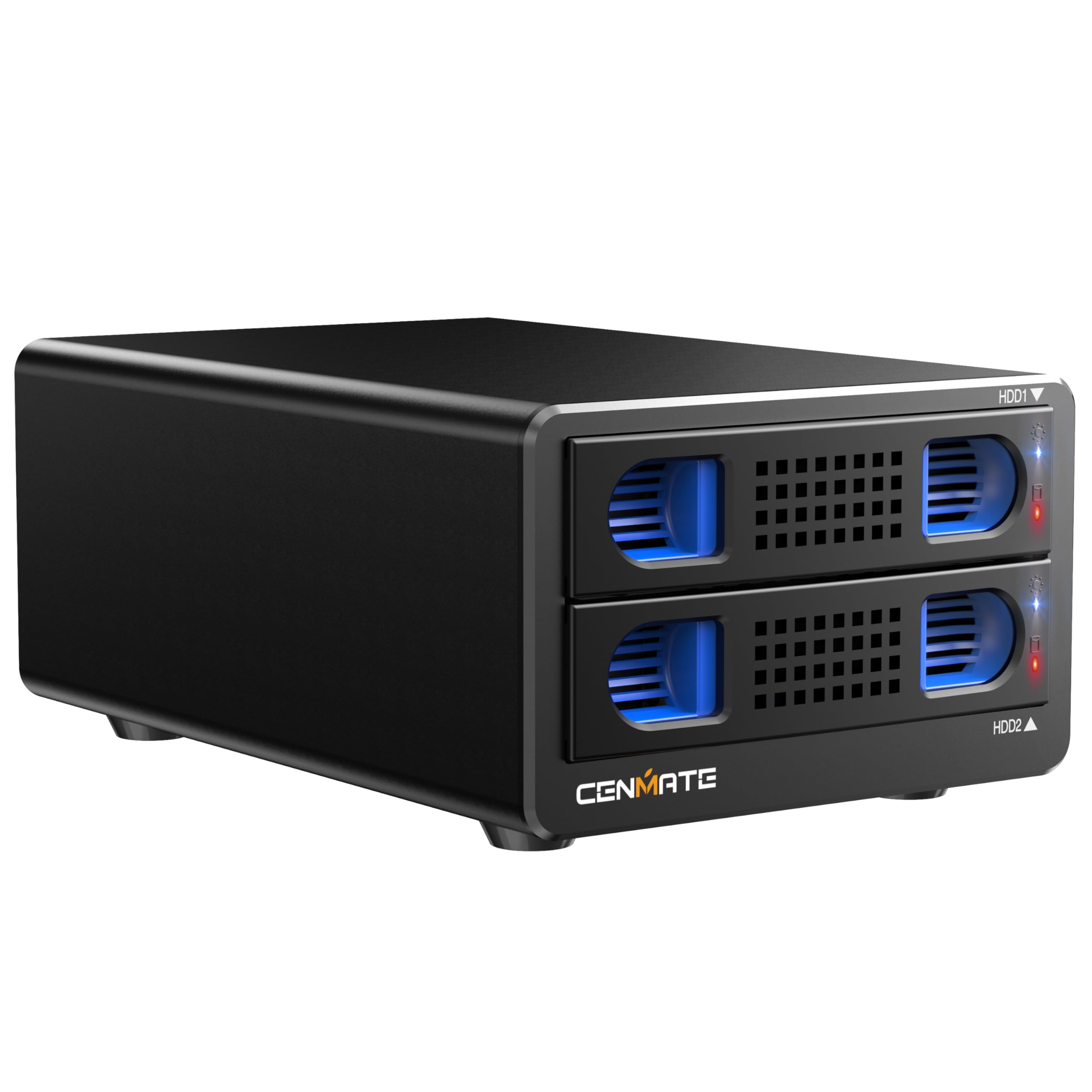
CENMATE 2-Bay 10Gbps

CENMATE 2-Bay 10Gbps

Two-bay 10Gbps

Our Score 8.2/10
Check Price

Worth Noting

  • Fan noise around 40-50 decibels
  • Plastic trays inside an aluminum shell
Bays
2
Interface
USB 3.2 Gen 2, 10Gbps
Daisy Chain
Up to 3 devices
Max Per Drive
20 TB

Two bays and a 10Gbps link is more bandwidth than a pair of hard drives can use, so the point of this enclosure isn't making one drive faster. It's having two drives on one cable, with a daisy-chain port that CENMATE rates for three units and 120TB of total storage through a single USB port on the computer.

The hardware is aluminum, with a two-inch fan, tool-free trays, hot swap and 20TB per drive. It's the same recipe as the four-bay TERRAMASTER in a smaller footprint, and the trays swallow 2.5-inch drives as well, so an old SSD can sit next to a big spinning drive without needing its own case.

We noticed the fan within a minute of switching it on, and CENMATE is upfront about it: the listing puts the fan at around 40-50 decibels and says not to buy it if you need silence. That's the right call. Under a desk or inside a cupboard it fades into the room; on a shelf beside a microphone it won't.

As a smaller, cheaper alternative to a NAS for two drives, it makes sense: no network setup, no RAID to configure, just two volumes over USB and a daisy chain if two bays stop being enough. It's also the newest design in this group, with the least use behind it, which is why it sits here rather than in a runner-up slot — buy it for the link and the expansion port, not because it has years of proof.

Bottom line: A sensible choice if you want two bays and a 10Gbps link without a NAS, provided the fan noise doesn't land where you sit.

How We Tested Hard Drive Enclosures

I started with roughly 40 enclosures, a mix of brands I'd used for years and ones that kept surfacing in forum threads, then cut the list by drive format, bridge chip, what came in the box, and price against what you actually get. Fourteen made it through, and each one lived with us for four months rather than a single afternoon.

Setup was the first real filter. I timed how long it took to open the case, seat a drive, and close it up without instructions, since some snap apart in seconds and others need a Phillips head and a steady hand for four tiny screws. Then I flipped each one upside down and shook it to hear whether the drive shifted, and checked whether rubber pads or a bracket actually held the board down. Every enclosure got plugged into a Windows laptop, a MacBook, a router, and a TV to see which ones demanded reformatting or an external power source.

For speed, I copied the same 40GB video folder and a 20,000-file photo library to each drive and compared the result against that drive's speed when mounted internally. The gap between a good bridge chip and a cheap one showed up within minutes. Heat got its own check: an infrared thermometer on the case after 30 minutes of continuous writing, plus a note on whether transfers slowed once the enclosure got hot.

Finally, the boring part. Each enclosure rode in a backpack for a week, got shoved into a tote bag with keys, and had its cable wiggled at the port to see if the connection held. Two stayed plugged in as nightly backup targets for the full four months, which is where dropouts and flaky ports tend to reveal themselves. The ones we recommend were still doing their job quietly at the end.

How to Choose Hard Drive Enclosures

Start with the drive you already own

Every pick here is a SATA enclosure, which rules out NVMe, M.2, SAS and IDE drives no matter what the photos suggest. Beyond that, size and thickness decide the shortlist: 2.5-inch drives come 7mm or 9.5mm thick and some shells won't take the thicker one, while 3.5-inch desktop drives need a much bigger box. Then check the ceiling: most here handle 20TB, but the BENFEI stops at 6TB and the GODO at 18TB. Read the label on the drive before you order anything.

Power separates pocketable from permanent

A 2.5-inch drive runs happily from a USB port, which is why those enclosures are small, cable-only and easy to carry. A 3.5-inch drive spins up on 12V and needs a wall outlet, so treat those as desk furniture: every 3.5-inch pick here includes the brick, and you want to confirm that before ordering any of them elsewhere. If the enclosure is going in a bag, a bus-powered 2.5-inch case is the only version that makes sense.

What 5Gbps buys, and what 10Gbps doesn't

SATA III itself tops out at 6Gbps, so a single drive in a 5Gbps enclosure is already close to the limit of the interface it plugs into. A 10Gbps enclosure won't make one hard drive faster — a spinning 3.5-inch drive can't fill either pipe. It earns its money when several drives share one link, which is why the multi-bay picks are the 10Gbps ones. On a single bay, UASP support matters more than the headline rate: it keeps small transfers moving instead of queueing them.

How the drive is held, and how it stays cool

Tool-free is a convenience, not a guarantee. On clip-together shells the lid locates the drive; on trays it slides into rails; on the GODO it is screwed to a frame. If the enclosure stays on a desk, any of those is fine. If it travels, screws or a firm tray matter more than the seconds you save. Cooling runs alongside: plastic stays warm, aluminum spreads heat, and fans move air at the cost of noise, which is why CENMATE's own listing puts its fan around 40-50 decibels. Give a fanless 3.5-inch enclosure air rather than a drawer.

When one box beats four

Past two drives, stacking single enclosures gets silly: four bricks, four cables, four things to knock over. A multi-bay DAS puts them on one power supply and one cable, adds hot swap, and usually costs less than the same number of singles. What it doesn't add is protection. These are not NAS units and most have no RAID, so four drives in one box remain four separate drives, each with its own copy problem. Buy one for tidiness and throughput, not for redundancy.

Frequently Asked Questions

Final Verdict

If you don't know what's in the drawer, buy the UGREEN: it takes 2.5- and 3.5-inch drives, includes the power supply, and won't need replacing when the drive changes. If you already know the drive came out of a laptop, the SABRENT EC-UASP is the smaller, cheaper answer.

And if the drawer holds four drives you actually use, skip the stack of singles and go to the TERRAMASTER D4-320 — one brick, one cable, four bays, and 10Gbps to share between them.