Home Appliances & Robots

Best Smart Curtain Openers of 2026

A smart curtain opener is a small motor that pulls your existing curtains open and closed on a schedule, by remote, or with your voice—and it removes the walk across the room to do it yourself. What sounds like a luxury becomes routine fast: curtains that open before your alarm, close for movie night, and respond when you're already settled on the couch. The right one makes light and privacy something you set and forget, without replacing your curtains or rethinking your whole window setup.

The hard part is that these openers look alike online but vary wildly in installation fuss, noise, connectivity, and whether the magnetic attachment holds. We put 10 units through eight months of mornings and movie nights, paying close attention to the unglamorous stuff—battery life, Alexa compatibility, remote range, and value for money—because that's what you notice after the novelty wears off. One tip from testing: the motor gets the attention, but the mount and rod compatibility decide whether the thing stays put. I'd start with the picks below—they earned permanent spots.

1

SwitchBot Curtain 3 Rod

Top Pick
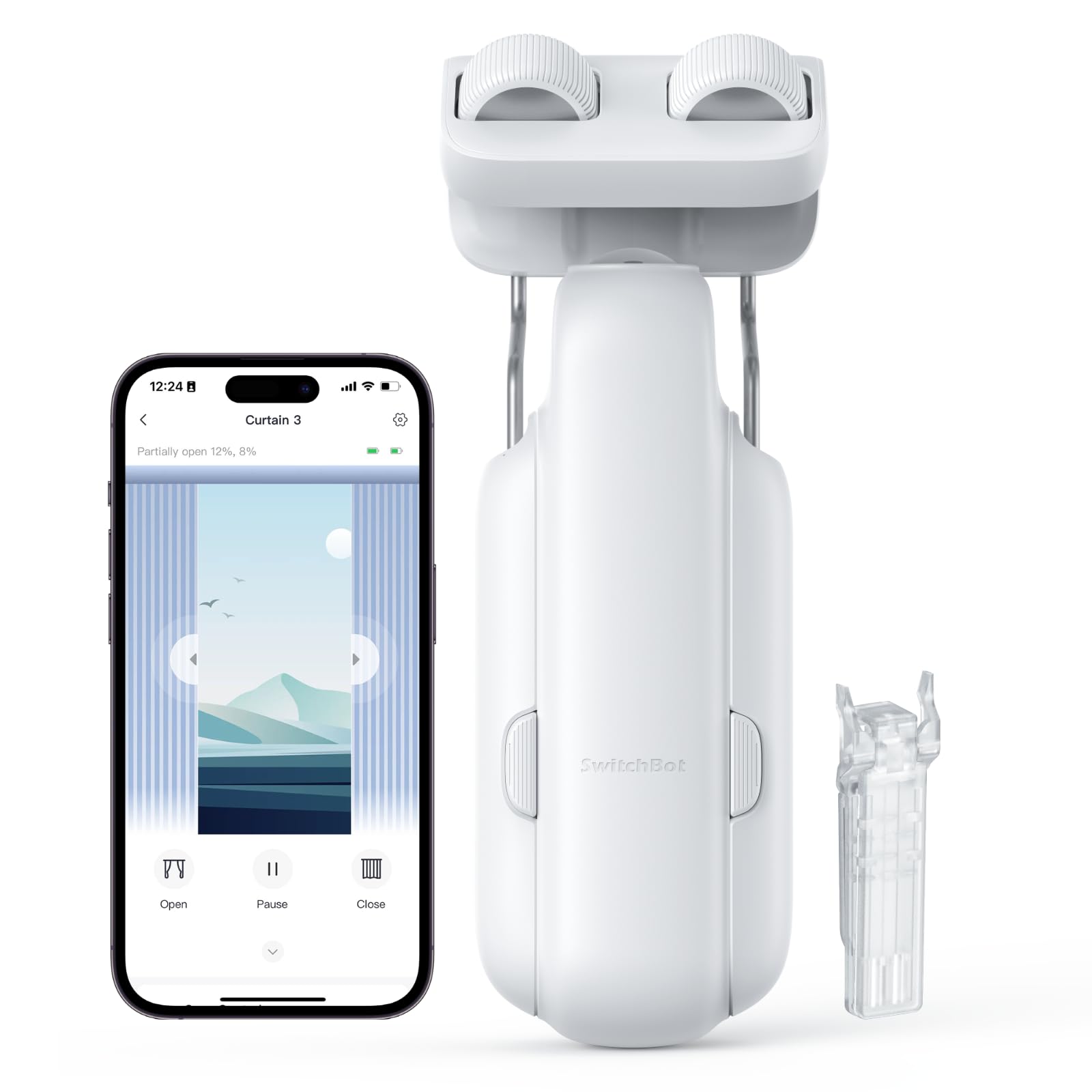
SwitchBot Curtain 3 Rod

Rod curtains

Our Score 8.0/10
Check Price

Worth Noting

  • Can catch on rod joints or thick rings
Control
App, Bluetooth, schedules
Mounting
Existing curtain rod
Silent Mode
Below 25 dB
Voice Control
Hub required

The Curtain 3 Rod is the opener we reach for when someone wants automation without changing the window. It clamps onto an existing rod, needs no drilling or tools, and then asks you to place a positioning magnet and finish setup in the app. That is the whole appeal: your curtains stay put, your rod stays put, and the motor does the daily work.

That makes it our pick as the default for rod-hung curtains. We value the app's open-percentage control and schedules more than any clever extra: setting the curtains to drift open at a set time is the feature you actually live with. Silent mode is rated below 25 dB, and the slower morning movement is the setting we keep on. Add the SwitchBot Hub for Alexa, Google Home, or HomeKit; without it, you are working through the app and Bluetooth.

One unit moves one side of a center-opening pair, so a standard two-panel window needs two. The other thing we watch is the rod itself: joints, thick rings, and a tight bend are where a rolling opener can catch, and the smoother the run, the better this behaves. If your rod is a single clean span, the Curtain 3 Rod is the least fussy way into smart curtains.

Bottom line: We recommend the Curtain 3 Rod as the default smart opener for existing rod curtains: it clamps on without tools and brings quiet scheduled openings to a normal window.

2

SwitchBot Curtain 3 Urail

SwitchBot Curtain 3 Urail

U-rail curtains

Our Score 9.0/10
Check Price

Worth Noting

  • U-rail hardware only
Control
App, Bluetooth, schedules
Mounting
U-rail curtain track
Silent Mode
Below 25 dB
Voice Control
Hub required; Matter with Hub 2

The U-rail version is a different purchase from the rod opener, and that is the point. It is built for curtains already hanging from a U-shaped track, with a mount that grabs the track rather than a rod. If that is your hardware, it is the easiest smart upgrade here: no drilling, no new track, and the same app-based schedules as the rod model.

We prefer this version when the track is straight and smooth. The motor is rated at over twice the thrust of the previous generation, and Silent Mode keeps scheduled movement below 25 dB. The app covers open percentage and timers, and adding a SwitchBot Hub opens Alexa, Google Home, and HomeKit; with Hub 2, Matter support also comes into play.

The limits are specific rather than mysterious: it is for U-rail tracks, not rods, and the small positioning magnet has to be placed carefully or setup becomes a hunt. On a long track with a tight bend or a join, check the full travel before you rely on a morning schedule. For the right track, though, it is the quieter and more consistent performer of the two SwitchBot retrofits.

Bottom line: For U-rail curtains, this is the retrofit we choose: quiet, tool-free, and more consistent than the rod version.

3

Quoya QL600 Track

Quoya QL600 Track

Ceiling track installs

Our Score 8.4/10
Check Price

Worth Noting

  • Instructions and videos can be unclear
Remote
Included
Control
App, remote, Alexa, Google
Mounting
Ceiling, hidden brackets
Max Curtain Weight
44.1 lb

The QL600 is what a curtain opener looks like when you stop pretending the rod is sacred. It is a complete ceiling track with clip-on brackets and concealed joiners, so the hardware disappears into the ceiling line and the curtains do the visual work. The motor takes up to 20 kg, and the Tuya/Smart Life app adds schedules, remote control, and Alexa or Google voice.

We recommend it for the room where the track itself should look finished. The hidden brackets are the detail that earns the premium: there is no exposed rod, and the white aluminum track reads as part of the ceiling. It is the most polished system in this group, and the strongest evidence for that is the build rather than a long feature list.

The trade-off is the install. This is a ceiling-mounted track, not a clamp-on gadget, so plan an afternoon and a helper, and check the track sections against your window before you drill. Once it is up, the payoff is a built-in look that a retrofit opener cannot match.

Bottom line: We recommend the QL600 when you want a finished, built-in track and are ready to mount it on the ceiling; it is the most polished system here.

4

Osprey Smart Curtain Track

Osprey Smart Curtain Track

Wide windows

Our Score 8.4/10
Check Price

Worth Noting

  • Remote open button can be hard to press
Noise
~33 dB
Mounting
Wall or ceiling
Track Length
71-130 in
Max Curtain Weight
110 lb / 50 kg

The Osprey track solves the window that makes retrofit openers look silly. It extends from 71 to 130 inches in one piece, with no belt cutting or splicing, and it mounts on the wall or ceiling. For a wide span, that is the difference between a motor that has to be coaxed across a jointed rod and a track that was sized for the job. We recommend it first for wide windows, especially when the curtain stack is heavy.

The no-hub setup is the other reason we like it. Alexa, Google Assistant, and Siri work through the Osprey app without an extra bridge, and the motor is rated around 33 dB with a 110 lb curtain capacity. The app, remote, and Touch & Go pull give you plenty of ways in, which matters when one person is carrying a laundry basket and the other is not.

The track is a long single piece, so measure the full span before ordering and check that the mounting points land where you can drill. One practical detail worth noticing is the extra-long power cord; it gives you more freedom about where the outlet goes.

Bottom line: We recommend the Osprey track for wide windows and heavy curtains, especially if you want voice control without adding a hub.

5

Aqara Curtain Motor E1

Aqara Curtain Motor E1

Aqara/HomeKit homes

Our Score 8.0/10
Check Price

Worth Noting

  • Needs Aqara Zigbee 3.0 hub
  • Track version only
Hub
Aqara Zigbee 3.0 required
Battery
6400 mAh, up to 1 year
Mounting
Track version
Max Curtain Weight
26.4 lb

A year between charges is the number that makes the Aqara E1 worth a look. The 6400 mAh battery is rated for up to a year, which is a real convenience at a window without an outlet, and the motor handles up to 26.4 lb of curtain. This is the track version, so the hardware match matters before anything else.

Inside an Aqara home, it is a tidy piece. The Aqara Home app can trigger the curtains from time, weather, lighting, or another Aqara device, and Siri, Alexa, Google Assistant, and IFTTT are available through the hub. You can run one or two motors on a window, which gives a center-opening pair a clean path.

We recommend it for the household already using Aqara, where the automations are the reason to choose it over a standalone track. The battery is the standout: a year between charges is a real convenience at a window without an outlet. For everyone else, the simpler SwitchBot or Osprey route involves less ecosystem overhead.

Bottom line: For homes already using Aqara and HomeKit, the E1 is a tidy track motor with a year-rated battery and useful automations.

How We Chose and Tested Smart Curtain Openers

We started by pulling together openers that could work with common curtain rods and tracks, then filtered the list by weight limits, mount style, app and voice support, and what came in the box. From that shortlist, we set up 10 units in our own bedrooms, a living room, and a home office, and lived with them for eight months. The test wasn't a single afternoon of pairing—it was morning openings before work, movie-night closings, and the less exciting check of whether the curtains were still where we left them after a week.

Installation was timed from unboxing to the first successful open, solo, and we noted every time we needed a drill, ladder, or second pair of hands. Once mounted, we tugged gently on the magnetic attachment and ran the opener along the full rod to see if it drifted, caught, or left the curtain half-open. In daily use, we fired the remote from the couch and through a doorway, gave Alexa commands with our hands full, and kept a log of dropped connections, missed schedules, and low-battery warnings. Noise got checked at two feet away and from the next room, because a motor that sounds fine in a kitchen can be a nuisance at 6 a.m.

We also tracked how often each unit needed charging, whether the app made simple routines feel simple, and how sturdy the brackets and motor housing felt after repeated use. Value for money came down to what each opener included—remote, mounting hardware, hub—and whether setup felt like a fair trade for the convenience. The ones that scored best were not the loudest or the flashiest; they were the openers that opened on command, stayed quiet, and didn't ask us to re-pair them every time the Wi-Fi hiccuped.

How to Choose Smart Curtain Openers

Match the Opener to Your Hardware

The first decision is not brand or app; it is what your curtains already hang from. A rod retrofit clamps onto an existing rod, a U-rail version grips a U-shaped track, and a full track replaces the rod entirely. The SwitchBot models are retrofits; the Quoya and Osprey are complete tracks.

The trap is assuming smart curtain opener means universal. A rod unit will not follow a bay window, and a U-rail unit will not clamp to a rod. Check the opener's stated compatibility with your rod or track, and look at whether the run is clear enough for the motor to travel.

Count the Motors Your Window Needs

Retrofit openers move one curtain panel each. A center-opening pair therefore needs two motors, one on each side, unless you choose a track system that drives both panels from one motor. That is the hidden cost of a single-unit retrofit: the second unit is not optional if you want the pair to meet in the middle.

Track systems such as the Quoya and Osprey are sized to the whole window and move the pair as one assembly. If you are buying a retrofit for a standard double curtain, price two units before deciding it is the cheaper route.

Decide How Much Voice Control You Need

Voice control is where the spec sheet gets slippery. The SwitchBot openers need a SwitchBot Hub for Alexa, Google Home, and HomeKit; the Osprey track connects to Alexa, Google Assistant, and Siri through its own app without a separate hub; the Aqara E1 needs an Aqara Zigbee hub. The product title may mention Alexa, but that does not mean the hub is included.

If voice is the whole point, add the hub to the budget and check which ecosystem you actually use. If you mainly want schedules and a remote, a hub-free setup is simpler and often cheaper.

Check Weight, Noise, and the Hardware Run

Curtain weight adds up with linings and blackout fabric. The Aqara E1 is rated to 26.4 lb, the Quoya track to 20 kg, and the Osprey track to 110 lb; match the motor to the curtain, not to the window's width alone. Noise is a separate trade-off: silent modes are rated below 25 dB on the SwitchBot units, while the Osprey motor runs around 33 dB. A smooth rod or track matters as much as the motor, because joints and rings are where a quiet opener starts to click.

Plan the Install and the Power Source

Retrofit units are the rental-friendly choice: no drilling, no new track, and setup is mostly app pairing and magnet placement. Full tracks are a building project. The Quoya is ceiling-mounted with hidden brackets; the Osprey can go on the wall or ceiling. Both need a power source, and the Osprey's extra-long cord gives you more placement freedom. Measure the full span, check where the brackets will land, and plan a helper for a long ceiling track.

Frequently Asked Questions

Final Verdict

Our default is the SwitchBot Curtain 3 Rod. It is the least disruptive way to automate a normal curtain rod: no drilling, no new track, and a mature app that handles schedules and open percentages. For a two-panel window, budget for two units; for voice control, add the hub.

If you are replacing the hardware anyway, the Quoya QL600 is the more polished ceiling track, and the Osprey track is the better fit for a very wide window without a hub. U-rail owners should go straight to the SwitchBot U-rail version.