Tools & DIY

Best Digital Caliper of 2026

A digital caliper turns the gap between two jaws into a number, and everything that separates a good one from a bad one comes down to whether that number is true. A caliper reading a couple thousandths off will send you back to the saw — or back to the 3D printer — with a part that never had a chance. I've kept one within arm's reach for years, checking bolts at the hardware store, sizing joinery, and measuring printed brackets at my desk.

Accuracy gets all the attention, but a caliper also has to survive a drop onto concrete, hold its zero, and still have battery left after a month in a drawer. My team and I spent six months with 14 of them, from budget models with plastic jaws to stainless ones that cost more than a decent wrench set, and the pattern held: money buys smoothness and a screen you can read at an angle, not always a truer measurement. The ones actually worth your money are below.

1

VINCA DCLA-0605

Top Pick
VINCA DCLA-0605

General workshop use

Our Score 9.2/10
Check Price

Worth Noting

Range
0-6 in / 150 mm
Readout
Inch / metric / fraction
Accuracy
±0.001"/0.03mm
Protection
IP54

A stainless body, IP54 protection, and a fraction readout are the things we want in a general-purpose caliper, and the VINCA DCLA-0605 delivers all three. We tested it alongside the other picks, and what stood out was how little it asked us to think about setup. The display is large, the jaws slide cleanly, and the unit button cycles through inch, millimeter, and fraction without a manual.

The glass scale is a nice detail at this level, and the IP54 rating is the practical one: coolant, dust, and the occasional splash are not an immediate emergency. We also like the included case and spare batteries, which keep it ready between projects. The RS232 port is the one feature most people can ignore; it needs a separately sold cable, so do not buy this expecting plug-and-play logging.

The one maintenance note is the coin cell: it can drain between projects, so keep the spare in the case and it is a non-event. That is a small habit rather than a reason to avoid the tool, and it does not change the fact that the VINCA is the easiest caliper here to live with day to day.

If you need to log measurements into software, the iGAGING is the better tool; for everyone else, the VINCA covers layout, hobby, repair, and light shop work without stretching the budget.

Bottom line: We recommend the VINCA first for general measuring: its stainless body, IP54 protection, and fraction readout cover workshop and household jobs without the premium price.

2

HARDELL Rechargeable 6-Inch

HARDELL Rechargeable 6-Inch

Dim workspaces

Our Score 9.4/10
Check Price

Worth Noting

  • No battery-level indicator
Power
USB-C rechargeable
Range
0-6 in
Display
Backlit LCD
Accuracy
±0.001"/0.02mm

USB-C charging is the reason this HARDELL stays on the bench when the garage lights are low. No coin-cell tray to open, no spare battery to hunt for, and one cable you probably already have. The backlight is not a gimmick either; it makes the numbers legible when you are under a bench or behind a machine.

The all-metal body gives it a more substantial feel than the budget plastic models, and the 0.001-inch accuracy and 0.0005-inch resolution are in the same conversation as the stainless picks here. We also appreciate the fraction mode, which is handy for woodworking and imperial fasteners, and the four measurement modes cover inside, outside, depth, and step.

It is not the most established design in this group, and the track record is shorter, so we treat it as the convenience pick rather than the default. If you already own a drawer full of LR44 cells, the VINCA is the safer default; if you want to stop buying them, this is the one.

Bottom line: We reach for the rechargeable HARDELL in dim shops and late-night projects, where USB-C charging and a backlit screen remove the usual battery-and-visibility annoyances.

3

Kynup Digital Caliper

Kynup Digital Caliper

Household quick checks

Our Score 9.2/10
Check Price

Worth Noting

  • Plastic body rather than stainless steel
  • Coarser ±0.2 mm accuracy
Range
0-6 in / 150 mm
Display
Large LCD
Accuracy
±0.2mm/0.01"
Material
Plastic

Big digits and one-hand controls are what make the Kynup a drawer caliper rather than a shelf ornament. The display is easy to read without leaning in, and the thumb roller and buttons let you switch between inch and millimeter without putting the tool down. For furniture, craft projects, and household repairs, that simplicity is the point.

We keep it as the budget pick because it covers the basics for very little money: 0-6-inch range, four measuring modes, a zero reset, and a case with spare batteries. The display is the friendliest part, with numbers that stay readable in normal indoor light. It is the caliper we hand to someone who needs a number now and does not want to spend much.

The VINCA is the step up when the measurement matters and you want stainless rigidity; the Kynup is the one for quick checks where a big screen and one-hand operation matter more than a lab-grade finish. It has a clear place in a drawer, and it earns it on convenience.

Bottom line: We keep the Kynup as the budget choice for quick household checks, where its large display and one-hand controls make measuring easier.

4

iGAGING Absolute Origin

iGAGING Absolute Origin

CAD data logging

Our Score 9.0/10
Check Price

Worth Noting

  • No auto shut-off
Range
0-6 in / 150 mm
Output
SPC/USB port
Accuracy
0.001"
Protection
IP54

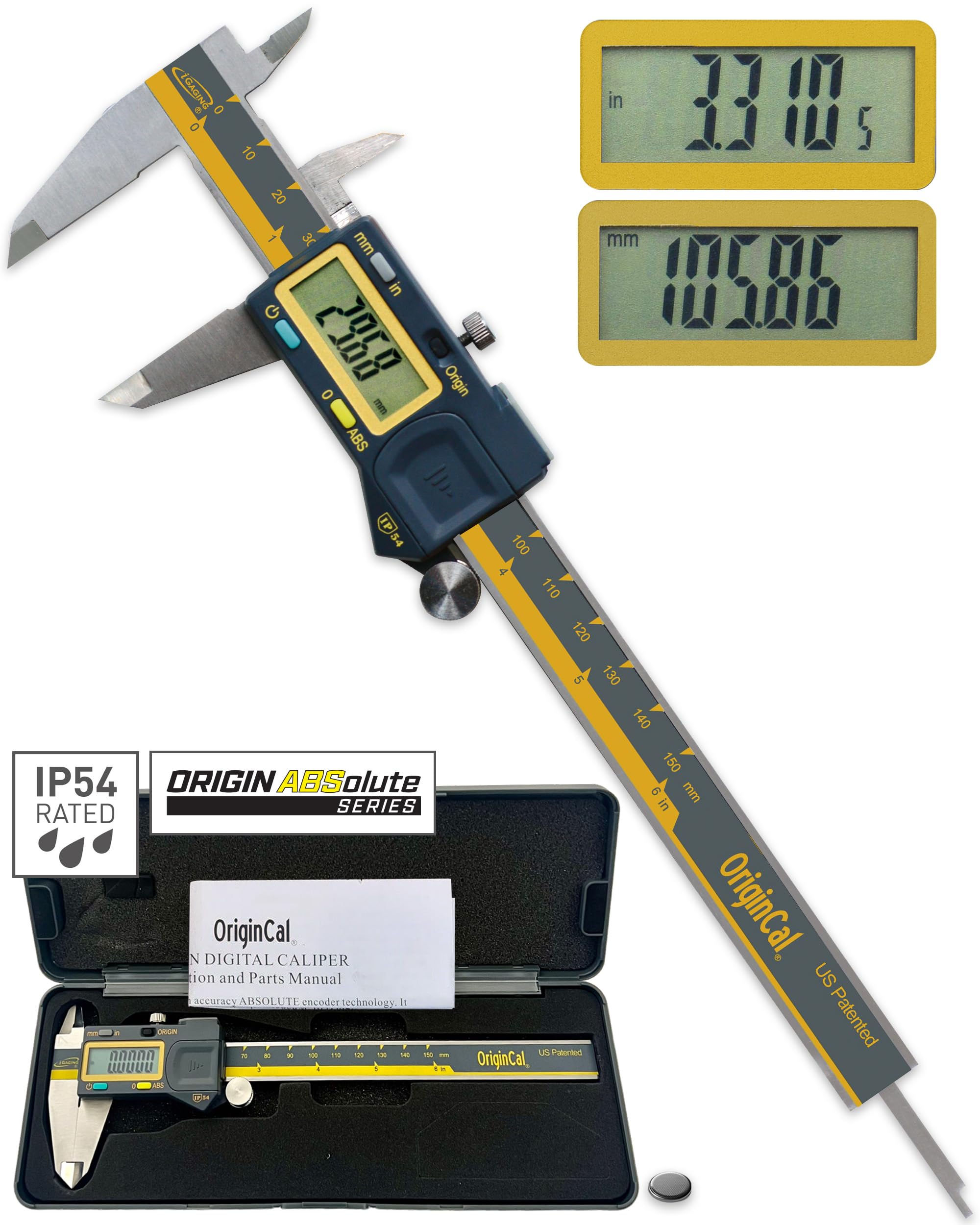
An SPC/USB port and absolute-origin electronics are the two features that separate the iGAGING from the rest of this group. If you measure parts for CAD, keep inspection notes, or just hate re-zeroing after every pause, those two features change the routine more than another fraction of a thousandth.

The stainless body and IP54 protection make it feel like a shop tool rather than a desk accessory, and the large contrast display is easy to read in normal light. We also like the included case and spare battery. The absolute-origin design is the detail that stuck with us: you can pick it up after a break and start measuring without resetting the zero.

For anyone logging measurements, the data port and absolute origin make it the pick; the VINCA remains the simpler default for general use because it asks less of your routine. If your work ends with a number in a spreadsheet, the iGAGING is the one that earns its place.

Bottom line: We recommend the iGAGING when measurements need to leave the shop: its absolute-origin electronics and SPC/USB port make logging and CAD work much easier.

5

Fowler Xtra-Value Cal

Fowler Xtra-Value Cal

Warranty-minded buyers

Our Score 9.2/10
Check Price

Worth Noting

  • No physical off switch
  • Slide can feel stiff at first
Range
0-6 in / 150 mm
Accuracy
±.001"/.03mm
Material
Stainless steel
Warranty
1 year

A one-year warranty and a familiar name are the reasons the Fowler Xtra-Value Cal earns a premium place here. There is no backlight, just a stainless caliper, a sturdy case, and coverage from a brand many shops already know. If you want a caliper you can send back rather than replace after a bad month, it changes the value calculation.

The basics are right. It measures 0-6 inches with 0.0005-inch resolution and 0.001-inch accuracy, switches between inch and millimeter, and covers inside, outside, depth, and step with two jaw sets and a rod. The case is robust enough to bounce around in a service van, and the included CR2032 batteries are a practical touch.

Against the iGAGING it gives up data output and IP54 protection; against the VINCA it asks for more money for warranty and brand support rather than more features. That is the trade you make with the Fowler, and it is a deliberate one rather than a missing feature.

For a buyer who wants a known name and a year of coverage, the Fowler is the calm choice; if you want features per dollar, stay with the VINCA or iGAGING. It is the premium pick for reassurance, not for specs on a page.

Bottom line: We point warranty-minded buyers to the Fowler, whose stainless construction and one-year coverage make it a reassuring premium alternative for occasional serious work.

6

Jiavarry Stainless Steel

Jiavarry Stainless Steel

Fraction-heavy work

Our Score 9.0/10
Check Price

Worth Noting

  • Display can malfunction
  • Durability is inconsistent
Range
0-6 in / 150 mm
Readout
Inch / metric / fraction
Accuracy
±0.001"/0.02mm
Material
Stainless steel

Heft is the first thing you notice about the Jiavarry, and the fraction readout is the second. The stainless body gives the tool a planted, shop-ready feel that the plastic budget models do not have, and the fraction mode is genuinely useful when you are working with inch stock and do not want to convert decimals in your head.

The 0-6-inch range, 0.001-inch accuracy, four measurement modes, and zero reset cover the same ground as the top picks, and the case and spare batteries make it a complete kit. We like it for woodworking, layout, and general shop measurements where a fraction display saves a step. The stainless body also stands up to the kind of handling that makes a plastic caliper feel loose.

The VINCA and HARDELL are the easier recommendations in this size, but if fraction readouts and a heavy stainless feel are what you want, the Jiavarry earns a look. It is an also-consider because it has to be chosen for those priorities, not because it lacks the basics.

Bottom line: We like the Jiavarry for fraction-heavy work and a heavier stainless feel, and it makes a solid also-consider for woodworking and shop layout.

7

LOUISWARE Digital Caliper

LOUISWARE Digital Caliper

Large-screen reading

Our Score 9.2/10
Check Price

Worth Noting

  • Accuracy can drift below 1/8 inch
  • Battery and durability are inconsistent
Range
0-6 in / 150 mm
Display
Large LCD
Accuracy
±0.02mm (0.001")
Auto-off
4 minutes

An oversized LCD and a four-minute auto-off define the LOUISWARE's place in this group. The screen is easy to read across a bench, and the auto-off is long enough that it does not cut out mid-measurement but still saves the coin cell when you set it down. For a household caliper that lives in a drawer, that is a sensible combination.

We see it as a large-screen household tool rather than a precision instrument. The stainless body and inch/millimeter conversion cover general measuring, and the included spare batteries are welcome. The display is the reason to pick it over the budget plastic models: big digits, simple buttons, and a case that keeps it tidy.

The screen is not backlit, so it is a daylight tool; that is a small price for the large digits. For furniture assembly, craft projects, and checking hardware, it is a friendly caliper that does not ask for much. It stays an also-consider because it is a household tool first, not because it lacks a clear job.

Bottom line: We see the LOUISWARE as a large-screen household caliper; its auto-off and clear LCD are welcome, and it suits general measuring around the house.

How We Tested the Best Digital Calipers

We started with a list of roughly 40 calipers sold by the major tool brands and machinist suppliers, then cut it down by resolution, measuring range, jaw material, and price until 14 were left — enough to cover the budget tier, the mid-range stainless workhorses, and the ones priced like a precision instrument. Every one went to someone who actually uses a caliper: a home woodworker's bench, a 3D printing desk, a garage where brake rotors get measured, and a hobby machinist's lathe.

Accuracy was checked against known references — gauge blocks where we had them, drill bit shanks and micrometer-verified pins where we didn't — at zero, mid-scale, and near full extension. We closed the jaws and held them to a light to see if a sliver showed through, then re-zeroed and measured the same pin five times to watch how far the readings wandered. Smoothness got judged by thumb: whether the roller moved under one finger or needed a shove, whether the slider rocked when we tried to twist it, and whether zeroing took one hand or two.

Then we treated them badly. Each caliper was dropped from bench height onto concrete, ridden around in a tool bag for a week, and checked again for nicked jaws and a zero that had shifted. Battery life was tested the slow way: a month in a drawer with the cell still in, then a check of whether it woke up and how quickly the auto shut-off actually kicked in. We read every display under shop lighting and at an angle, since a screen you have to squint at is a screen you stop reaching for. Value came last — what the extra money bought, and whether it showed up in the numbers or only in the finish.

How to Choose the Right Digital Caliper

Match accuracy to the work

A 0.001-inch / 0.02 mm accuracy spec is the useful target for fitting parts, checking 3D prints, and any measurement where a few thousandths matter. Household checking can live with a coarser 0.01-inch / 0.2 mm model, but only if it repeats the same number when you close the jaws and reopen them. Before trusting any caliper, close it fully, zero it, and measure a known feeler gauge or drill shank. If the reading wanders, send it back.

Choose the body for where it lives

Stainless steel gives you rigidity and a slide that stays consistent; plastic is lighter and cheaper but can flex if you clamp down or drop it. If the caliper lives in a garage or travels in a tool bag, pay for stainless and, where possible, an IP54 rating. For a kitchen drawer and light household checks, a plastic body is a reasonable compromise. Check the thumb roller and locking screw with one hand; a sticky slide makes every measurement slower.

Read the display and controls

A large LCD helps, but the useful differences are unit switching and fraction readout. Fraction mode saves conversion when you work with inch stock; a backlight matters if you measure under a bench or in a dim garage. Try the zero and mode buttons with the hand you will actually use. Auto-off is worth having, but a four-minute timeout is more forgiving than a short one. None of these features rescue a caliper that will not repeat zero.

Plan for power and data

Coin-cell calipers are cheap to keep running, but they can arrive with a dead cell and drain if you forget to switch them off. A USB-C rechargeable model removes the battery hunt; a spare coin cell in the case solves the occasional-use problem. If you log measurements into CAD or a spreadsheet, an SPC/USB output port is the feature that changes your workflow. Check whether the cable is included and whether the caliper has auto-off, because data features do not fix a power routine.

Frequently Asked Questions

Final Verdict

Start with the VINCA DCLA-0605. It has the best balance here of stainless rigidity, IP54 protection, fraction readout, and a display that is easy to live with, and it is the caliper we recommend for most general measuring. The rechargeable HARDELL is the alternative when USB-C charging and a backlight matter more than the VINCA's broader track record. If you log measurements into software, the iGAGING is the one; if you need a drawer tool for quick household checks, the Kynup is enough.