Tools & DIY

Best Soldering Irons of 2026

A soldering iron has one job: get the joint hot enough, fast enough, that the solder flows and you get out before anything cooks. Do it wrong and you get the familiar fail — a dull, blobby joint that looks connected until the thing you fixed quits three weeks later. I've been on both sides of that, and the difference is rarely the person holding the iron.

Most irons fail in the same two places: the temperature wanders, and the tip gives up its heat the moment it touches anything bigger than a wire. Over six months, my team and I put 12 irons — plug-in pencils, adjustable stations, and a couple of butane and USB-C portables — through real repairs, from a guitar cable to a laptop charging port to a stained-glass panel that ate a weekend. Wattage tells you less than you'd think; what matters is holding heat under load and how little fuss sits between you and the work. The picks below earned a permanent spot on my bench.

1

Weller WE1010NA

Top Pick
Weller WE1010NA

Repeatable electronics work

Our Score 9.2/10
Check Price

Worth Noting

  • Heating element is the durability watch point
  • Needs about a foot of bench depth
Power
70W
Weight
5.5 lb
Display
LCD
Temperature Stability
±4°F

The WE1010NA is the station in this group that feels like bench equipment rather than a kit: 70 watts, an LCD, a temperature lock, standby and auto setback, and an ESD-safe station and iron. The ±4°F (2°C) stability claim is the number that matters for electronics; it means the set temperature is meant to stay put while you work, not just spike on startup.

We prefer that predictability to the extra tips and accessories of the cheaper kits. The temperature lock keeps a bumped dial from changing a setting mid-board, and the standby behavior is the sort of detail you appreciate after leaving the iron on a bench. It is also the heaviest pick here at 5.5 pounds, which is exactly what you want from a station that should not skate across the bench.

The caveat is longevity. The heating element is the part to watch, and early failure is the one durability note that keeps this from being a blind recommendation; buy it as a tool with a one-year warranty, not an heirloom. If your soldering is a weekly electronics habit, that trade is easy. If it is two repairs a year, the HANDSKIT kit covers the same basic jobs with far less bench commitment.

What we keep coming back to is the control loop: it gives you a repeatable starting point for different joints, and that is worth more than a drawer of novelty tips. The station wants about a foot of bench depth, so clear that before it arrives and it settles in as the least fussy tool here.

Bottom line: For frequent electronics work, we trust the Weller WE1010NA's 70W station, ±4°F stability, and temperature lock more than any pen iron here.
2

HANDSKIT 90W Kit

HANDSKIT 90W Kit

Starter electronics kit

Our Score 9.2/10
Check Price

Worth Noting

  • Heat recovery can lag on long joint runs
Power
90W
Heat-up Time
About 10 seconds
Tips Included
6
Temperature Range
180–480°C

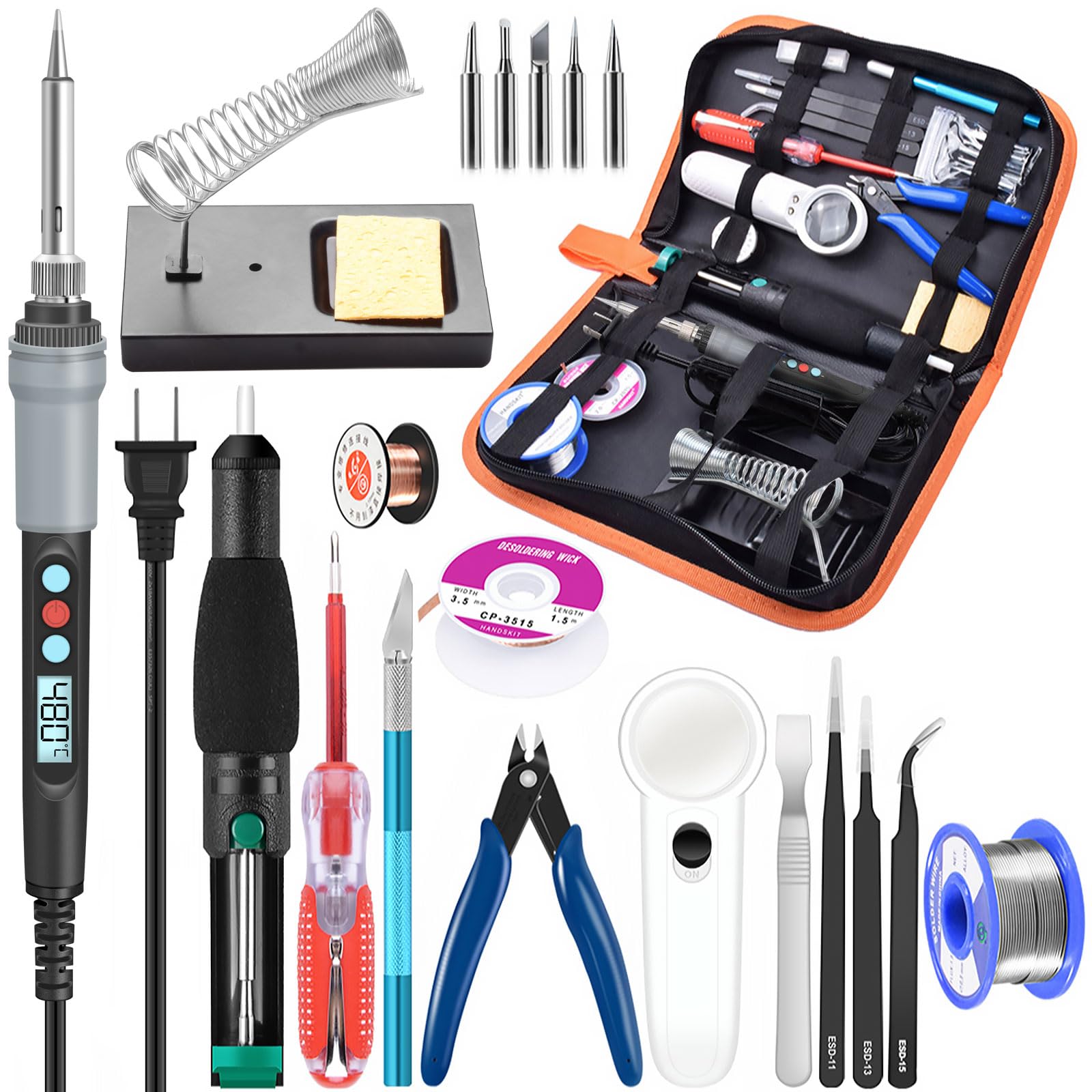
Open the HANDSKIT case and you get a small bench in a box: the 90W digital iron, six 900M tips, tweezers, a desoldering pump, a stand, solder wire, and a place for each. That completeness is the reason we hand it to a first electronics bench; you can start a repair without assembling a second shopping list.

We appreciated the calibration offset and temperature memory more than the headline wattage. A 90W core that reaches working temperature in about 10 seconds is convenient, but the ability to trim the displayed temperature and return to the last setting is what makes a budget iron feel predictable. The auto-sleep feature is a sensible safety net for anyone who sets the iron down mid-job.

The kit is not a substitute for a station. The stand is a simple wire rest, and the included solder and flux are starter quantities, not a lifetime supply. If you are learning on through-hole boards and occasional wires, that is enough. If you are chasing a stubborn ground plane or soldering all afternoon, the Weller's stability is the better long-term buy.

What we like most is the case: it keeps the tips, pump, and tweezers together, which matters more in a small workspace than another novelty tip shape.

Bottom line: We hand the HANDSKIT 90W kit to beginners and occasional tinkerers because it puts the iron, six tips, and the small tools in one organized case.

3

YIHUA 939D+

YIHUA 939D+

Midrange bench station

Our Score 9.0/10
Check Price

Worth Noting

Power
120W
Display
LCD
Temperature Range
392–896°F
Temperature Stability
±5°C

The 939D+ is the station that makes the case for spending more than a kit but less than the Weller. YIHUA gives you a 120W station, a detachable 907F iron, a metal stand, a brass tip cleaner, an LCD, and ESD-safe construction for a midrange bench.

We noticed the calibration support before the wattage. The display can be trimmed, which matters because a station's readout is only useful if the tip agrees with it; on arrival, run it up to a working temperature and check the tip against a known solder melt. The temperature lock and automatic handle detection are the sort of features that keep a shared bench from drifting.

The heat is the caveat. This is not the station to buy if you expect the display to be a lab-grade measurement; some units run cooler than the number suggests, and heavy joints can expose that. Calibration helps, and the 896°F ceiling gives you headroom, but verify the tip temperature before trusting it on a dense board. For routine through-hole work, wiring, and hobby repairs, it is a lot of station for the outlay.

We preferred its metal stand and brass cleaner to the wire rests in the cheap kits; those are the small bench details that make daily use less annoying. If you need the last word in stability, the Weller is the safer buy; if you want a station with room to grow, the YIHUA is the value call.

Bottom line: Our pick for a first station is the YIHUA 939D+: it brings a 120W station, ESD-safe build, and calibration to a midrange bench.

4

Pinecil

Pinecil

Portable field repairs

Our Score 9.2/10
Check Price

Worth Noting

  • Some units stop working early
Power
65W
Weight
2.12 oz
Power Input
USB-C PD/QC 3.0 or DC5525
Power Supply
Not included

The Pinecil is the one here that disappears into a tool bag: 60 grams, a stainless handle, a 6.1-inch body, and a choice of USB-C PD/QC 3.0 or a DC5525 barrel jack. The catch is in the box: there is no power supply, so the first decision is how you will feed it.

We wish the missing supply were more obvious on the shelf, because the iron itself is the most portable serious option here. With a suitable 65W supply it heats fast and holds temperature, and the auto-standby display is a neat confirmation that it has dropped into a safer state. The 65W rating is not a guarantee from every USB-C charger; use a supply that actually supports the needed PD profile.

For field repairs, soldering at a makerspace, or a bench that has to pack away, the Pinecil is worth the extra planning. It is not the default for a permanent bench: the tiny controls and the need to manage a power source make it fussier than a station. It is at its best for connector repairs and small wire jobs, where the compact size matters more than a cradle.

The tip selection is good, and swapping tips is quick, but the power supply is the real accessory. Budget for a proper supply, not the oldest phone charger in a drawer.

Bottom line: We recommend the Pinecil to anyone who solders away from a bench; its 65W core and dual power inputs make it the most portable serious iron here.

5

Hakko FX601-02

Hakko FX601-02

Stained glass work

Our Score 9.2/10
Check Price

Worth Noting

  • Stiff cord takes some getting used to
Power
67W
Included Tip
T19-D5
Heating Element
Ceramic
Temperature Control
Adjustable closed-loop

The FX601-02 is the pencil iron we reach for when the work is stained glass, jewelry, or any detail job where a station's cradle and cord feel like extra furniture. It is a 67W iron with closed-loop temperature control, a dial in the handle, and a slender handpiece that keeps the heat close to your fingers without making the tool feel bulky.

We kept coming back to its balance. The controller lives in the handle, so there is no box on the bench, and the closed-loop sensor is designed to hold the set temperature rather than just cycle a thermostat. For stained glass, the strong record here is not a surprise; the iron has the reserve to move from foil to lead work without a long recovery wait.

The premium buys control and comfort, not a complete kit. You get the iron and a standard T19-D5 tip, and you will supply your own stand, solder, and extra tips. The heating element is the part to watch; this is not the iron to buy if you want a sealed, disposable tool for the occasional repair.

If your work is mostly circuit boards, the Weller's station format is easier to live with; if you stand at a glass project for an afternoon, the Hakko's handpiece is the one we want in hand.

Bottom line: We like the Hakko FX601-02 best for stained glass and detail work, where its closed-loop dial and slender handle earn the premium.

6

Q-MING 80W LCD

Q-MING 80W LCD

Budget digital setup

Our Score 9.0/10
Check Price

Worth Noting

Power
80W
Display
LCD
Heat-up Time
20 seconds
Max Temperature
896°F

The Q-MING 80W LCD is the budget digital iron that looks like it should cost more: 80 watts, a clear LCD, a ceramic heater, five tips, a stand, sponge, solder wire, and flux paste. It heats in about 20 seconds and lets you set a temperature instead of guessing at a knob.

We found the display the useful part. Being able to see the set temperature makes repeat work less of a guess, and the 896°F ceiling gives you room for heavier joints than the 60W kits. The five tips are a real starter set, not a single conical afterthought, and the kit covers the small repairs that send most people looking for an iron.

The heat is where the budget shows. The display is a set-point, not a promise that the tip is at that temperature, and a long run of joints can pull the tip down. The stand is a simple wire rest, and the included solder and flux are enough to start rather than to rely on. For small boards, wires, and occasional repairs, that is a fair trade; for daily production work, step up to a station.

We see it as the iron to keep in a drawer for quick fixes, not the one to build a bench around. The five tips cover more shapes than most beginners need, and that is the value.

Bottom line: We see the Q-MING 80W LCD as the budget digital iron to beat here: it pairs an 80W core and clear display with a five-tip kit.

7

LDK 60W Kit

LDK 60W Kit

Simple occasional fixes

Our Score 8.8/10
Check Price

Worth Noting

  • Basic stand and starter solder
Power
60W
Heat-up Time
Within 1 minute
Tips Included
5
Temperature Range
Up to 450°C

The LDK is the no-frills option: a 60W pencil iron, a knob on the handle, five replacement tips, a simple stand, and a roll of solder. There is no display, no station, and no attempt to be a smart tool. You plug it in, wait for the ceramic element to come up to temperature, and solder.

We liked the honesty of that. The knob gives you a temperature range up to 450°C, and the five tips cover the usual shapes for wires, guitar jacks, and small boards. For a drawer in a rental, a first repair, or a backup when the main iron is tied up, the simplicity is the point.

The trade is heat. This is a 60W iron with a basic control, so a dense board or a run of larger joints can pull it down, and the tip is not the place to discover that. The iron is not built for daily production. None of that matters for occasional fixes; all of it matters if you are soldering every week.

We keep it on the list because there is still a place for a cheap, simple iron you can lend out or leave in a toolbox. Just do not expect it to replace a station when the job gets serious.

Bottom line: We keep the LDK 60W kit on the list as the simplest cheap backup: a knob, five tips, and no station to set up.

How We Tested Soldering Irons (and What Quit)

We started with more than 30 irons: the ones hobby electronics forums keep recommending, the ones repair shops actually keep on their benches, and the adjustable plug-in models that dominate search results. We cut anything with a fixed, unlisted tip temperature, no path to replacement tips, or a cord so short it dictated where you sat. That left 12 irons, which we used for six months.

Every iron got the same first test — a stopwatch from cold to its set temperature, then a thermocouple pressed to the tip to see whether the number on the dial was real. Plenty weren't; one ran more than 100 degrees hotter than it claimed. Then we soldered to a fat copper ground plane, the kind that pulls heat straight out of a tip, and watched whether the iron recovered or stalled and went dull.

The rest happened on actual repairs. I reflowed joints on an old stereo, replaced a laptop charging port, soldered battery connectors on an RC car, and spent a three-hour session on a stained-glass panel, which is about as close to an endurance test as this category gets. We noted how the handle felt after an hour, whether the stand tipped when we set the iron down, how long a hot tip swap took, and for the butane and USB-C models, how the power source behaved away from an outlet.

Six months in, we rechecked which tips had oxidized, which heating elements still reached their set temperature, and what replacements cost. Value came down to the tips more than the iron itself: a modest unit with inexpensive, easy-to-find tips beats a bargain that orphans you.

How to Choose Soldering Irons

Station or Pen Iron?

Think about where the iron will live. A station keeps the transformer, stand, and controls on the bench, which makes it the better choice for recurring electronics work; the Weller and YIHUA both give you a dedicated cradle and a temperature display. A pen iron is easier to store and carry, but a wire stand in a kit is not the same as a station. If the iron will spend most of its life in a drawer, buy a pen; if it will stay plugged in, buy a station.

Temperature Control and Heat Recovery

Adjustable temperature is table stakes; what matters is whether the tip stays near that temperature when you touch a joint. Wattage helps, but a 60W iron with a good heater can outperform a higher-rated iron with poor recovery. Look for calibration if the display matters to you, and test a new iron on scrap joints before trusting the readout. For through-hole boards and wires, 60W to 90W is a practical range; denser boards and heavier ground planes reward a station with more reserve.

Tips, Kits, and Accessories

Start with three to five tip shapes, not a drawerful. A conical tip handles fine work, a chisel tip moves heat into a joint, and a small screwdriver tip is a good generalist. Check that replacements are easy to find: 900M tips are common on budget irons, while Hakko's T19 family is more specialized. A kit can save a first purchase, but the stand, solder, and flux are often the weakest parts; upgrade those before adding more tips.

Portable Irons and Power Supplies

Portable irons such as the Pinecil are genuinely useful, but they are not cordless. They need a USB-C PD or DC supply that can deliver the rated power, and a random phone charger may not. If you plan to solder away from a bench, budget for a proper supply and a safe place to rest the hot tip. A portable iron is a second tool for most people, not a replacement for a station that stays set up.

Frequently Asked Questions

Final Verdict

For regular electronics work, the Weller WE1010NA is the soldering iron we recommend: the 70W station, ±4°F stability, and temperature lock give you a repeatable bench tool, and the ESD-safe build is the right default for boards.

The HANDSKIT 90W kit is the better first buy if you are learning or solder only occasionally; it includes the tips and small tools, and its calibration and memory are useful without a station's footprint. If portability is the requirement, the Pinecil is the alternative, but plan the power supply before you plan the repair.