Gaming

Best Gaming Keyboards of 2026

At 1 a.m., a mechanical keyboard can sound like a snare drum in a library. I learned that after a late-night match when my old board’s clack echoed through the apartment and my roommate started texting me from the next room. A good gaming keyboard should feel crisp and responsive without turning every keystroke into a public announcement. It also needs to survive daily abuse—energy drinks, marathon sessions, the occasional desk slam—and light up without becoming a neon billboard you can’t dim.

Over the past six months, I’ve lived with 12 gaming keyboards, from budget-friendly models to premium boards, and my team and I put each one through the same mix of workday typing and late-night gaming. The biggest surprise? Price and build quality don’t always track—some cheaper boards felt sturdier than ones that cost twice as much, and the loudest switches weren’t automatically the most satisfying. The picks below are the ones that earned a permanent spot on my desk; the rest went back in the box.

1

AULA F75 Pro

Top Pick
AULA F75 Pro

Everyday gaming

Our Score 9.2/10
Check Price

Worth Noting

  • Six-month warranty is the shortest here
  • Dropped presses can develop over time
Layout
75% (81 keys)
Weight
2.25 lb
Switches
Hot-swap linear, 3- and 5-pin
Connection
2.4GHz, Bluetooth 5.0, USB-C

Set the F75 Pro on a desk and the first thing that registers is how planted it feels. The 1.02 kg chassis barely shifts, and the pre-lubed Reaper switches bottom out with a low, soft thock rather than a plastic clack. That combination of weight and sound is why it is our top pick: it is the board here that feels closest to a custom build without asking you to assemble one.

The layout does quiet work too. At 81 keys it keeps the arrow cluster and the function row, drops the numpad, and adds a rotary knob in the corner for volume, which became the control we reached for most once it was there. Around the back you get 2.4GHz, Bluetooth 5.0, and USB-C with up to five devices paired at once, so one board follows you from desktop to laptop to tablet. Side-printed PBT keycaps stay legible and do not go shiny.

Hot-swap sockets take 3- and 5-pin switches, and AULA includes a puller and two spare switches, so the feel is a choice rather than a commitment. Per-key RGB runs 16 preset effects, plenty for a lit desk and easy to ignore if you prefer a dark one. The volume knob is the detail people underestimate until they use one for a week and then miss it on every other keyboard.

What you give up is the numpad. If your evenings are spreadsheets or MMO hotbars, those missing columns are the thing you will notice hourly, and a full-size pick serves you better. For everyone else the narrower body is the whole point: more room for the mouse, and a keyboard that does not dominate the desk.

Bottom line: We recommend the F75 Pro to almost anyone buying a gaming keyboard: it feels and sounds like a custom build, and it works over 2.4GHz, Bluetooth, or cable.
2

Womier SK80

Womier SK80

Sound and style

Our Score 9.4/10
Check Price

Worth Noting

  • Screen and macros need the driver software
Case
Metal, gasket mount
Extras
Color multimedia display
Layout
75% (82 keys)
Switches
Hot-swap pre-lubed linear

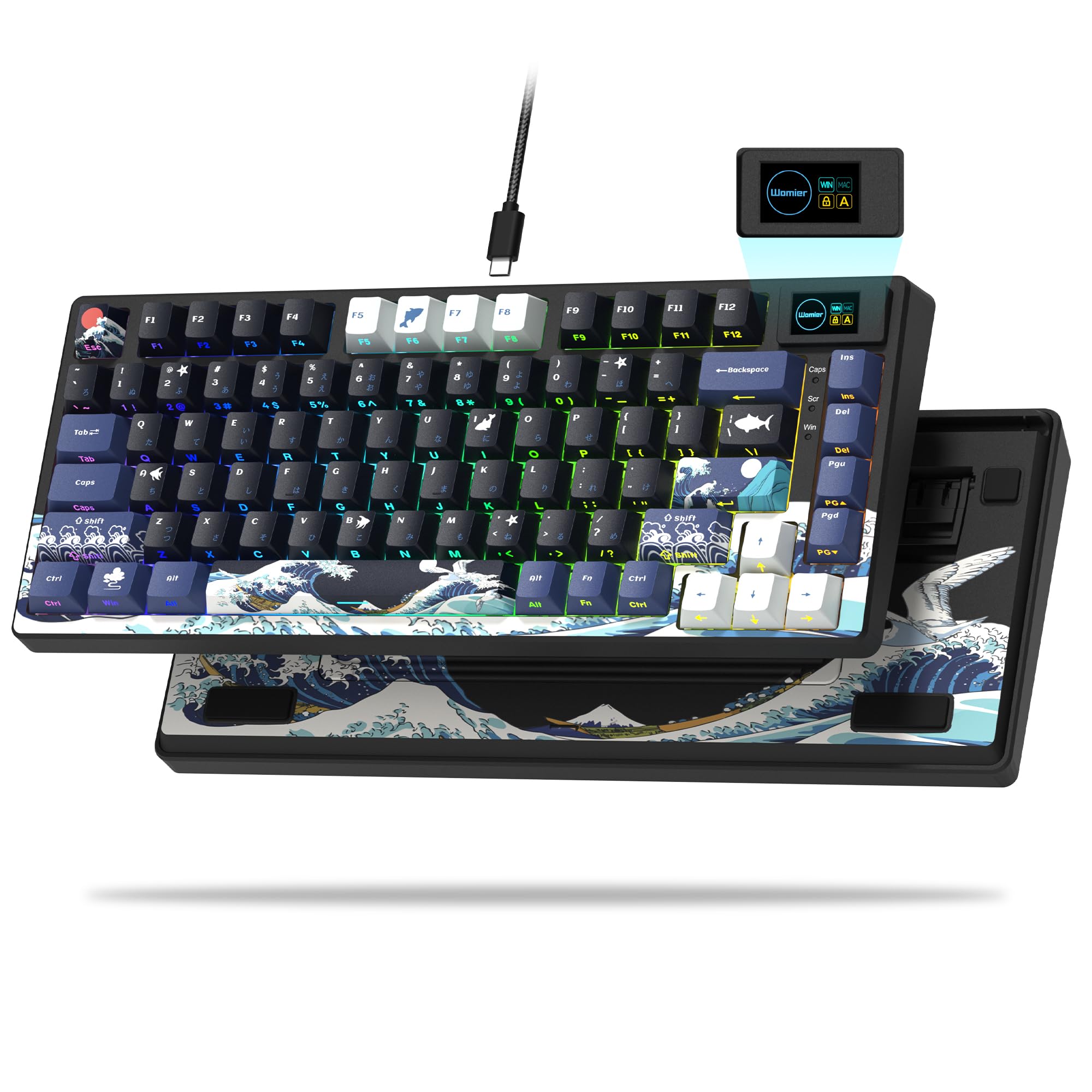
A small color screen sits in the top-right corner of the Womier SK80, and it is the detail nobody expects at this level: load a GIF, check caps lock, move on. The rest of the frame is where the money went. This is a metal-cased, gasket-mounted 75% with cherry-profile keycaps and 82 keys, and it reads as a desk piece rather than a peripheral.

Sound is the reason to buy it. The gasket mount and pre-lubed linear switches produce a soft, deep, cushioned keystroke, and we kept coming back to it even with the wireless boards closer to hand. It is the best-sounding keyboard in this group, the one visitors ask about, and it stays on the right side of quiet. Nineteen lighting effects run bright and even, and the black Kanagawa keycap art holds up close.

It runs off a USB-C cable and nothing else, so it lives on one desk. In exchange you get hot-swap sockets, a screen to fill with whatever you like, and most of the feel of a boutique build. There is also more on-keyboard control than we expected: plenty of the lighting can be changed without opening the driver at all. If your keyboard has one home and you care how it sounds, this is the pick.

Bottom line: The best-sounding board here, and the one we point to when your desk is on display as much as your game is.

3

AULA WIN68 HE

AULA WIN68 HE

Competitive shooters

Our Score 9.0/10
Check Price

Worth Noting

  • Wired only, no wireless option
Layout
60% (68 keys)
Switches
Hall effect magnetic
Actuation
0.02–3.44 mm adjustable
Polling Rate
8,000 Hz

Eight thousand hertz polling and a 0.02mm actuation floor usually signal a flagship purchase. On the AULA WIN68 HE they are the reason it stays plugged into the gaming PC: magnetic Hall-effect switches measure how far a key travels, so actuation becomes a setting between 0.02mm and 3.44mm instead of a fixed point, and rapid trigger resets a key the instant you lift rather than on the way back up. We noticed the difference in strafing first.

The 60% body is the other half of the pitch. Sixty-eight keys keeps the arrow cluster and puts the function row on an FN layer, which frees real desk space for a mouse, and 686 g is light enough to carry to a friend's place. Rapid trigger, SOCD, DKS, key remapping, and macros all live in a web driver, and there are two spare magnetic switches in the box because these are hot-swappable too.

One thing to know before you buy: the shortest actuation settings are fussy, and keys can fire on a breath. Set actuation a notch above the minimum, where rapid trigger still does its job cleanly, and the board stops being twitchy. Below that, this is the most gaming per dollar in the group and the board we push at anyone who plays shooters and does not want to spend flagship money.

Bottom line: Our pick for competitive play on a budget: Hall-effect switches, rapid trigger, and an 8,000Hz polling rate in a compact 60% body.

4

SteelSeries Apex Pro TKL Gen 3

SteelSeries Apex Pro TKL Gen 3

Pro-level play

Our Score 9.4/10
Check Price

Worth Noting

  • Costs the most of the boards here
  • No numpad on the TKL layout
Layout
TKL (84 keys)
Weight
3.5 lb
Features
Rapid Trigger, Rapid Tap, Protection Mode
Switches
OmniPoint 3.0 magnetic

Protection Mode is the feature on the Apex Pro TKL Gen 3 we did not expect to care about. It damps accidental presses on neighbouring keys, which is exactly what starts happening when you move from a chunky mechanical board to one this sensitive. After a week of hitting the wrong ability, it became the setting we switched on first.

The hardware is flagship-grade: OmniPoint 3.0 analog magnetic switches with adjustable actuation, Rapid Trigger for faster resets, Rapid Tap for snapping to your latest input, an OLED display, PBT keycaps, and a sound-absorbing underlay. The 84-key body weighs 3.5 lb, so it does not skate when you flick, and QuickSet loads a per-game profile automatically when a title starts.

Whether the premium is worth it is the entire question, and our answer is narrow. If you compete, whether in scrims, on a ranked ladder, or with a team, the tuning is real and you feel it in counter-strafes. If you play a few hours a week, the AULA WIN68 HE delivers the same Hall-effect idea for a fraction of the cost and loses nothing you are likely to notice.

What the extra money actually buys is depth of adjustment: per-key actuation, Rapid Tap and Protection Mode tuned game by game, and presets that launch themselves. The OLED is small and mostly for status, the volume roller is where your thumb ends up anyway, and the driver is dense enough that the first evening disappears into it. Set the profile you need once and it stops being a complicated keyboard.

Bottom line: We think it is the most capable keyboard here, and worth the premium only if competitive play is the main thing you do at that desk.

5

SteelSeries Apex 3

SteelSeries Apex 3

Quiet shared spaces

Our Score 9.2/10
Check Price

Worth Noting

  • Backlighting is dim on the number keys
  • Long-term reliability is uneven
Extras
Magnetic wrist rest, media controls
Layout
Full-size (104 keys)
Switches
Whisper-quiet membrane
Water Resistance
IP32

The Apex 3 is not mechanical, and that is the entire point. Its whisper-quiet switches are rated for 20 million presses, the frame carries an IP32 water-resistance rating for the drink you will eventually knock over, and the magnetic wrist rest snaps on and stays put. Ten-zone RGB and a column of dedicated media controls, including a volume roller, round out a genuinely complete full-size board.

We recommend it to anyone gaming within earshot of other people: a shared office, a bedroom next to a sleeping kid, a microphone that picks up every clack. The soft key feel is easier on the hands across a long session than the clickier mechanicals here, though you give up the crisp bottom-out that makes a mechanical satisfying. What you get instead is near silence and a wrist rest that actually supports your palm.

Spill resistance is the sleeper feature. IP32 covers the accidental glass, and the surface wipes clean without pulling keycaps. The full-size layout brings a numpad and a 17.5-inch footprint, so measure the desk before you commit, and remember that lighting is where this board is weakest once the room is bright. As a first gaming keyboard, or a second one for an office, it is the least fussy board here.

Bottom line: For gaming within earshot of other people, we have not found a better answer here: quiet keys, a wrist rest, and spill resistance.

6

Logitech G413 SE

Logitech G413 SE

Durable full-size

Our Score 9.0/10
Check Price

Worth Noting

  • Spacebar clack carries across a room
Case
Brushed aluminum
Layout
Full-size (108 keys)
Keycaps
PBT
Switches
Tactile mechanical

PBT keycaps and a brushed aluminum top plate are the two things budget mechanicals usually skip, and they are why the G413 SE is on this list at all. Heat- and wear-resistant PBT does not develop the greasy shine ABS picks up, and the aluminum plate means the board does not flex or slide when a game gets tense.

The rest is deliberately plain. Tactile mechanical switches with a clear bump, white LED backlighting at three brightness settings instead of RGB, 6-key rollover, and 108 keys with a numpad. It is a heavy, solid slab of a keyboard, and the legends stay readable in a dim room without lighting up your face.

Value here is durability rather than features. The build is the most confidence-inspiring of the full-size boards in this group, and the price sits in the middle of the pack. What you do not get is a light show or a cushioned, cloud-soft typing feel: this is a firm, tactile board that rewards deliberate presses, and that is a fair trade for someone buying once.

Bottom line: We recommend the G413 SE to anyone who wants a full-size mechanical that still feels solid years in: PBT keycaps, an aluminum plate, no light show.

7

Razer BlackWidow V4 X

Razer BlackWidow V4 X

MMO and macros

Our Score 9.2/10
Check Price

Worth Noting

  • ABS keycaps shine sooner than PBT
  • Full-size footprint needs a wide desk
Layout
Full-size (104 keys)
Keycaps
Doubleshot ABS
Switches
Razer Yellow linear, 1.2 mm
Macro Keys
6 dedicated

Six dedicated macro keys run down the left edge of the BlackWidow V4 X, and they are the reason to consider it over anything else here. Map a rotation, a sim checklist, or an editing sequence onto them and your left hand stops doing gymnastics. A multi-function roller and secondary media keys sit up top, the sort of thing you miss the moment you go back to a board without them.

Razer's Yellow linear switches are genuinely quick: 1.2mm to actuation with no gap between actuation and reset, at 45g of force. That is light and fast, and it is also why heavier-handed typists fire keys they did not mean to, because resting a palm near the board is enough to register a press. Per-key Chroma lighting is bright and even, and the doubleshot legends are molded in rather than printed.

It is a substantial board: 20.5 inches across, 2.5 pounds, a full numpad, and six extra keys on the left. The plastic chassis is stiff and does not skate, and the media roller is the control we ended up using constantly, which is not something we expected to say about a volume wheel.

So who is it for? Players whose games live on the left-hand keys, meaning MMOs, sims, and anything with a rotation, plus anyone who wants a roller and dedicated media keys without adding a second device. If you mostly play shooters, the Hall-effect boards here give you more for the same money or less. If you want a plain, tough full-size, the G413 SE is the sturdier buy. The macro column is the whole argument, and for the right player it is a good one.

Bottom line: Buy the BlackWidow V4 X if six macro keys and a media roller would genuinely change how you play; we think it is a specialist's board, not a default.

8

Redragon K521

Redragon K521

Tight budgets

Our Score 8.6/10
Check Price

Worth Noting

  • Rainbow presets, not per-key RGB
  • 19-key anti-ghosting only
Layout
Full-size (104 keys)
Switches
Mechanical-feel membrane
Backlight
Rainbow LED
Anti-ghosting
19 keys

At the bottom of the price range sits a full-size board with a numpad, a full set of media keys, and a backlit key set you switch on with one button. The Redragon K521 is the cheapest way onto this list, and it is the one we point at when someone is building a first setup and the keyboard is the last line item.

The keys are mechanical-feel membrane rather than mechanical, and that is a real difference: a soft, quick press without the crisp bottom-out or the hot-swap sockets. It also keeps the board quiet enough for a shared room, and an afternoon of typing does not wear your hands out.

Where it shows its price is the long run. The failure to watch for is keys that stop registering, and a keyboard at this level gets replaced rather than repaired, so buy it knowing that. Nothing about it feels fragile in the hand, but nothing about it feels expensive either.

Buy it as a first keyboard, a spare, or a cheap second station, and do not expect it to be the last one you own. If you play competitively or type all day, spending more gets you switches that still feel right in two years, and the AULA WIN68 HE is the upgrade we recommend first.

Bottom line: We keep the K521 on the list for one reason: it is the least expensive full-size keyboard here that still gets you a numpad, media keys, and a backlight.

How We Tested the Best Gaming Keyboards

We started with a shortlist of more than 40 keyboards sold by major gaming brands, then narrowed it by switch type, size, connectivity, and price so we weren’t comparing a compact wired board to a full-size wireless one. The final 12 included membrane, mechanical, and optical models, with and without wrist rests, and a mix of full-size, tenkeyless, and 60-percent layouts. All testing ran from January through June, with each keyboard spending at least a week as my daily driver.

During the day, I typed documents, answered emails, and took video calls, paying attention to whether keys wobbled, whether the frame flexed under pressure, and whether the legends stayed readable. At night, I played fast-paced shooters and slower strategy games, listening for rattle or pinging from the case and noting how quickly each switch returned after a press. To judge noise, I recorded each board from two feet away in a quiet room—some clicky switches were genuinely disruptive on a shared call, while a few linear ones stayed close to a laptop keyboard’s hum. I also checked reliability by unplugging and reconnecting each board repeatedly, rebooting mid-session, and using the same macro and media keys daily to see if software or onboard controls glitched.

Backlighting got its own test: I cycled through every brightness level and effect in a dark room, then checked whether the keycaps still looked evenly lit in daylight and whether the controls made sense without the manual. For value, I compared what each board offered at its price—extra keycaps, cable quality, wrist rest, onboard memory—and whether those extras felt useful or like filler. Color and appearance were judged on how the board looked on a real desk, not in a product photo, and whether the finish attracted fingerprints or dust.

How to Choose Gaming Keyboards

Start With the Switch

Membrane keys are soft, quiet, and inexpensive, and they never need servicing; the SteelSeries Apex 3 is the clearest example in this group. Mechanical switches give a crisp, defined press, and on hot-swap boards you can change the feel later without buying another keyboard. Hall-effect magnetic switches, found in the AULA WIN68 HE and the Apex Pro, measure travel instead of closing a contact, so you set how far a key goes before it fires.

Choose by what you play. Shooters and anything with fast direction changes reward Hall effect and rapid trigger, where the key resets the moment you lift. Long typing sessions favour a switch you can live with at volume. If you want one board for a decade, buy a hot-swap mechanical, because a worn switch then becomes a swap rather than a replacement.

Pick the Layout You Will Actually Use

Four layouts cover almost everything. Full-size keeps the numpad and the whole function row; tenkeyless drops the numpad and keeps the rest; 75% squeezes the same keys into a narrower body with a compact cluster; 60% drops the function row and the numpad entirely. Compact in a listing means it fits a desk, not that it keeps the keys you reach for.

Count what your hands touch in a week. A numpad you use daily is worth the width. A numpad you touch twice a month is several inches of desk you could hand to your mouse. The 75% boards here keep the arrow cluster and function keys, which is why we treat that size as the safe middle for a mixed gaming and working desk.

Decide Whether the Cable Matters

Wireless is a real convenience and a recurring commitment: a 2.4GHz dongle for low-latency play, Bluetooth for hopping between devices, and a cable for charging. The AULA F75 Pro does all three. Wired boards are cheaper per feature and never need charging, which is the better trade if the keyboard never leaves the desk.

Polling rate deserves a careful read. An 8,000Hz board reports its key state more often than a standard gaming keyboard, and it is the Hall-effect models here that advertise it. Chasing the last millisecond is a smaller upgrade than fixing a layout you fight, so settle the size and the switch first.

Build, Keycaps, and What Outlives the Warranty

PBT keycaps resist the greasy shine that ABS develops, aluminum plates stop a board flexing under heavy presses, and a gasket mount softens the keystroke. None of that shows up in a headline spec, and all of it is what the keyboard feels like in year three.

Warranty length varies more than it should across this group, from six months on the AULA boards to two years on the Razer and Redragon models. If you plan to keep one for years, weigh the coverage as heavily as the feature list, and buy somewhere with a straightforward return window so an early fault is the seller's problem rather than yours.

Frequently Asked Questions

Final Verdict

We recommend the AULA F75 Pro for most people. It is the best all-round gaming keyboard in this group: hot-swappable, wireless over 2.4GHz, Bluetooth, or cable, and it sounds and feels like a board that costs considerably more.

If competitive shooters are the point, the AULA WIN68 HE brings Hall-effect switches and rapid trigger for a fraction of the flagship price. And if you want the deepest tuning available here and do not mind paying for it, the SteelSeries Apex Pro TKL Gen 3 is the one that earns the premium.