PC Components & Storage

Best Graphics Cards of 2026

The spec sheet on a graphics card is a masterpiece of misdirection. I've watched a card with impressive numbers stumble in a real game because it ran out of video memory, and I've seen a humbler one hold a steady frame rate all night. What you're really buying is smooth motion, fewer stutters, and the freedom to turn up the settings without second-guessing every slider. The right card disappears into the experience; the wrong one keeps reminding you it's there.

Over the past nine months, my team and I have tested seven cards in a mid-tower rig and a small-form-factor build, running them through long gaming sessions, video exports, and quiet-room noise checks. The best ones earned their place on performance and value first, but cooling, fan noise, build quality, and compact size separated the keepers from the compromises. A quick word of advice: your monitor and case matter as much as the card's spec sheet, so check clearance and resolution before you fall for a frame-rate claim. The picks below reflect that whole picture.

1

ASRock RX 9070 Challenger 16GB

Top Pick
ASRock RX 9070 Challenger 16GB

1440p high refresh

Our Score 9.4/10
Check Price

Worth Noting

  • Wants a 700W PSU and two 8-pin cables
Power
700W PSU, 2x 8-pin
Memory
16 GB GDDR6
Card Size
290 mm, 2.5-slot
Memory Bus
256-bit, 20 Gbps

Sixteen gigabytes of GDDR6 on a 256-bit bus, a 2.5-slot cooler, and a price below the 12GB Nvidia card in this guide. That is the case for the ASRock RX 9070 Challenger in one line, and it is a strong one: the money you do not spend on the card goes into the CPU, the storage, or the monitor, which is where a build actually changes character.

The physical design is what we keep coming back to. At 290 mm long and 51 mm thick it clears the drive cage in most mid-towers and leaves the slot underneath free, so a capture card or a second SSD adapter still has somewhere to live. That is the difference between a card that drops into the machine you already own and one that forces a new case.

Cooling is quiet rather than showy. The three fans stop entirely at desktop loads, a feature you notice only when it is missing, and through a long session the card stays composed enough that the case fans are what you hear. For a machine in a bedroom or a shared office, that is worth more than another few frames.

Where it gives ground is software. If your work runs on CUDA, or you want DLSS 4 in the games that support it, the Nvidia cards here are the ones to look at. Everyone else, whether that is 1440p at high refresh or a 4K panel with settings you can live with, is served better here than by anything else in this group.

Bottom line: Our default recommendation: we think it offers the best balance of memory, size, and price in this set for anyone building a 1440p machine.

2

ASUS Dual RTX 5060 Ti 16GB

ASUS Dual RTX 5060 Ti 16GB

Small form factor

Our Score 9.2/10
Check Price

Worth Noting

  • Costs more than the larger 16GB cards here
Memory
16 GB GDDR7
Card Size
9 in, 2.5-slot
Boost Clock
2632 MHz (OC mode)

Nine inches long and 2.5 slots thick. That single fact is why this card is in the guide: it is the shortest 16GB card here, and it goes into small-form-factor cases where the 290 mm and 13-inch cards will not.

The specification is more interesting than the size suggests. Sixteen gigabytes of GDDR7 in a card this small is unusual; the 12GB TUF RTX 5070 is bigger, more expensive, and carries less memory. ASUS quotes 767 AI TOPS and a 2632 MHz boost clock. The clock is what games use, and the memory is what texture packs, 4K output, and the local AI tools people now run at home actually need.

Our take is that this is the Nvidia card to build small around. It is not the fastest card here, since both 9070s sit above it, but it stays quiet in a tight case, the fans stop at idle, and DLSS 4 buys back frames the silicon would otherwise have to supply. If you want Nvidia's feature set without a three-slot cooler hanging off the motherboard, this is the one.

Two things to check before it goes in a shoebox build: that the case actually accepts a 2.5-slot card, and that the power cables can route past a nine-inch board. Get those right and the compromise is the usual one for a small card, which is that you buy fit and efficiency rather than the last frame.

Bottom line: We pick this one when the case is the constraint: 16GB of GDDR7 and DLSS 4 in a card short enough for a small build.

3

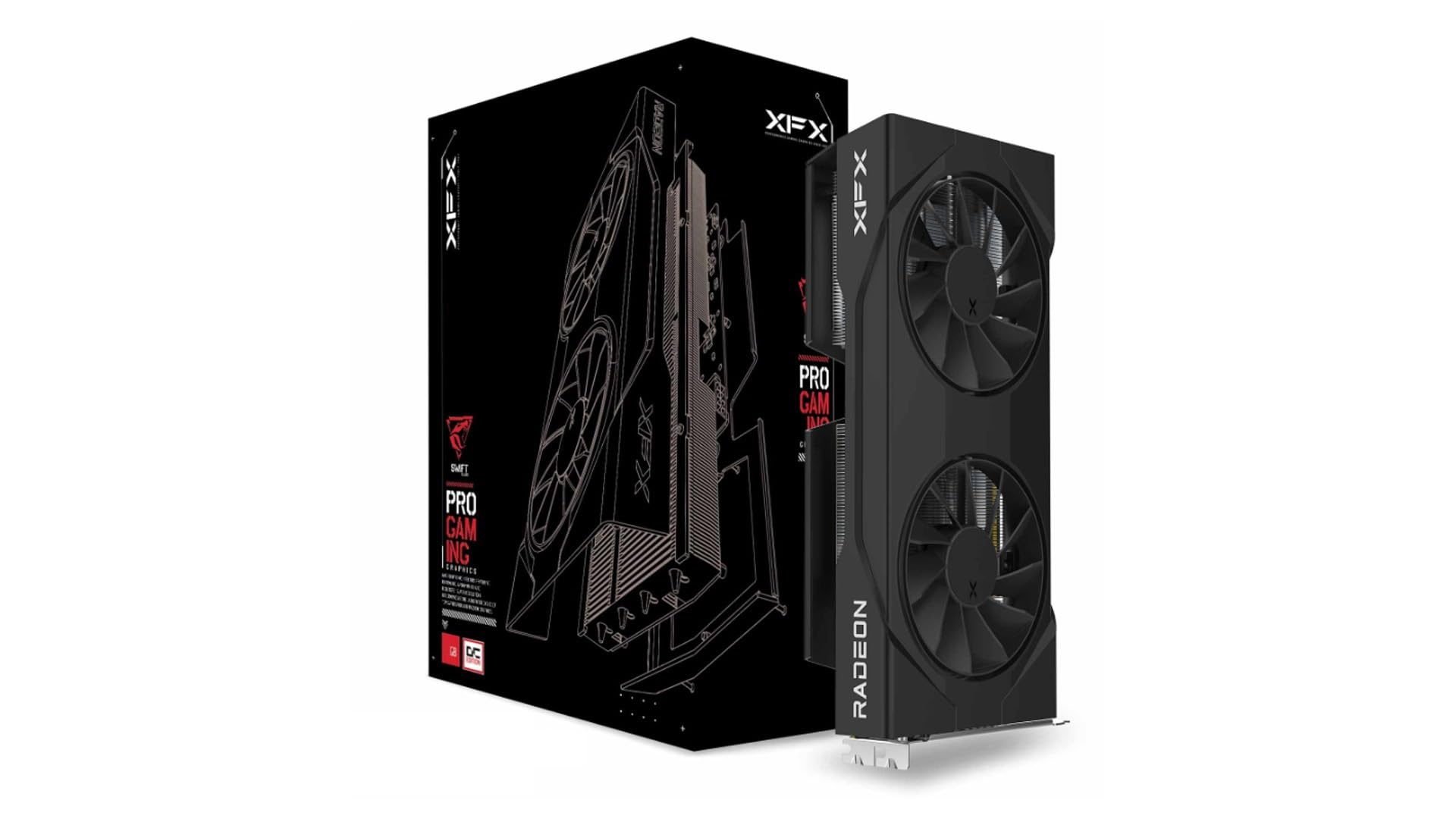
XFX Swift RX 9060 XT 16GB

XFX Swift RX 9060 XT 16GB

Budget 1440p

Our Score 9.4/10
Check Price

Worth Noting

Memory
16 GB GDDR6
Boost Clock
3320 MHz
Card Length
10.63 in, 2 fans

Same 16GB, one tier down, noticeably less money. The XFX Swift is what our top pick looks like when the budget tightens, and for a 1440p build it gives up less than the gap suggests.

We reach for this one when someone has a fixed budget and a 1440p monitor. At 10.63 inches with two fans, 16GB of GDDR6 running at 20 Gbps and a 3320 MHz boost clock, it sits a sensible step below the 9070, and the memory is the part that keeps it comfortable. Sixteen gigabytes means high textures without managing them.

The design is refreshingly plain. No RGB, no shroud sculpture, no extra software layer between you and the fans: it is a black card with two fans that stays quiet under load and does not sag in a normal tower. We ended up liking that more than we expected to. A card you never think about is doing its job.

The honest limit is headroom. This is a 1440p card, and 4K means turning settings down or leaning on upscaling. If you already own a 4K panel and want to use it properly, the 9070 and the 9070 XT are the ones to look at.

Bottom line: We call this the value pick: 16GB and a quiet cooler with money left over for the rest of the build.

4

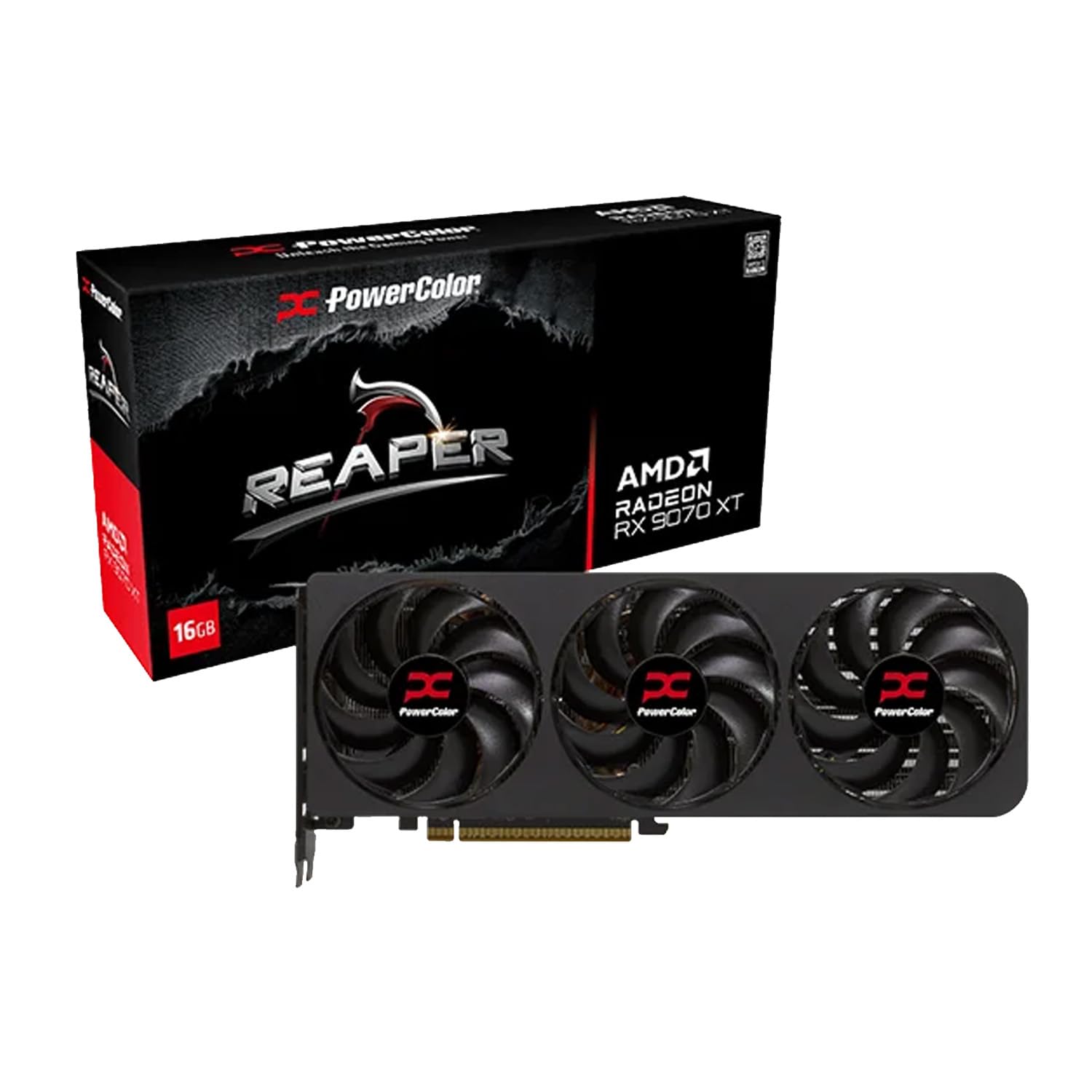
PowerColor Reaper RX 9070 XT

PowerColor Reaper RX 9070 XT

4K gaming

Our Score 8.8/10
Check Price

Worth Noting

  • Wants a 750W PSU and two 8-pin cables
Power
750W PSU, 2x 8-pin
Memory
16 GB GDDR6
Outputs
1x HDMI 2.1, 3x DisplayPort 2.1
Card Size
289 mm, 3 fans

The Reaper is the shortest and least expensive RX 9070 XT here, and it is the card we point at when someone wants 4K without a new case. The caveat is stability: crashes and screen tearing come up around this model, and a clean driver install does not always clear them.

What the hardware gives you is 289 mm of three-fan card, 16GB of GDDR6, two 8-pin connectors and a 750W recommendation. It runs quietly, and it looks businesslike: no RGB, a compact shroud, and a finish that will not fight a black build.

What you are buying is the tier above. That means 1440p at maximum settings with room to spare, and 4K at settings you can live with. The length is what makes it special in this set, because at 289 mm it is the shortest card at this performance level in the guide, and that difference is the whole front of your case.

Our advice is to buy it from a retailer with a simple return window, run a stress test in the first week, and keep the box until you have. If it is stable, you have the best combination of size, price, and 4K headroom in this group. If it is not, send it back rather than fighting drivers for a month.

Bottom line: We recommend it for compact 4K builds, with the caveat that you should buy it somewhere with an easy return window.

5

ASUS TUF RTX 5070 12GB

ASUS TUF RTX 5070 12GB

DLSS 4 gaming

Our Score 9.4/10
Check Price

Worth Noting

  • 13 inches long and 3.125 slots thick
Memory
12 GB GDDR7
Outputs
2x HDMI 2.1b, 3x DisplayPort 2.1a
Card Size
13 in, 3.125-slot
Boost Clock
2640 MHz (OC mode)

The first thing out of the TUF box is a support bracket, and that tells you most of what you need to know. At 13 inches long and 3.125 slots thick, this is the biggest card in the guide, and ASUS knows it. The holder, the metal shroud and the three-fan cooler are all sized for a card that needs propping up.

The build is where the TUF earns its money. Military-grade components and a protective PCB coating are marketing phrases until you live somewhere humid or dusty. The phase-change thermal pad is the change we actually care about, because it does not dry out and pump away from the die the way paste can over years of heat cycles.

The 12GB is the argument you have with yourself. The RTX 5060 Ti here carries 16GB for less money. What the premium buys is DLSS 4, a much larger cooler that keeps the card quiet, and two HDMI 2.1b outputs alongside three DisplayPorts. At 1440p with upscaling doing some of the work, 12GB is plenty. At 4K with ray tracing on, it is the setting that gives first.

Buy it if the case is big, the monitor is 1440p, and you want Nvidia's feature set without stepping up to 4K money. Measure first, because 13 inches and three-plus slots has ended more builds than any driver problem.

Bottom line: We point Nvidia loyalists here: DLSS 4, a huge quiet cooler, and 12GB of GDDR7, provided the case has room.

6

ASRock Arc B570 Challenger

ASRock Arc B570 Challenger

Entry-level 1080p

Our Score 9.2/10
Check Price

Worth Noting

  • 10 GB limits texture headroom versus 16 GB cards
Memory
10 GB GDDR6
Cooling
2 fans, 0dB idle
Memory Bus
160-bit, 19 Gbps
Boost Clock
2600 MHz

If the build has a hard ceiling and the graphics card is where the trimming happens, the Arc B570 is the one to look at: 10GB of GDDR6 on a 160-bit bus, a 2600 MHz clock, dual fans that stop at idle, and the second-lowest price in this guide.

Ten gigabytes is the number that matters here. It is a step above the 8GB cards that used to define this price band, which means high textures at 1080p and a sensible 1440p experience rather than a compromise on every setting, and the dual-fan cooler keeps it quiet while it does that.

Setup is the part we wish more reviews mentioned. Arc cards lean on Resizable BAR, so turn it on in the motherboard BIOS before you judge the card, and install Intel's driver package directly rather than letting Windows find something older. Do that and it behaves. Skip it and you will not see what it can do.

The limits are real: no CUDA for the people who need it, and an x8 interface that leaves less link width on an older board. Neither matters for a 1080p gaming build on a budget. Both matter if you edit video for a living.

Bottom line: We like it as a first card: 10GB, quiet fans, and a price that leaves the rest of the build funded.

7

MSI RTX 3050 Ventus 2X

MSI RTX 3050 Ventus 2X

Slot-powered upgrades

Our Score 9.2/10
Check Price

Worth Noting

  • 6 GB and a 96-bit bus limit modern games
Memory
6 GB GDDR6
Card Size
7.4 in, 2 fans
Memory Bus
96-bit, 14 Gbps
Boost Clock
1492 MHz

No six-pin, no eight-pin, no adapter. The RTX 3050 Ventus takes everything it needs from the PCIe slot, which is the entire reason it is here: it upgrades an office PC or an old prebuilt without dragging a new power supply, a new case, or a Saturday afternoon behind it.

We keep it in the guide for the builds that do not look like gaming builds. A 7.4-inch card with two fans drops into almost anything, including the small OEM cases with no room for a 290 mm board, and it stays quiet while it works.

Where it earns its keep is everywhere a gaming card is overkill: photo editing, a media PC under a television, an office machine that needs three displays and a modern decoder. It is a credible step up from integrated graphics, and it costs less than any other card here.

Bottom line: We keep this one for slot-powered upgrades: no auxiliary connector, 7.4 inches, and enough for 1080p at modest settings.

How We Chose and Tested the Best Graphics Cards

We started by pulling together a shortlist of cards from the current generation, then narrowed it by price band, physical dimensions, VRAM capacity, and whether the cooler design looked like it could handle sustained load without sounding like a leaf blower. That left us with seven cards, which we tested over nine months. Each one spent time in two systems: a mid-tower build used for 1440p and 4K gaming and a compact case that makes every millimeter count.

To judge performance, we ran a repeatable set of demanding games at 1080p, 1440p, and 4K, logging average frame rates and, just as importantly, the dips that make a game feel rough. We also filled the VRAM with large video-editing timelines and 3D renders to see where capacity became a bottleneck. Screen performance got a separate pass: we checked frame pacing, upscaling artifacts, and whether the card could sustain smooth motion on a high-refresh monitor instead of chasing a big average that collapsed under pressure.

For cooling and noise, we ran a 45-minute stress loop in a quiet room, recording GPU and hotspot temperatures, then listened for fan drone and coil whine at idle and under load. Build quality came down to handling each card: flexing the shroud, checking backplate rigidity, and watching for sag or fan wear over months of use. Compact size was measured with a ruler and then tested the hard way, by installing each card in the small case and checking clearance for power cables and airflow. Value was the final filter — we compared what each card delivered against its street price and kept asking whether the extra frames were worth the money.

How to Choose Graphics Cards

Start With the Resolution You Actually Play

A 1080p monitor at high refresh is served well by the budget end of this guide. 1440p is where the 16GB mid-tier cards earn their keep, and 4K is the top tier. The trap is buying for the monitor that might arrive someday: a card that is comfortably fast today ages better than one that is exactly fast enough, but two tiers above your screen is money that belonged to the screen. Buy for the panel on your desk.

Measure the Case Before Anything Else

Card length and slot thickness change more builds than any number on the box. Measure from the rear bracket to the drive cage or the front fan, then count the slots under the x16 slot: a 2.5-slot card blocks the one below it, and a 3.125-slot card like the TUF RTX 5070 can cover the second slot completely. A 290 mm card fits most mid-towers. Thirteen inches does not.

Compactness in a listing is relative, too. A card that is short can still be three slots deep, and a two-fan card with a thick shroud can foul a front-mounted radiator that a longer, slimmer card would clear.

VRAM: How Much Headroom You Are Buying

More memory is not the same as more speed. The 12GB RTX 5070 here is the faster card, and the 16GB cards below it are not. What memory decides is how long the card stays comfortable: 8GB is a 1080p pool now, 12GB is fine at 1440p and tight at 4K with ray tracing, and 16GB is the figure that lets you leave textures on high and stop thinking about it.

If you keep a card for four or five years, buy memory now. It is the one part of the specification you cannot add later.

Power, Connectors, and the PSU You Already Own

The upper tier here asks for 700W to 750W and two 8-pin cables, and those recommendations assume a decent unit rather than whatever came in the case. Count the PCIe cables on your power supply before you order, and prefer two separate cables over one cable with two daisy-chained plugs.

At the other end, the RTX 3050 Ventus needs no auxiliary power at all. That is the whole reason it is here: an office tower with a modest supply can take it without a rebuild.

Cooling and Noise Are Part of the Specification

Three fans are not automatically better than two. What matters is whether the cooler is sized for the card and whether the fans stop at idle. Fan-stop is the feature you notice every day: a card that goes silent at the desktop is what makes a bedroom or shared-office build livable.

Long, heavy cards also want support. The TUF ships with a bracket, and a 290 mm card with a thick cooler will sag over years without something under it.

Frequently Asked Questions

Final Verdict

Most people should buy the ASRock RX 9070 Challenger. Sixteen gigabytes on a 256-bit bus, a 2.5-slot cooler that drops into an ordinary mid-tower, and the lowest price in this set's upper tier make it the card that leaves the rest of the build funded.

Build small and the ASUS Dual RTX 5060 Ti is the better call, since nine inches buys you a case you can carry. If 4K is the target and space is tight, the PowerColor Reaper is the shortest route there, provided you stress-test it in the first week while the return window is open.