Gaming

Best Handheld Gaming PCs of 2026

The appeal of a handheld gaming PC is obvious: your PC library in your hands, without being chained to a desk. The hard part is everything the spec sheet leaves out—whether games actually play smoothly, whether the screen is big and bright enough to see, whether it stays comfortable after an hour, and whether the battery, software, and chargers cooperate when you’re away from home. A good one fixes all of that; a bad one becomes an expensive paperweight.

We spent eight months with seven handheld gaming PCs, playing on commutes, on the couch, and on weekend trips, and the pattern became clear. Value isn’t just the sticker price—it’s how long the battery lasts, how sturdy the controls feel, and whether your existing USB-C chargers and dock work without drama. The picks below are the ones that earned a place in my bag.

1

Steam Deck OLED 1TB

Top Pick
Steam Deck OLED 1TB

Steam library

Our Score 9.2/10
Check Price

Worth Noting

  • Some anti-cheat multiplayer games will not run
  • 800p panel is the lowest resolution here
Battery
50Whr, 3-12 hours gameplay
Display
7.4-inch HDR OLED, 1280 x 800, 90Hz
Storage
1TB NVMe SSD
Operating System
SteamOS

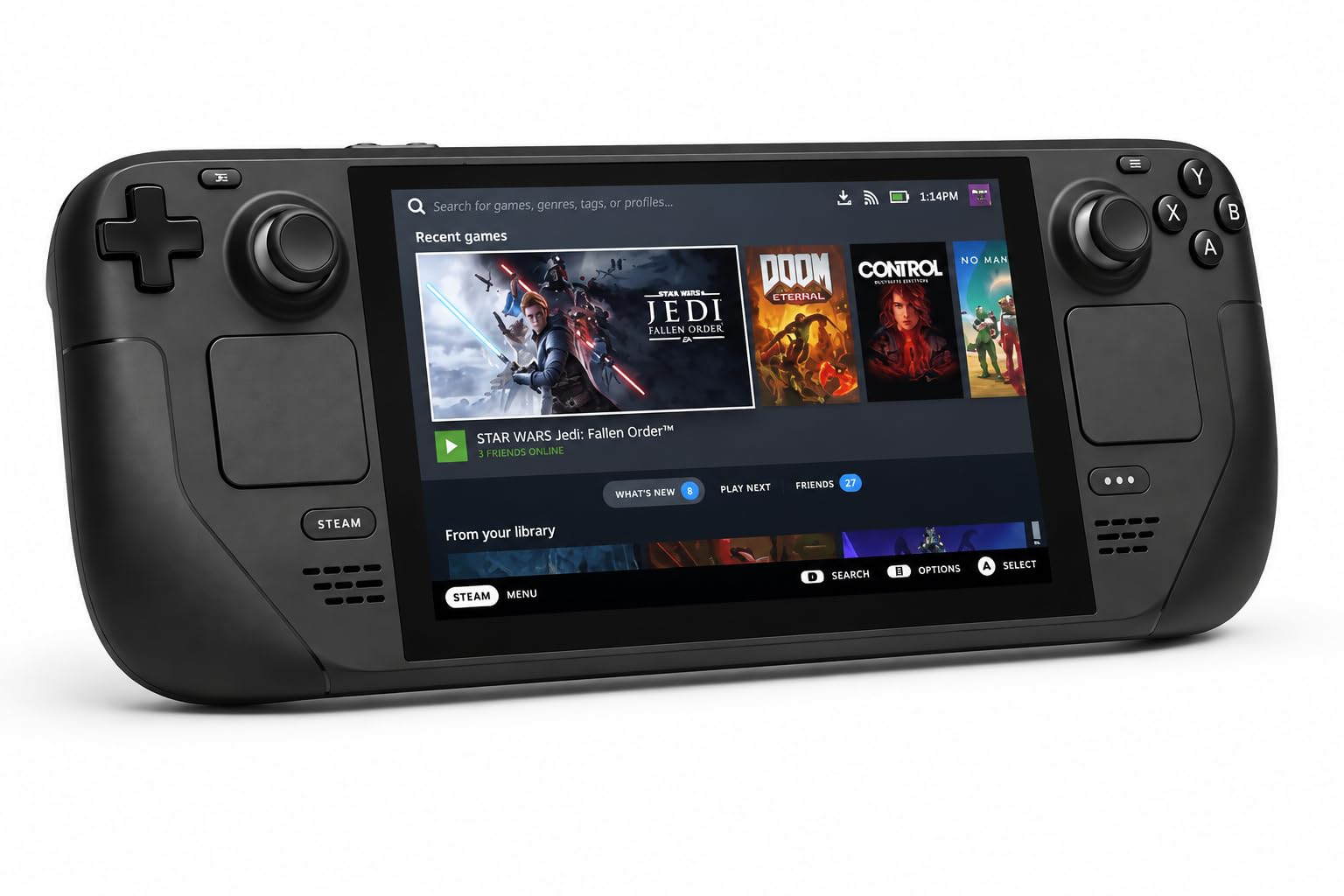
Most people who ask us which handheld to buy should stop here. The Steam Deck OLED turns a Steam library into something that behaves like a console: press the power button, you are back in the game you left, and you never see a desktop unless you go looking for one. Every other machine on this page asks you to decide how much tinkering you will tolerate. This one asks nothing.

The 7.4-inch 1280 x 800 HDR OLED panel is the best-looking screen in this group: deep blacks, anti-glare etched glass, and 90Hz that keeps menus from juddering. It is also the lowest resolution here, and that stopped mattering to us about an hour in. At this size the contrast buys you more than the extra pixels on a 1600p panel do. Steam Deck's own figure for the 50Whr battery is 3 to 12 hours depending on the title, and its battery holds up better than any other pick on this page.

SteamOS is the reason it works. Games come from one library, shaders download before launch instead of stuttering through the first ten minutes, and there is no antivirus prompt in the middle of a boss fight. The catch is compatibility: a handful of big multiplayer titles with kernel-level anti-cheat still will not run, so check the one you play most before ordering. Single-player and most co-op games are fine.

The 1TB drive is the version to get if you keep more than a couple of big installs around, and the microSD slot handles the rest. It ships with a case that has a removable liner, which sounds like nothing until you are carrying it without a bag. You are paying more than the budget pick for the OLED panel and the drive, and for a machine you will never have to troubleshoot, that is the right place to spend it.

Bottom line: This is the one we point most people to: it plays your Steam library like a console, the OLED screen is the best here, and the battery holds up. Buy it unless your games need Windows.

2

MSI Claw 8 AI+

MSI Claw 8 AI+

Windows power users

Our Score 9.0/10
Check Price

Worth Noting

  • Heaviest of these at 1.8 pounds
Ports
Thunderbolt 4, microSD card reader
Display
8-inch, 1920 x 1200, 120Hz
Processor
Intel Core Ultra 7-258V
Memory And Storage
32GB LPDDR5, 1TB NVMe SSD

Thirty-two gigabytes of memory and a terabyte of storage. Those two numbers are why the Claw 8 AI+ belongs near the top of this list: it carries double what most of these machines do, and on a Windows handheld that headroom is what stops a launcher, a browser and a game from fighting over the same resources. There is a microSD slot for overflow, and Thunderbolt 4 if you want to dock it to a monitor.

The 8-inch 1920 x 1200 120Hz screen is the sweet spot of the group, big enough for Windows tablet mode and sharp enough that inventory text does not need squinting at. Intel's Core Ultra 7-258V handles modern titles at sensible settings, and the fans stay quiet enough that we stopped noticing them mid-session. Screen, memory and a genuinely quiet chassis: that combination is what makes this our pick for anyone whose library lives on Windows.

The trade is weight. At 1.8 pounds it is the heaviest thing here, and you feel it after an hour of holding it up rather than resting it on your knees. Everything else is the payoff for carrying it: the bigger screen, the quieter fans, and a battery that lasts a session rather than a level.

Bottom line: Our Windows default: 32GB of memory, a 1TB drive and a quiet 8-inch 120Hz screen handle whatever you install, as long as the weight does not bother you.

3

Lenovo Legion Go

Lenovo Legion Go

Big-screen play

Our Score 8.8/10
Check Price

Worth Noting

  • Battery drains fast, and it loses charge in sleep
  • Legion Space software is the least polished here
Ports
Two USB4 40Gbps ports
Display
8.8-inch, 2560 x 1600, 144Hz
Processor
AMD Ryzen Z1 Extreme
Memory And Storage
16GB RAM, 512GB SSD

An 8.8-inch, 2560 x 1600 panel at 144Hz is not what you expect a handheld to carry. The Legion Go is the only machine here that makes a strategy game's text or a racing game's scenery look like it belongs on a desktop monitor, and that fact alone earns it a place: if the handheld is going to be your main screen, this is the one to get.

The Ryzen Z1 Extreme has real headroom and the 16:10 display shows it. The controllers detach, which changes how you hold the thing: hands apart, screen resting on the tray table in front of you, the most comfortable way we found to play on a long trip. Two USB4 ports mean docking is not an afterthought either, and with a monitor and keyboard it does a convincing midrange-laptop impression.

Battery life is the price of that screen. The 8.8-inch panel and the Z1 Extreme both draw hard, and this is the machine that has you looking for an outlet mid-flight. It also loses charge in sleep, so shut it down between sessions rather than closing the lid. Legion Space, the launcher, is the other rough edge: it works, and it is the least polished software in this group.

Where it fits is the desk-to-couch machine. Dock it, play on the TV, undock it, keep the same save. The people who end up happiest with it are the ones who treat it as a small PC that happens to have grips.

Bottom line: The biggest, sharpest screen in this group paired with real Z1 Extreme power; buy it if the display is what you care about and you can plan around short battery life.

4

ROG Xbox Ally

ROG Xbox Ally

Game Pass

Our Score 8.6/10
Check Price

Worth Noting

  • Least powerful chip in this group
  • Plays PC versions of Xbox games, not console titles
Weight
1.48 lb
Display
7-inch, 1080p, 120Hz
Processor
AMD Ryzen Z2 A
Memory And Storage
16GB LPDDR5, 512GB SSD

This is the cheapest of these, and it does not feel like the cheap one. The white 670-gram body has grips shaped so your thumbs land on the sticks instead of reaching for them, and the 7-inch 1080p 120Hz screen is the same specification the step-up ROG Ally uses.

What you are buying is the front end. It boots into a full-screen Xbox interface, the Xbox button pulls Game Bar over whatever you are playing, and three months of Game Pass Premium are in the box. Underneath it is Windows 11, so Steam, Epic and GOG all work, but this is the only Windows machine here that greets you like a console instead of a desktop. One thing to know: it plays PC versions of Xbox games, not the console library, so check that the title you want exists on PC.

The Ryzen Z2 A is the least powerful chip in this group, and that is what keeps it a value pick rather than our overall one. Indies, older titles and Game Pass standbys run at 1080p without complaint, and those are the games we kept coming back to on it; a new AAA release means dropping settings and accepting a softer frame rate. At this end of the range that is a fair trade. Just do not buy it expecting the headroom of the Claw or the Legion Go.

Bottom line: If you pay for Game Pass, this is where we start you: cheapest of these, comfortable for long sessions, and powerful enough for everything but the newest AAA releases.

5

ROG Ally Z1 Extreme

ROG Ally Z1 Extreme

Tinkerers

Our Score 8.4/10
Check Price

Worth Noting

  • Battery drains fast in demanding games
  • Runs warm under load
Display
7-inch, 1080p, 120Hz
Expansion
microSD card slot
Processor
AMD Ryzen Z1 Extreme
Memory And Storage
16GB RAM, 512GB SSD

Same 7-inch 1080p 120Hz shape as the Xbox Ally, different engine underneath. The Z1 Extreme version is the older, brawnier sibling: a Ryzen Z1 Extreme, 16GB of RAM, a 512GB SSD and a microSD slot, running straight Windows 11 with no console layer on top.

For some of you that is exactly right. If your library is scattered across Steam, Epic, GOG and Game Pass, and you are willing to spend ten minutes per game in a settings menu, the Z1 Extreme gives you noticeably more GPU headroom than the Z2 A in the Xbox Ally. We think it is the better of the two ROGs for anyone who treats a handheld as a small gaming PC rather than a console.

The costs are the usual Windows ones plus a couple of its own. It runs warm in the hand under load, and demanding games pull the battery down fast enough that a long flight needs a power bank in the bag. Setup is the other thing: this is a machine that rewards an evening of driver updates and per-game profiles, and frustrates anyone who wants to press one button and play.

Bottom line: We keep this one for tinkerers: the Z1 Extreme's extra headroom in a 7-inch body, with a charger never far away.

How We Tested These Handheld Gaming PCs

We started by rounding up the handheld gaming PCs shoppers actually consider, then narrowed the list by size, price, screen specs, and reported compatibility headaches. Seven units made the cut. For eight months they lived in backpacks and on coffee tables: morning train commutes, lunch-break sessions, cross-country flights, hotel rooms, and a few docked evenings on the living room TV.

We played the same demanding and indie titles on each, noting load times, frame pacing, fan noise, and whether menus or controls got in the way of gameplay. For screen size and quality, we checked brightness and glare under office lights and afternoon sun, and whether small text in strategy games was readable. For ergonomics, we logged two-hour sessions and noted hand cramping, button reach, weight, flex in the chassis, and how warm the grips got.

Battery life was timed from a full charge to shutdown at a fixed brightness, with a second run at lower settings to see how much playtime changed. Reliability meant repeated sleep/wake cycles, software updates, and a week of daily use to catch crashes or sticky controls. Compatibility testing included launching games from major storefronts, pairing Bluetooth headphones, and connecting to TVs and monitors; plug compatibility meant trying included chargers, common USB-C power bricks, power banks, and docks. We weighed all of that against price—a unit with great performance but short battery life and fussy connections lost points.

How to Choose Handheld Gaming PCs

Pick the operating system first

SteamOS and Windows lead to different ownership. SteamOS gives you one store, compatibility labels and a machine that resumes where you left off. Windows gives you every launcher and every game, including the anti-cheat multiplayer titles SteamOS still cannot run, and charges for it in updates, driver installs and per-game settings. Write down the ten games you actually play. If eight of them are single-player and live on Steam, take the simpler machine. If Game Pass or a competitive shooter is in the mix, you need Windows.

Match the screen to where you play

These panels run from a 7.4-inch 1280 x 800 OLED to an 8.8-inch 2560 x 1600 LCD, and the bigger number is not automatically the better screen. Higher resolution costs frames and battery, and at eight inches the gap between 1200p and 1600p is smaller than the difference an OLED's contrast makes. Buy resolution if you dock to a TV or monitor. Buy panel quality and refresh rate if the screen in your hands is the only one you will use.

The trap is judging a handheld on pixel count and then running every game at half resolution to keep the frame rate up. Work backward from the games you play and the setting you play them in.

Weigh battery against weight

Every machine here is a battery compromise, and the listed ranges are honest about it: Steam Deck quotes 3 to 12 hours depending on the content, and demanding 3D games land at the bottom of that. A heavier chassis usually buys a bigger screen and a bigger battery, and the 1.8-pound Claw is the clearest example here. If your sessions are commutes and lunch breaks, favor the lighter machine. If they are flights, favor capacity and carry a power bank.

One habit matters more than the spec. Shut these down instead of leaving them asleep. Sleep drains the battery on several of these machines, and waking to a dead handheld is a bad way to start a trip.

Storage, memory and what you will add

512GB sounds generous until three modern installs eat it. Memory matters more on Windows than on SteamOS, because a Windows handheld is running a desktop's worth of background services while you play, which is why the 32GB machine here has the easier time of it. A microSD card is fine for older and smaller games and noticeably slower for big ones, so treat it as overflow rather than a substitute for a drive.

Ports are the other half of this. Thunderbolt 4 or USB4 turns a handheld into something you can dock to a monitor with a keyboard and mouse, and the Legion Go's two USB4 ports are the most flexible arrangement here.

Frequently Asked Questions

Final Verdict

Buy the Steam Deck OLED if you want the handheld that feels finished. It resumes instantly, the OLED panel is the best screen in this group, and the 1TB model means your library travels with you instead of being managed around.

The requirement that flips the answer is Windows: Game Pass, Epic, and the anti-cheat multiplayer games SteamOS skips. Then the MSI Claw 8 AI+ is the most capable Windows machine here, and the ROG Xbox Ally is the cheapest way into the same library if its chip is enough for the games you play.