Gaming

Best Racing Wheel for PC of 2026

A racing wheel's real job isn't steering — it's telling your hands what the front tires are about to do. Force feedback is where that happens: a good one goes light the instant the front end washes out, loads up through a long sweeper, and kicks back over a curb strip. A bad one feels like a rubber band tied to a motor, and no amount of practice fixes it. The rest of the package matters just as much, though — how the pedals sit under your feet, whether the clamp holds on an ordinary desk, and whether the thing is still being recognized by your PC six months in.

Over the past seven months we've lived with 11 wheels, from belt-driven units to direct-drive bases, running rally stages and ovals from a desk in my spare room. What surprised me is how little the spec sheet predicts. The wheels people actually keep coming back to are the ones that clamp on in ten minutes, work with the sims already in their library, and still feel tight after a hundred hours — which is why build quality and value kept beating raw torque in our notes. Here's what held up.

1

MOZA R5 Bundle

Top Pick
MOZA R5 Bundle

PC sim racing

Our Score 9.2/10
Check Price

Worth Noting

  • Two-pedal set with no clutch
Pedals
Two Hall-sensor pedals
Drive Type
Direct drive
Peak Torque
5.5 Nm
Wheel Diameter
280 mm

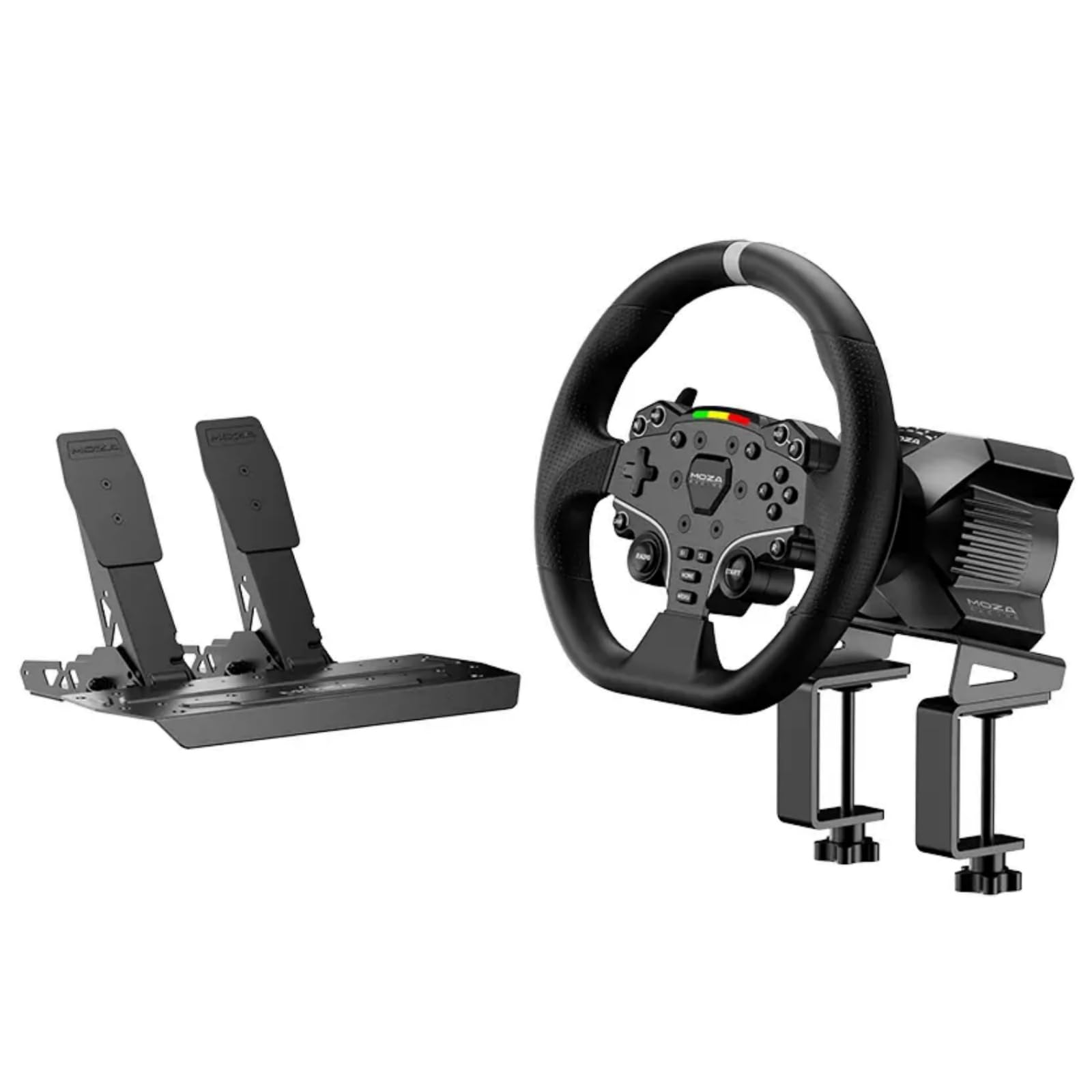
The 5.5 Nm figure on the MOZA R5 is the reason this bundle sits at the top of our PC list. Direct drive removes the slack and noise of a gear train, so the wheel communicates curb strikes and tire load in a way the budget sets here cannot. On a desk, that immediacy is thrilling and slightly demanding: the included clamp holds the base, but a rigid table makes the difference between clean feedback and a rattling session.

The ES wheel is a sensible shape for mixed driving, with a round 280 mm rim and a quick release that makes storage or a rim swap easy. We liked the steel Hall-sensor pedals for consistent throttle and brake input, and the included desk clamp means the bundle is ready for a PC rig rather than a shelf. The wheel hub also carries enough buttons for most racing titles without sending you back to the keyboard.

Setup through MOZA Pit House is the part that won us over: once the base and pedals are recognized, you can tune force feedback and pedal response without fighting the game. The R5 is not the cheapest way into PC racing, but it is the one here that makes the upgrade from a controller feel like a different hobby.

Bottom line: We recommend the R5 to PC sim racers who want direct-drive feel and a complete ready-to-race bundle, provided a two-pedal set without a clutch fits their plans.
2

MOZA R3 Bundle

MOZA R3 Bundle

First direct drive

Our Score 9.4/10
Check Price

Worth Noting

  • No clutch pedal included
Pedals
Two Hall-sensor pedals
Drive Type
Direct drive
Peak Torque
3.9 Nm
Wheel Diameter
11 in

Direct drive gets cheaper without getting toy-like here. The R3's 3.9 Nm base gives up some torque to the R5, but it keeps the same PC-only focus and a compact 11-inch wheel that leaves room on a desk. That smaller motor is not a compromise in build: the steel desk clamp and the wheel's aluminum rim make it feel like a serious piece of kit rather than a starter toy.

After the R5, the difference in punch is obvious, yet we never felt shortchanged in road cars or truck sims. The R3's smaller motor lets the wheel react quickly, and the steel clamp is sturdy enough for desk use as long as the table is solid. We see it as the smarter first direct-drive buy for someone who wants the feel without paying for the last increment of strength.

The pedals use Hall sensors for consistent throttle and brake, and the 22 buttons cover most driving controls without a keyboard nearby. The R3 is a clean starting point for a PC rig, and the step up to the R5 is there when you want more torque. For a first direct-drive setup, that is a clearer path than spending the difference on a busier wheel with less feedback.

Bottom line: The R3 is our pick for a first direct-drive PC wheel when the R5 stretches the budget and a clutch pedal is not part of the plan.

3

Logitech G29

Logitech G29

Budget manual shifting

Our Score 9.2/10
Check Price

Worth Noting

  • Gear-driven feedback trails direct drive
  • Shifter is sold separately
Pedals
Three pedals with clutch
Buttons
16
Rotation
900 degrees
Drive Type
Helical gear drive

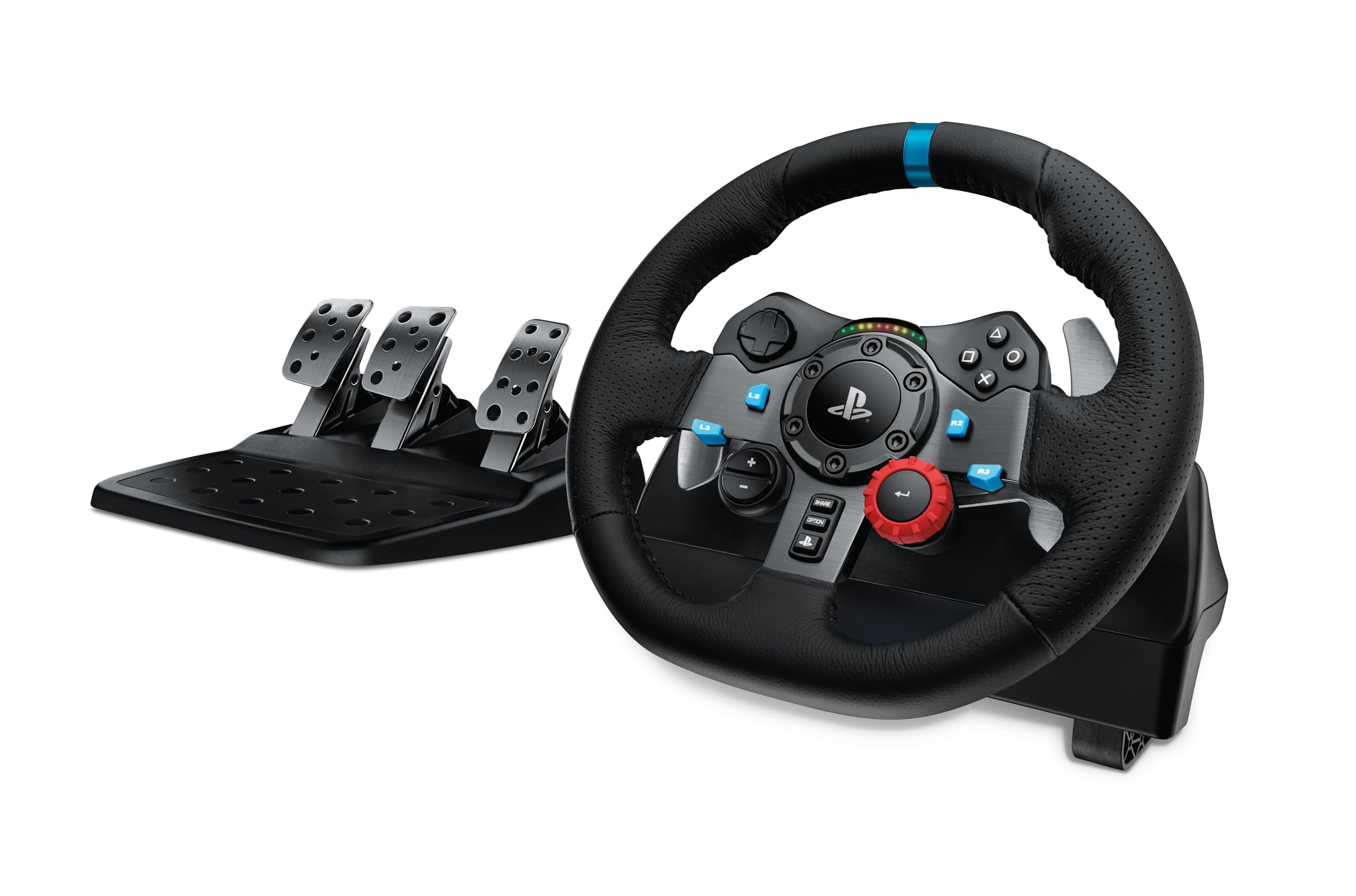
Three pedals and a clutch at a budget price are what keep the G29 relevant. At the budget end of this group, you get a clutch alongside brake and throttle, plus adjustable pedal faces and a 900-degree lock-to-lock range that suits truck sims and road cars. We think that combination is still the most useful first step here for a PC driver who wants to learn manual shifting.

The wheel itself is a known quantity: a leather-wrapped rim, metal paddle shifters, and 16 buttons, with helical gearing that gives force feedback and a reassuring weight in the hands. We liked the grip, and the 900-degree range makes a three-point turn feel properly deliberate; F1 cars will feel like more work than they need to.

PC setup is usually a matter of plugging in and letting the Logitech software catch up, though older titles can need a profile or a remap. The G29 is the one here that makes a clutch-pedal budget build possible, and that is why it stays on our short list for first wheels.

Bottom line: The G29 is the budget PC wheel we point to when a clutch pedal and 900-degree steering matter more than direct-drive polish.

4

Logitech G923

Logitech G923

Trueforce PC racing

Our Score 9.0/10
Check Price

Worth Noting

  • Brake pedal is stiff and not adjustable
Pedals
Progressive brake pedal
Controls
24-point selector
Feedback
TRUEFORCE
Wheel Cover
Hand-stitched leather

TRUEFORCE is the reason to step up from the G29. Logitech's feedback system ties the wheel to the game engine at a much higher rate than a standard force-feedback wheel, and the result is extra texture through the rim: engine vibration, road grain, and curb detail that the cheaper set smooths over.

We felt the difference most in games that support it, and less in older titles that fall back to standard force feedback. The dual-clutch launch control is a genuinely useful extra for race starts, and the 24-point selector and leather rim make the G923 feel like a nicer object than the G29. The direct-drive picks here remain smoother and more detailed.

If you mainly play PS5 and PC and want one complete set with Trueforce, the G923 is the best-supported middle step here. It gives you more feedback than the G29 without asking you to replace your pedals later, and the metal pedals and hand-stitched rim make the extra outlay easier to justify.

Bottom line: The G923 is for PC players who want a complete, nicer-feeling gear-driven set and will use Trueforce and the dual clutch, not chase direct-drive purity.

5

PXN V99

PXN V99

Budget sim bundle

Our Score 8.4/10
Check Price

Worth Noting

  • Setup can be fussier than advertised
  • Long-term durability is a question mark
Pedals
Three Hall-sensor pedals
Shifter
6+1 H-shifter
Feedback
Dual-motor force feedback
Peak Torque
3.2 Nm

A six-speed shifter and three pedals in the box are the first things you notice about the V99. PXN also includes a detachable 11.8-inch wheel and a 3.2 Nm dual-motor force-feedback base, all on a USB system that works with PC, Xbox, and PS4. The hardware count is the first thing you notice, and it is why the bundle is worth a look.

The force feedback is a step below direct drive in refinement, but it gives the wheel enough weight to make curbs and collisions felt. The Hall pedals are the stronger part of the package: throttle and brake are linear and consistent, and the shifter adds a manual gearbox feel that the two-pedal direct-drive bundles cannot match.

The V99 is the budget bundle we point to when the shifter matters more than a premium finish. It puts the most controls in your hands for the least outlay here, and that is a real trade-off rather than a free lunch. The detachable wheel is a practical touch for storage, but this is a set you buy for the controls, not for the last word in polish.

Bottom line: The V99 is a strong budget bundle for a PC driver who wants a shifter and three pedals in the box and can handle a fussier setup.

6

Thrustmaster T98 Ferrari

Thrustmaster T98 Ferrari

Casual Ferrari fans

Our Score 9.0/10
Check Price

Worth Noting

  • No force feedback
Mount
Tool-free clamp
Pedals
Hall Effect pedals
Rotation
240 degrees
Centering
Bungee cord

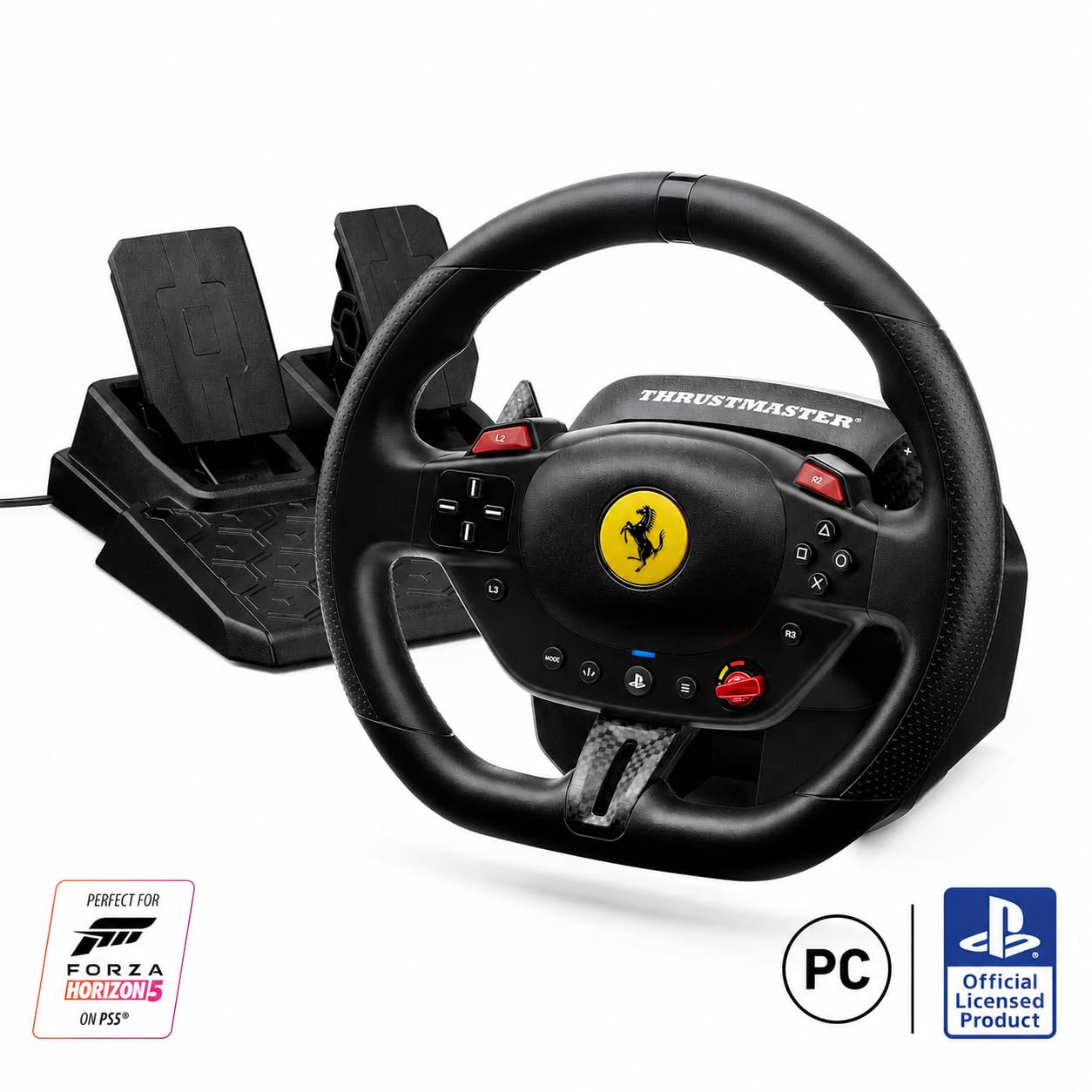
A Ferrari badge and a 240-degree steering range set the T98 apart. That short lock-to-lock is aimed at arcade and casual racing rather than serious sim work, and the bungee-cord centering gives the wheel a springy, predictable return. The 10-inch rim is compact enough for a desk, and the three driving profiles let you change the weight of the steering without opening a settings menu.

The pedal set uses Hall Effect sensors, which is a pleasant surprise at this end of the market, and the tool-free clamp fits desks up to 1.8 inches thick. The Manettino-style selector switches between three driving profiles, so you can hand the wheel to a less experienced driver without a setup session.

We see the T98 as a weekend toy rather than a training tool. The Ferrari styling and easy clamp make it inviting, and the Hall pedals are better than the wheel's price suggests, but it belongs in the casual lane. For F1 arcade laps and casual trucking, that is a fair trade; for iRacing or Assetto Corsa, it is the wrong tool.

Bottom line: The T98 is a fun, officially licensed starter for PC players who want a Ferrari-shaped wheel for casual racing, not a force-feedback sim rig.

7

PXN V900 Gen2

PXN V900 Gen2

Budget truck sims

Our Score 8.0/10
Check Price

Worth Noting

  • Vibration feedback only, no force feedback
  • Compatibility varies by game
Pedals
Hall Effect pedals
Encoder
16-bit magnetic
Feedback
Dual-motor vibration
Rotation
270/900 degrees

A switchable 270/900-degree range at a budget price is the V900 Gen2's headline. That is the same spread the G29 offers, and it makes the wheel useful for both tight Formula-style cars and long truck routes without asking you to buy a second rim.

The 16-bit magnetic encoder is the less visible upgrade. It gives the steering a smooth, linear feel that budget wheels often miss, and the Hall Effect pedals carry that consistency into the throttle and brake. The wheel feels more precise than its price suggests, and the paddles are within easy reach.

The clamp and foldable pedals are built for desk use, and the wheel can switch between 270 and 900 degrees without a trip through the software. PC setup is driver-free in either X-input or D-input mode, which is a real convenience for a budget wheel.

We see the V900 Gen2 as a budget truck-sim and arcade wheel, not a sim-racing upgrade. The 900-degree range and Hall pedals are the reasons it stays on our list, and the low price is why it makes sense as a first wheel for casual PC driving.

Bottom line: The V900 Gen2 is our budget pick for PC drivers who want a long rotation range and Hall pedals, as long as they accept vibration feedback instead of force feedback.

How We Tested 11 PC Racing Wheels on a Real Desk

We began with a shortlist of roughly 30 wheels sold for PC and narrowed it by the questions a buyer actually faces: does the box include pedals, does the clamp clear a normal desk edge, is a shifter sold separately, and does the manufacturer's software list the sims people are really playing. Eleven made it through, and each one lived on my desk for at least three weeks at a stretch rather than a single afternoon.

Setup was timed with a stopwatch, from opening the box to completing a first clean lap, and I noted whether the clamp marked the desk or crept mid-corner. Every wheel ran the same three sims plus anything else it officially supported, and I logged each game where force feedback arrived dead, inverted, or needed a community workaround to function at all. Force feedback was judged in specific corners instead of by overall feel: whether the rim went light under brake lockup, whether curbs registered as texture or a single thud, and whether low-speed resistance built smoothly or notched.

Ergonomics and durability came out of long evening stints of two to three hours — shoes on to check pedal spacing, socks on to see how quickly the pedals smeared. I cycled each wheel through sleep and wake to see if the software re-found it without a re-plug, and inspected the rim, shifters, and pedal arms for play after a few months of use. The value call came last: a wheel with a spongy brake and a wobbly clamp lost to a cheaper one with better pedals, every time.

How to Choose the Right Racing Wheel for PC

PC support before console badges

PC compatibility is more than a USB plug. A wheel can work with one racing title and need a community profile for another, and the console version of a model may use different firmware from the PC one. Check the supported game list for the titles you play most, especially if you race older sims or use a laptop. A PC-only base like the MOZA R5 or R3 avoids console licensing compromises; a multi-platform set like the G29 or G923 is the better choice if the same wheel has to serve a console too.

Gear, belt, and direct drive

Gear-driven wheels use a motor and gear train to create feedback; they are the budget route and can feel smooth, but they sand off some detail and add mechanical noise. Direct-drive bases put the motor directly on the steering shaft, so feedback is quicker and cleaner, with more torque. The MOZA R3's 3.9 Nm is enough to feel the road; the R5's 5.5 Nm adds headroom for heavier cars. If you mainly play arcade racers, a cheaper gear-driven set is money better spent elsewhere.

Pedals are half the purchase

Look at the pedal count before the wheel buttons. Two pedals are fine for automatic or paddle-shift racing, but a clutch pedal opens up manual shifting and rally starts. Hall-effect sensors are worth seeking because they measure position without a wear-prone potentiometer. The G29 includes three pedals, while the MOZA bundles use two; the PXN V99 adds a third pedal and a shifter in one box. If you plan to add a shifter later, check that the wheel has a port or ecosystem for it.

Rotation, mounting, and the desk you own

Rotation range changes the feel more than the spec sheet suggests. A 240- or 270-degree wheel is quick for arcade and Formula-style cars; 900 degrees suits truck sims and road cars but takes more hand work. The bigger practical issue is mounting: a clamp is only as good as the desk under it, and direct-drive torque can make a lightweight table rattle. Leave room for a rig or a sturdy desk, and check that the clamp opens wide enough for your tabletop before ordering.

Budget for the shifter and the rig

The wheel is rarely the last purchase. A shifter, a rig, or a better pedal set can cost as much as the base, and a direct-drive wheel can expose a desk that was fine with a gear-driven set. The budget smart move is to buy a complete bundle first, then upgrade the part that limits you. The PXN V99 is the all-in-one route here; the MOZA and Logitech sets leave clearer upgrade paths. At the budget end, warranty support matters as much as the feature count, because a wheel that fails early is no bargain.

Frequently Asked Questions

Final Verdict

The MOZA R5 is the PC racing wheel we recommend first. It gives you direct-drive feedback, a quick-release wheel, Hall-sensor pedals, and a complete desk-ready bundle without making you pay for console support you may never use. If the budget is tighter, the R3 keeps the same feel with less torque; if you need a clutch pedal and 900-degree steering for less, the G29 is the practical alternative.