Gaming

Best Retro Handheld Game Consoles of 2026

The games hold up. It's the plastic they came in that doesn't: dig an original handheld out of a drawer and the screen has a scratch right where the HUD sits, the speaker crackles, and the battery dies somewhere in level two. A good retro handheld puts that whole library in your pocket — no cartridges, no charging-dock graveyard, no eBay bidding war. What separates a great one from a shelf ornament is rarely the processor. It's a screen you can actually read outdoors and a d-pad that registers a diagonal every single time.

I've had one riding in my jacket pocket since winter, and my team has spent six months living with 10 of them — new emulation machines, modern takes on the classics, and a few reissued originals. The consoles with the longest spec sheets were not the ones we kept reaching for. Nostalgia gets you to buy one; the controls, the battery, and the screen are what keep it in your bag past week three. A few of these are collectible in their own right, but every one that made the list is a console we actually finished games on.

1

Retroid Pocket 4 Pro

Top Pick
Retroid Pocket 4 Pro

Wide-ranging emulation

Our Score 9.4/10
Check Price

Worth Noting

  • Uncomfortable after an hour of play
  • Emulators need updating before you play
Battery
5,000 mAh
Chipset
Dimensity 1100
Display
4.7 in touchscreen
Storage
128 GB

GameCube and PlayStation 2 games on something you can hold in one hand is the line the Pocket 4 Pro crosses, and it's why this is our top pick. A MediaTek Dimensity 1100 and a G77 GPU do the heavy lifting, the 4.7-inch touchscreen gives those games room, and the 5,000 mAh battery means a long flight doesn't end early.

What struck us is how little the old 3D games look like compromises on that panel — upscaled GameCube and PS2 titles come out crisp, and the sticks and face buttons hold up under them. The 128 GB of UFS 3.1 storage is roomy and quick, and the microSD slot takes the rest of your library. Long sessions are the weak point: the flat body leaves our hands wanting a grip after an hour or so, which is the one accessory worth adding.

Setup is the real trade-off. The emulators come installed, but ours were out of date, so the first evening goes to updating them and loading a library. That's the same evening every emulation handheld asks for, and the reason this isn't a gift you hand over and walk away from.

If you want to press power and be playing within thirty seconds, the Mini Plus below is the better buy. If you want a machine that treats a thirty-year-old library as its native language and still has headroom for the generation after it, the size and the setup evening are worth it.

Bottom line: We recommend the Pocket 4 Pro to anyone who wants one handheld to cover everything from 8-bit to PS2, and who doesn't mind an evening of setup to get there.

2

Miyoo Mini Plus

Miyoo Mini Plus

Pocket carry

Our Score 9.0/10
Check Price

Worth Noting

  • Tops out around PlayStation 1
Extras
Wi-Fi, real-time clock
Screen
3.5 in IPS, 640 x 480
Battery
3,000 mAh
Storage
64 GB card

The Mini Plus is the one that disappears into a jacket pocket. A 3.5-inch 640 x 480 IPS screen, a 3,000 mAh battery rated for about six hours, Wi-Fi and a real-time clock — nothing about it feels like a compromise until you set it beside the Retroid's panel.

What won us over is how deliberate it feels. The buttons sit where your thumb expects them, the d-pad is crisp, and 16-bit art looks vivid at this size. The software is the catch: ours was much better after we installed Onion OS, and the card it ships with is a mixed bag of homebrew rather than the classics you were hoping for. Budget an evening and a spare microSD card.

It tops out around PlayStation 1, and after a couple of hours our hands cramp on the corners. Neither matters if the games you miss are 16-bit and the trips are short. What does matter is that a spare card and an evening of setup stand between you and the library, so the real cost sits a little above the checkout page.

Bottom line: We point anyone who wants a pocketable retro machine at the Mini Plus: the screen, controls and battery all beat what its size suggests.

3

Atari Gamestation Go

Atari Gamestation Go

Living-room play

Our Score 8.8/10
Check Price

Worth Noting

  • Vector games scale poorly on the screen
  • Trak-ball can be oversensitive
Games
200+ built in
Screen
7 in
Controls
Paddle, trak-ball, keypad
Connections
HDMI, Wi-Fi

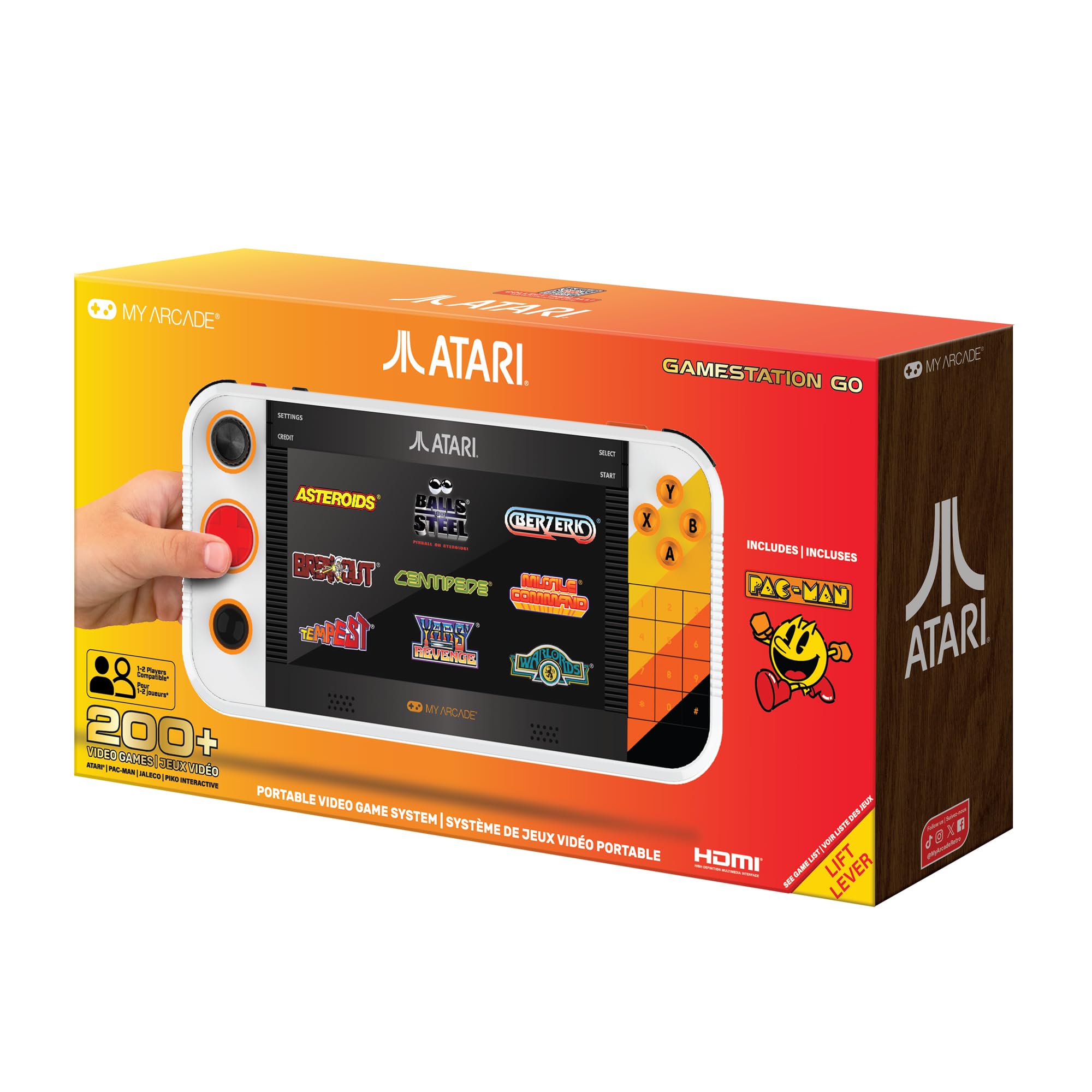
The Gamestation Go is the only handheld here with the controls these games were written for: a spinner, a trak-ball, a numeric keypad, a d-pad and four face buttons, all wrapped around a 7-inch screen. Playing Breakout with a paddle and Centipede with a trak-ball is a different thing from nudging a d-pad, and it's why this one earns a place on the list.

More than 200 licensed games are inside — Atari 2600, 5200 and 7800 titles, arcade classics including PAC-MAN, plus Jaleco and PIKO games — with save options and Wi-Fi for updates. HDMI out turns it into a living-room console, and the rechargeable battery means it can come off the shelf and sit on your lap.

The trak-ball is the one control that needs taming. It can be twitchy enough to make Missile Command harder than it should be, and switching to the d-pad for that game is no hardship. Everything else behaves: the paddle is exactly what Breakout wants, and the keypad is there for the 5200 titles that need it.

Seven inches of screen and a full control deck make this a coffee-table device rather than a commute one — which suits the games, since most of them are better with your elbows on a cushion.

Bottom line: We recommend the Gamestation Go to anyone who wants the Atari library done properly: real paddle and trak-ball controls, plus HDMI when the TV is free.

4

Game & Watch: Super Mario Bros.

Game & Watch: Super Mario Bros.

Collecting

Our Score 9.4/10
Check Price

Worth Noting

  • Only three built-in games
Extras
Animated clock
Weight
4.6 oz
Charging
USB-C
Built-in Games
3

Three games. That's the entire library — Super Mario Bros., The Lost Levels and a Mario version of Ball — and it's why we treat this as a collectible that happens to be playable rather than a console that happens to look nice.

As an object it's lovely. The screen is bright enough to read outdoors, the pixels are crisp, and 4.6 ounces disappears into a shirt pocket. The clock face that shifts as Mario moves through the level is the detail that made us smile; this is the one you leave on a desk. The box includes a USB-C cable but no wall adapter.

The size cuts both ways. It's small enough that adult hands cramp on the harder Lost Levels stages, and small enough for a child to hold properly — which is the point of a device that's half toy, half display piece.

Bottom line: We recommend it to Mario completists and anyone who wants a small, bright slice of 1985 for a desk or a stocking, not as a main console.

5

Douddy 32-Bit Handheld

Douddy 32-Bit Handheld

Young kids

Our Score 8.6/10
Check Price

Worth Noting

  • Screen or charging faults on some units
Size
5.3 x 3.46 x 0.7 in
Games
139 built in
Screen
3 in IPS
Battery
5 hours

Handing a young child an emulation handheld with a glass screen and a memory card is not a plan. The Douddy is the other approach: 139 games built in, a 3-inch IPS screen, a five-hour battery and a body of 5.3 by 3.46 by 0.7 inches that fits small hands.

What we appreciated is the sorting. The games are grouped into categories and the manual carries a guide to them, so a child can find the racing games without scrolling a list of 139 titles. Charging is USB-C, which means no drawer full of AA batteries, and five hours covers most car rides.

It's a plastic toy and it's built like one. Expect a case or a dedicated backpack pocket from the start, and judge it as a travel toy rather than a hand-me-down.

Bottom line: We recommend the Douddy as a first handheld or a travel toy: enough games to be interesting, and a body a small child can actually hold.

6

X36 Ultra

X36 Ultra

Budget Android play

Our Score 9.0/10
Check Price

Worth Noting

  • 1 GB RAM and 8 GB onboard storage
Screen
4.2 in, 720 x 720 IPS
System
Android 10
Battery
3,500 mAh
Storage
64 GB

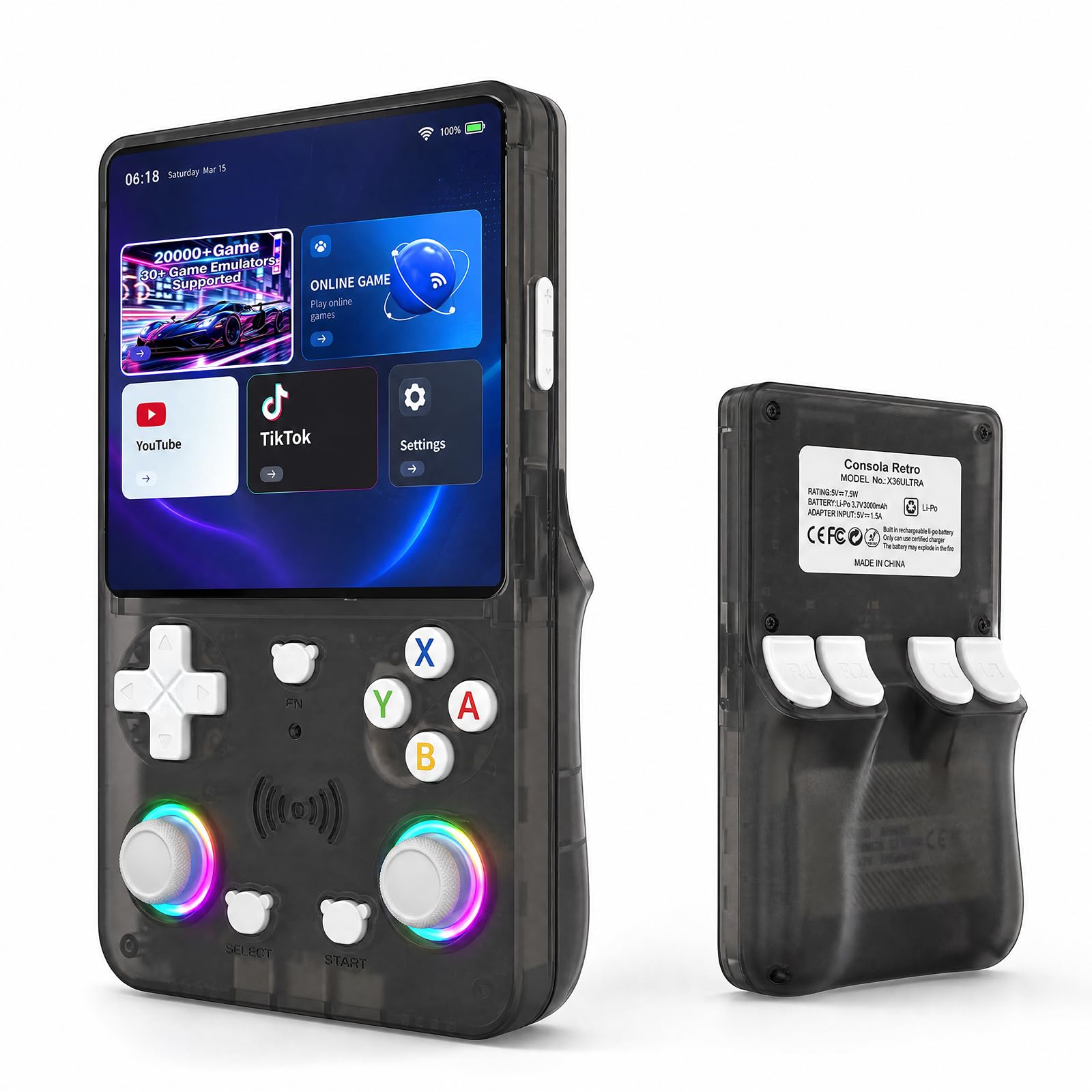
Two numbers define the X36 Ultra: 28,000, the number of games the spec sheet claims are on the card, and 1 GB, the RAM the Android side has to work with.

The rest of the package is more interesting than either. A 4.2-inch 720 x 720 laminated IPS panel, a 3,500 mAh battery rated for up to eight hours, a 210-gram body, four-player local play, and Android 10 with Wi-Fi — which means YouTube, TikTok and streaming apps alongside the emulators. The card slot takes 16 GB to 256 GB, and the shells come in transparent black, red or purple.

We treat it as a cheap way to get a small Android screen with controls attached and a big card in the box. The 1 GB of RAM is where that idea strains: Android apps will feel tight, and anything much past the 16-bit era is a gamble rather than a promise. If the classics are the point and you don't want to tinker, a real emulation handheld buys back a lot of patience.

Bottom line: We suggest the X36 Ultra for budget-minded tinkerers who want Wi-Fi apps and a big card in one small shell.

How We Tested These Retro Handhelds

We built a shortlist from spec sheets and owner forums, then narrowed it hard: each candidate had to run its advertised systems at full speed without frameskipping, ship with a screen worth looking at, and cost something a normal person would spend on a hobby. Anything that demanded a computer, a paid firmware tool, or a forty-minute file-renaming session before the first game booted got marked down — not out of laziness, but because most people want to be playing on the train ride home. Ten made the cut, and we've used them for six months.

For each one I timed setup from unboxing to the first playable game and wrote down every step that required a laptop. Controls got tested with the games that expose them: quarter-circle inputs in fighting games, diagonal jumps in platformers, long strafing runs to see whether the d-pad pivots cleanly or snags. Each console also spent a week in a jacket pocket to see whether it vanished or bulged, and I handed them to friends who grew up on different systems, watching how quickly they found their way around.

Screens were judged on a bright afternoon outdoors and again at night in a dark room, with an eye on viewing angles, blur behind fast side-scrolling, and whether the panel washed out at low brightness. We watched for dead pixels and for flicker that appeared after a few weeks rather than out of the box. Battery life was timed the honest way: charged to full, a demanding game at fixed brightness until it died, then the recharge clocked too. Six months of real carry — bag, pocket, kitchen table — told us the rest, from shells that scuffed to buttons that went shiny or mushy.

The ones that held up shared something no spec sheet mentions: they felt finished. Nothing wobbled, nothing needed a workaround, and none of them made us miss the original hardware.

How to Choose Retro Handheld Game Consoles

Start With the Games

The library is the whole purchase. A handheld with a few hundred built-in titles is a sealed box: those games are what you get, and the better ones tend to be simple 8- and 16-bit style arcade, puzzle and sports games rather than the console classics you remember. An emulation handheld is the opposite — the machine is a shell for games you supply, and its ceiling is what matters.

Write down five games you want to replay, note which systems they ran on, then check that ceiling against your list. A PlayStation 2 favourite puts you in Retroid territory. A Game Boy favourite doesn't, and paying for that headroom buys you nothing.

Plug-and-Play, or an Evening of Setup

Two very different products wear the same name. Preloaded consoles switch on and play. Emulation handhelds arrive with emulators installed but no games, and expect you to add firmware, files and a memory card before the first session — which is either the hobby or the dealbreaker, depending on you.

The trap is assuming you can add to a preloaded library later. On the sealed units the games are fixed on the device rather than sitting on a card you can swap, so what's in the box is what you live with. If you want to be playing within a minute of opening it, buy the preloaded kind and accept its limits.

Screen Size, and What Portable Really Means

Old games were drawn for a 4:3 screen, so a wide modern panel letterboxes or stretches them, and a 3-inch 4:3 display can show a 16-bit game larger than a 4.7-inch widescreen does. Compare the listed dimensions to your phone before you commit.

Then there's the word compact, which usually means it fits a bag rather than a jeans pocket. Our rule: a 3.5-inch screen is the smallest we're happy playing on for an hour, and 7 inches turns a handheld into something you hold in two hands and set down on a table.

Controls That Match the Era

A d-pad and two buttons cover most 8- and 16-bit games, and analog sticks start to matter with PlayStation-era 3D. The exception is early arcade software: Breakout wants a spinner, Centipede and Missile Command want a trak-ball, and a d-pad makes both feel wrong.

Very few handhelds include those controls — the Atari Gamestation Go is the one here that does. If those games are why you're shopping, the control layout should decide the purchase before the screen or the battery gets a vote.

Battery and Charging

Capacity in this group runs from under 1,000 mAh on the smallest kids' units to 5,000 mAh on the emulation handhelds. A bigger number usually means more play time, but it also means a heavier device, and the six-hour ratings on the small units assume a new cell.

Two practical checks: some boxes ship with a USB-C cable and no wall adapter, so plan on a charger you already own, and if the handheld will live in a car, confirm it can charge while it plays.

Frequently Asked Questions

Final Verdict

The Retroid Pocket 4 Pro is the one we point most people to. It plays nearly everything from the 8-bit era through PlayStation 2 on a screen big enough to do those games justice, and the setup evening is a one-time cost rather than an ongoing chore.

If you want something that slips into a jacket pocket and plays 16-bit games on the train, the Miyoo Mini Plus is the better companion. If the TV is where you game, the Atari Gamestation Go's paddle and trak-ball are worth the bulk.