PC Components & Storage

Best USB Flash Drives of 2026

A USB flash drive is about as simple as tech gets: a little shell, a connector, and a chip. The difference between a good one and a frustrating one shows up when you are copying a folder of photos before a flight or pulling a video off a camera card while the clock is running. The right drive gives you enough usable storage, transfer speed that does not make you wait, and a compact shape that survives a keyring or laptop bag.

I have used enough sticky-capped, slow-writing drives to be picky about the small stuff: whether the claimed capacity is actually usable, whether the drive runs hot during a long transfer, and whether it still mounts after a few months of being plugged in and pulled out. Over the past four months, my team and I put 16 USB drives through everyday file shuffling on old USB 2.0 ports and newer USB-C laptops, and the keepers were the ones that stayed quick, stayed cool, worked without a fuss, and felt worth the money.

1

Samsung BAR Plus 128GB

Top Pick
Samsung BAR Plus 128GB

Speed and durability

Our Score 9.4/10
Check Price

Worth Noting

  • No USB-C connector for phones
Capacity
128 GB
Warranty
5 years
Read Speed
400 MB/s
Write Speed
200 MB/s

Four hundred megabytes a second on reads and two hundred on writes is the headline, and it holds up as the reason to buy. Every other drive here is rated at 100 MB/s or below on reads apart from the Ultra Flair, and nothing else comes close on writes. In use that gap is the difference between a folder that copies while you find your coat and one that keeps you standing there.

The body earns its keep too. It is a solid piece of metal with a wedge profile that tells your fingers which way is up before you look, and the keyring hole is molded into the shell rather than stamped through a plastic tab. Samsung rates it against water, shock, temperature, magnets and X-rays, and backs it with a five-year warranty. The one annoyance is length: the shell sits almost flush with the port, so pulling it out of a recessed laptop slot takes a fingernail.

We gave it the least forgiving job we had, shuttling a folder of video project files between a desk machine and a laptop, and it never left us waiting on a re-plug or a retry. It also stays cooler than we expected for a metal-bodied drive, which matters once a copy runs for several minutes.

Bottom line: If you want one drive that moves big files quickly and survives a bag, this is the one we point most people to.

2

Lexar D40E 128GB

Lexar D40E 128GB

Phone-to-laptop transfers

Our Score 8.8/10
Check Price

Worth Noting

  • One connector is always exposed
Capacity
128 GB
Connectors
USB-A and USB-C
Read Speed
100 MB/s
Write Speed
80 MB/s

A USB-A plug on one end and a USB-C plug on the other, on a body that swivels to hide whichever one you are not using: that is the whole idea, and it is a good one. Getting a folder off a phone and onto a laptop that only has USB-C ports is normally a two-adapter annoyance. Here it is one drive, plugged in twice.

We used it exactly that way, off a handset in the morning and into a work laptop by lunch, and the metal shell has held up to being tossed in a bag between the two. The speeds are modest next to the Samsung, at 100 MB/s read and 80 MB/s write, but those are honest numbers for photos, documents and music, and 128 GB means you rarely have to prune. For anyone whose files live across a phone and a computer, this is the pick.

Two practical notes. The drive arrives in FAT32, which refuses any single file over 4 GB, the reason a long video can fail to copy onto a drive with a hundred gigabytes free; reformat to exFAT on day one and the problem disappears. And the swivel always leaves one connector exposed, so it picks up pocket lint. Keep it in a small pocket rather than the bottom of a bag.

Bottom line: The drive to buy if your files move between a phone and a laptop, as long as you reformat it before handing it a big video.

3

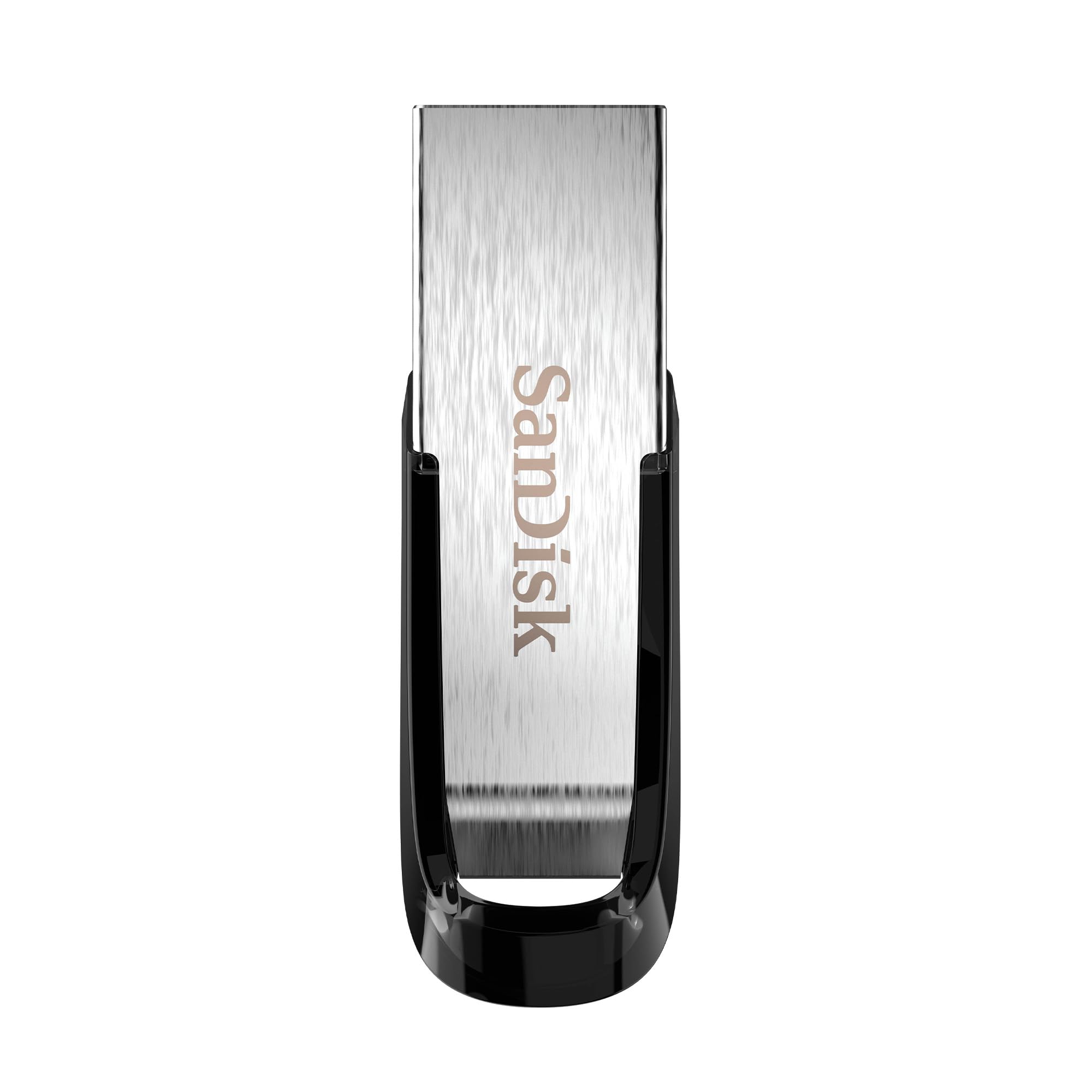
SanDisk Ultra Flair 128GB

SanDisk Ultra Flair 128GB

Slim everyday carry

Our Score 9.2/10
Check Price

Worth Noting

  • Gets hot during long writes
  • One-year warranty only
Capacity
128 GB
Warranty
1 year
Interface
USB 3.0
Read Speed
150 MB/s

The Ultra Flair is the drive you buy when you want 128 GB without top-pick money. The metal casing is genuinely slim, so it disappears into a jeans pocket and adds nothing to a keyring, and the stated 150 MB/s read speed is second only to the Samsung in this group.

It is the heat that stays with us. The Ultra Flair gets noticeably warm during a long copy, warm enough that you notice when you pull it out, and metal bodies show that more than plastic ones. It never stopped working for us, and a warm drive is not automatically a failing drive, but it is the first thing we mention when someone asks about this one.

The other compromises are ordinary. That 150 MB/s is a read figure and writes are slower, the warranty runs a single year where Samsung gives five, and there is no USB-C here. Against that, the built-in password protection is a real extra for a drive that carries work files. If speed leads your list, pay more for the BAR Plus; if you want the most storage in the smallest body for the least money, this is the one.

Bottom line: A slim 128 GB drive that is easy to keep in a pocket and costs well under our top pick, provided you are not writing for minutes at a time.

4

SanDisk Cruzer Blade 64GB

SanDisk Cruzer Blade 64GB

Keyring budget pick

Our Score 9.2/10
Check Price

Worth Noting

  • USB 2.0 only, slow for large files
Capacity
64 GB
Warranty
5 years
Interface
USB 2.0
Read Speed
30 MB/s

The Cruzer Blade is barely longer than the metal plug inside it. On a keyring it is a small black nub you forget about until you need it, which is the highest compliment a drive this cheap can earn. It is USB 2.0, rated at 30 MB/s read and 10 MB/s write, and it carries a five-year warranty that matches the Samsung's.

USB 2.0 sounds like a downgrade in 2026, and for video it is: filling 64 GB at those write speeds is a coffee-and-a-walk job. For what most people actually carry, though, such as documents, a folder of photos and a few hundred songs for a car stereo, you will not notice. We have used ours for exactly that and never once sat waiting on a document.

The plastic shell is light, and light reads as flimsy in the hand. Ours has lived on a keyring through a couple of bag dumps and a near miss with a washing machine without complaint, and reliability is where this drive quietly beats several more expensive ones on this page.

Treat it as the second drive, the car drive, or the one you hand to the person who keeps borrowing yours. If it is going to be your only flash drive and big files are part of the job, put the money toward something faster.

Bottom line: Cheap, tiny and the most consistently reliable drive in this group, the one to put on a keyring and stop thinking about.

5

PNY Turbo Attaché 3 32GB 10-Pack

PNY Turbo Attaché 3 32GB 10-Pack

Office and classroom

Our Score 9.2/10
Check Price

Worth Noting

  • Writes fall short of the USB 3.0 label
  • One-year warranty only
Capacity
32 GB each
Warranty
1 year
Interface
USB 3.0
Pack Size
10 drives

Ten 32 GB USB 3.0 drives in one box answers a specific problem: you need a drive for each student, each technician, each client handoff, and it has to be cheap enough that losing one does not ruin the week. Per drive, this is the least expensive route to USB 3.0 anywhere in this guide.

The hardware suits the job. A sliding collar covers the plug instead of a cap, so there is nothing to lose, and the body is light enough that a lanyard does not drag. Read speed is quoted at up to 100 MB/s. Writes are the slower half of the equation, as they are on everything here, and these are not the drives to choose if you push video around all day.

Reliability is the honest caveat. These are workhorse drives sold by the box, and a bulk pack is where a dead unit hides longest and hurts least. Our habit with any pack is the same: label them, plug each one in before it leaves your desk, and never let one be the only copy of anything.

So buy the box if distributing files is a recurring job and speed is a nice-to-have. If you want one good drive for yourself, with real write speed and a long warranty, the Samsung is the better use of the money even though it costs far more per unit.

Bottom line: The right buy when the drives leave your hands, in a lab, a classroom or a crew, and the wrong one if you only need a single drive.

6

MECHEER 8GB 10-Pack

MECHEER 8GB 10-Pack

Cheap handouts

Our Score 9.0/10
Check Price

Worth Noting

  • USB 2.0 only, slow for video
Capacity
8 GB each
Interface
USB 2.0
Pack Size
10 drives
Default Format
FAT32

Eight gigabytes, USB 2.0 and FAT32 out of the box: on paper this is a product from another decade. In practice it is the shape of drive a lot of hardware still wants. Car stereos, televisions, printers and embroidery machines are far happier with a small FAT32 stick than with a 128 GB drive formatted in exFAT, and that is the job this pack does.

The rest is thoughtful for the money. Each drive has a little LED that flickers while data moves, which sounds trivial until you are copying a wedding album and want to know it is actually happening. The metal swivel hides the plug and takes a lanyard, and 8 GB is room for a folder of photos or an album or two of music.

Two things to plan for. USB 2.0 writes are slow, and you will feel it with video. A bulk pack is also exactly where a dead unit hides, so open the box, plug each drive in and copy a file across before you hand any of them out. Do that and this is the least painful way to put a folder of photos in a room full of hands.

Bottom line: Ten small, cheap FAT32 drives for gear that will not take anything newer, from televisions and car stereos to the drawer of handouts.

7

IMEASON 16GB Swivel

IMEASON 16GB Swivel

Legacy hardware

Our Score 9.2/10
Check Price

Worth Noting

  • USB 2.0 speeds only
  • One-year warranty
Capacity
16 GB
Interface
USB 2.0
Read Speed
16 MB/s
Default Format
FAT32

USB 2.0, 16 MB/s reads, 16 GB and FAT32: the specification reads like a step backwards, and for moving a video library it would be. That is not what this drive is for. It is for the sewing machine that only accepts a small FAT32 stick, the car radio that plays MP3s off a thumb drive, the 3D printer that wants a boot file, and the pile of legacy gear that chokes on a 128 GB exFAT drive.

We tried it in exactly those situations, and the pattern held: where a big modern drive was ignored, this one mounted and worked. The metal swivel protects the plug, the keychain hole means it stays with the machine, and 16 GB covers a playlist or a few hundred design files. The slowness only bites when you move something large, which is not what these devices ask for. It is a narrow tool, and it is the right one for that narrow job.

The caveats are the price of entry. It is slow, the warranty is a year, and if all your devices are current, a faster drive costs a little more and does far more for you. Buy this for the old machine, not for your laptop.

Bottom line: The drive to buy when the thing you are plugging into is older than the drive itself: embroidery machines, car stereos, old printers.

8

Maspen 64GB 2-Pack

Maspen 64GB 2-Pack

Spare drive pair

Our Score 9.0/10
Check Price

Worth Noting

  • 8 MB/s writes make filling it slow
Capacity
64 GB each
Interface
USB 2.0
Pack Size
2 drives
Read Speed
60 MB/s

Two 64 GB drives for barely more than a single budget 64 GB stick is the reason to look at this pair. The idea is sound: one lives in the car, one stays in the drawer, and you stop carrying the same drive back and forth and leaving it in the wrong place. The matte metal swivel body feels nicer in the hand than the money suggests.

The figure to stare at is the write speed: 8 MB/s against a 60 MB/s read rating. Reads are fine. Writes are the slow part of any drive, and at this level filling 64 GB is something you start and walk away from. For documents, photos and music it is tolerable; for a folder of video it is the wrong tool entirely.

Test both drives before you trust them with anything you cannot replace, keep the second copy of a folder on the other one, and this is a sensible, cheap pair. If you want a single drive you will never think about again, the Cruzer Blade or the Samsung is the safer spend.

Bottom line: Two 64 GB drives for barely more than one budget single, good for a car and a desk drawer as long as you are not in a hurry to fill them.

How We Tested (and Lived With) 16 USB Flash Drives

We started with a shortlist of drives from familiar and smaller brands, then narrowed it by connector type, stated capacity, physical size, and price band. Listings that hid real-world speed or gave no usable-capacity detail got cut early. That left 16 drives, which we used for four months across laptops, a desktop, a car stereo, and a living-room TV.

Each drive started with the same chores: moving a folder of photos and a couple of large video files, then reading them back to check for errors. We timed the transfers, noted whether speeds held steady or fell off a cliff, and felt the shell afterward to see how warm it got. We also formatted each drive to confirm usable capacity and plugged them into older USB-A ports, newer USB-C ports, and a couple of devices that are fussier than a laptop.

To test the pocket factor, we clipped each drive to a keyring, dropped it into a bag, and plugged and unplugged it repeatedly over the four months. We checked whether caps loosened, connectors bent, or the drive disappeared into the bottom of a bag. At the end, we compared usable capacity and transfer times with what each drive cost, because a fast drive is not a good value if it holds less than promised or feels like it will crack after a few weeks.

How to Choose USB Flash Drives

Read speed sells, write speed decides

Every drive here advertises a read figure, which is how fast files come off it. Putting files onto the drive is a write, and writes are slower, often several times slower. If you carry documents, photos and a few albums, a modest drive is invisible in daily use. If you move video or a full phone backup, the write rating is the number worth hunting for.

The Samsung BAR Plus is the only pick here rated above 100 MB/s on both read and write, which is a large part of why it tops this list. The Maspen pair makes the opposite case: a 60 MB/s read rating with 8 MB/s writes is fine for music and painful for a folder of clips.

Match the connector before anything else

USB-A is the rectangular port on older laptops, desktops and car stereos. USB-C is the oval one on newer laptops, most Android phones and Macs. If files regularly move between a phone and a computer, a dual-connector drive such as the Lexar D40E saves an adapter and a lot of fiddling.

Check that your phone mounts removable storage at all. Plenty of handsets need a file manager to see a drive, and some simply refuse one, so test the pairing before a trip rather than at the airport.

The 4 GB wall and usable capacity

Two things make a brand-new drive look broken. A drive shows less space than its stated capacity once formatting and overhead are counted, which is normal on every drive ever made. And many drives ship in FAT32, which refuses any single file over 4 GB, which is why a long video can fail to copy onto a drive with a hundred gigabytes free.

Reformat to exFAT before you move video, and do it on day one rather than the night before a deadline. For documents, photos and music, the default format is fine and works with more older hardware.

One drive or a pack

If drives leave your hands, whether that means client photos, student files or a set of conference handouts, buy a pack. The per-drive cost drops, a lost drive stops being a crisis, and a strip of labels keeps them straight.

Packs are usually USB 2.0 and modest in capacity, so the sensible arrangement is one fast, large drive for yourself and a box of cheap ones for distribution. The PNY set is the exception worth knowing: ten drives that are still USB 3.0.

Heat, build, and what a flash drive is not

Metal bodies feel better and shed heat, which means they get warm in your hand during a long copy; the Ultra Flair is the clearest example here. Warm is normal and not by itself a failure, though a drive that gets hot and then stops being recognized is done.

Capless and swivel designs cannot lose a lid, keyring holes keep a drive with you, and warranties run from a single year to five. Whatever you buy, a flash drive carries files rather than protecting them: keep the only copy of anything irreplaceable somewhere else.

Frequently Asked Questions

Final Verdict

For most people the Samsung BAR Plus 128GB is the drive to buy. It is the fastest thing here on both read and write, the metal body shrugs off a bag, and the five-year warranty is the longest in this guide. That combination makes every other drive feel like a compromise.

If your files move between a phone and a USB-C laptop, the Lexar D40E is worth giving up speed for. And if you want a drive you can lose without caring, the SanDisk Cruzer Blade is the budget answer that keeps working.